You exported the cut, dropped the voiceover beside it, and ran the merge. FFmpeg printed nothing alarming, returned exit code 0, and wrote a file that looks the right size. Then you hit play and the picture is there with no sound, or the clip dies a few seconds early. A zero exit code only means the process finished. It doesn't mean the streams you wanted are inside the container, or that their durations match what you planned to ship.
That failure is a mapping and duration problem, not a mystery codec bug. Inputs are numbered from zero. Streams inside each input are numbered the same way. If you don't name both, FFmpeg can pick a thumbnail, a silent track, or nothing usable, and still exit cleanly. The checks below catch a silent or truncated file before it leaves the pipeline.
Table of Contents
- The One Command That Merges Audio and Video
- Pick Codecs That Match Your Container
- How to Merge Audio and Video Step by Step
- Handling Audio and Video of Different Lengths
- Fix Silent Drifting and Truncated Merges Then Check the File
- Run the Merge at Scale With the RenderIO API
The One Command That Merges Audio and Video
Start with one command that muxes a picture file and a separate soundtrack into a single MP4:
ffmpeg -i video.mp4 -i audio.wav -map 0:v:0 -map 1:a:0 -c:v copy -c:a aac -b:a 192k -shortest output.mp4
The two -i flags are inputs, numbered from zero. Input 0 is video.mp4. Input 1 is audio.wav. -map 0:v:0 takes the first video stream of the first file. -map 1:a:0 takes the first audio stream of the second file. FFmpeg does not get to guess, which is how a successful run still ships a silent file.
-c:v copy copies video packets. There is no decode and no re-encode, so a long file finishes in seconds and the picture stays as it was. -c:a aac encodes the soundtrack to AAC, because uncompressed WAV (PCM) is a common reason an MP4 player shows video and then refuses the audio. -b:a 192k sets that audio bitrate. -shortest stops the output when the shorter stream ends, so you don't get trailing silence or a frozen last frame.
| Flag | What it does | Change it when |
|---|---|---|
-map 0:v:0 |
Selects the first video stream of input 0 | The source file has several video tracks or a thumbnail stream |
-map 1:a:0 |
Selects the first audio stream of input 1 | The audio file has several tracks or the wrong one is picked |
-c:v copy |
Copies video packets without re-encoding | The video codec does not fit the output container |
-c:a aac |
Encodes audio to AAC | The audio codec is not supported by the output container, for example PCM in MP4 |
-b:a 192k |
Sets the audio bitrate | You need higher quality for music or lower size for speech |
-shortest |
Ends output when the shorter stream ends | Durations differ and you want no trailing silence or frozen frames |
If the picture came from a social post rather than a local export, grab the file first with a download LinkedIn video tool, then point -i at that download. I would leave every flag above as written until a probe shows a second video track or a codec the container will reject.
What you have now is one file with one video stream and one audio stream. It is not finished until you probe it.
Pick Codecs That Match Your Container
If the source codecs already appear in the target container's row below, stream copy is safe. If they don't, re-encode only the stream that doesn't fit. Pick the container before you touch a bitrate.
MP4 is the safe default for playback almost anywhere, and H.264 with AAC is the pair most players accept. In 2025, 79% of video developers surveyed reported using H.264/AVC, the codec most relevant to broad container compatibility, in Bitmovin's 2025 Video Developer Report as summarized by Shotstack. That share is why H.264 is the best default target when a merge has to play on phones, browsers, and ad platforms.
| Container | Video codecs | Audio codecs | Stream copy works when |
|---|---|---|---|
| MP4 | H.264, H.265, AV1 | AAC, MP3 | Source streams already use these codecs |
| MOV | H.264, H.265, ProRes | AAC, PCM | Source is a camera or editing export with matching codecs |
| MKV | Nearly any codec, including VP9 and AV1 | Nearly any codec, including AAC, Opus and FLAC | You need to keep the original streams intact |
| WebM | VP9, AV1 | Opus, Vorbis | Target is web playback and both streams already match |
MOV follows the same family as MP4, but camera and editing exports often carry ProRes or PCM. Copying those into MP4 is the usual way a player refuses a file that FFmpeg just wrote. MKV is the row that surprises people, because it accepts nearly any codec, so it is the right box when you must keep the original streams intact. WebM expects VP9 or AV1 with Opus or Vorbis. An H.264 file dropped into WebM with -c copy will not behave.
Choosing the container first avoids a second encode later. A fuller matrix of what players support lives in this video codec support guide. Match the container, then copy only what already fits.
Practical rule: If the codec isn't in that container's row, don't copy it. Encode that one stream and leave the other alone.
How to Merge Audio and Video Step by Step
A reliable mux starts with inspection, not with a guess. The FFmpeg documentation defines stream copy as packet-level copying without decoding, filtering, or encoding, and it notes that -shortest ends the output when the shortest stream ends. The same page documents a default maximum buffering duration of 10 seconds, which is why a clean exit can still hide latency, a missing track, or a short file.
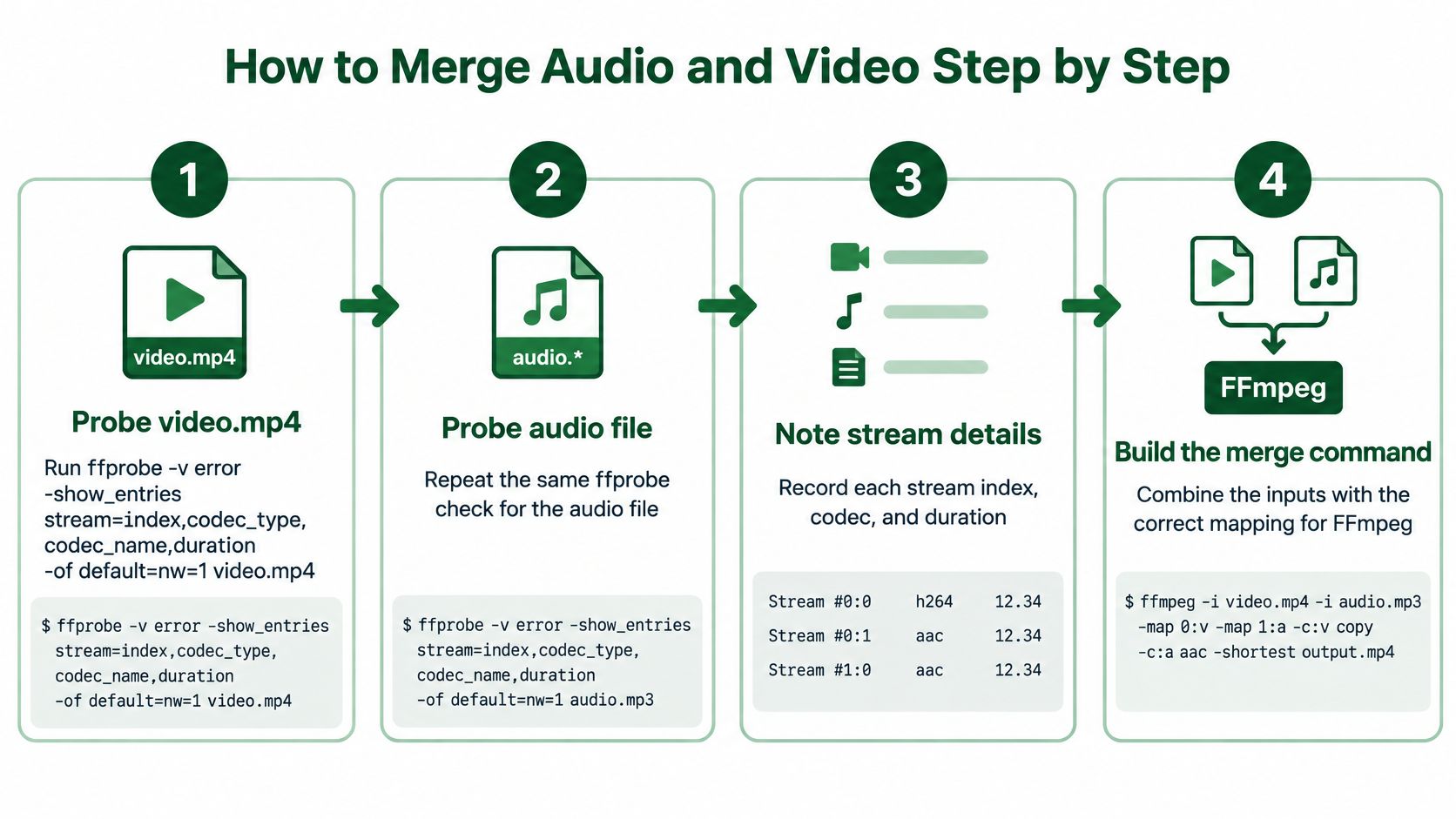
- Probe the picture with
ffprobe -v error -show_entries stream=index,codec_type,codec_name,duration -of default=nw=1 video.mp4. You need indexes before any-mapis trustworthy. - Run the same probe on the audio file. A WAV, an MP3, and a multi-track M4A do not share a layout, so don't assume
a:0is the voice. - Write down each stream index, codec, and duration. Those three fields decide the maps and whether copy is legal.
- If the video codec already fits the container, keep
-c:v copy. If it doesn't, encode that stream and leave a compatible one copied. - Put one
-mapin the command for every track you want. Anything you don't map should stay out, including attached pictures. - Pick a duration strategy before you run it.
-shortestis the default I use when one side is spare length. Padding and looping are the other two, covered next. - Run the command and keep stderr in a log. Exit code 0 does not prove the audio is present, especially when buffering on a sparse stream adds latency and memory use.
- Probe the output. You want exactly one video stream and one audio stream, and a duration that matches the plan.
Say the planned length is 42.8 seconds. The output video reads 42.8 seconds and the audio reads 42.7 seconds. A gap under a tenth of a second is normal packet rounding. A gap of several seconds is a cut, a missing map, or a timestamp problem.
A file is ready to leave the pipeline only when the probe shows both streams and the duration you planned, not when the shell prompt returns.
Handling Audio and Video of Different Lengths
Narration longer than the picture
This is the sales-clip case. The voice runs past the last frame. -shortest cuts the audio at the video's end, which is usually what you want.
If the picture must stay up for the whole read, hold the last frame instead:
ffmpeg -i video.mp4 -i narration.wav -map 0:v:0 -map 1:a:0 -vf tpad=stop_mode=clone:stop_duration=5 -c:v libx264 -c:a aac -b:a 192k out.mp4
tpad=stop_mode=clone:stop_duration=5 freezes the final frame for five extra seconds. That filter re-encodes video, so -c:v copy no longer applies. Change 5 to the gap you measured.
Short music under a longer clip
Loop the bed, then stop at the picture:
ffmpeg -i clip.mp4 -stream_loop -1 -i music.mp3 -map 0:v:0 -map 1:a:0 -c:v copy -c:a aac -shortest out.mp4
-stream_loop -1 has to sit before the audio -i. The loop would run forever. -shortest is what ends it at the video. Copy stays valid here because you didn't filter the picture.
A fixed length, late speech, or a bad time base
-t 30 forces a 30-second output when the brief is a fixed slot, regardless of which input is longer. Use it instead of -shortest when the target length is a number, not "whichever file ends first."
Probe start_time on both inputs before you trust a copy. If speech begins late, put -itsoffset and the delay immediately before that input's -i, so the words land on the picture. A tenth of a second of start offset is audible as late speech. That is not the same thing as a normal duration gap under a tenth of a second.
Phone recordings sometimes carry an odd video time base. Stream copy keeps those timestamps. Drop -c:v copy and encode with libx264 so FFmpeg writes a fresh time base. I would do that whenever the probe shows a non-zero start or a time base you don't recognize.
Fix Silent Drifting and Truncated Merges Then Check the File
Play the file once and match the symptom to one flag change. Don't rebuild the whole command.
| Symptom | Likely cause | Fix |
|---|---|---|
| Video plays, no sound | No audio -map, so the wrong track or none was chosen |
Add -map 1:a:0 and probe the output |
| Player refuses the file | Codec not allowed in the container | Re-encode audio to AAC and video to H.264 |
| Audio drifts after minutes | Sample rate or timestamp mismatch | Re-encode audio with -ar 48000 |
| Trailing silence or frozen frame | Missing -shortest or -t |
Add -shortest or trim with -t |
| Output ends early | -shortest cut a longer source |
Pad the video or loop the shorter stream |
| Exit code 0 but file is empty or short | Unsynced or truncated input | Read stderr and compare output duration with expected duration |
Silence means the audio stream never entered the output. Add the map, then probe for a single audio stream before you touch codecs. A player that refuses the file is rejecting a codec, so re-encode with -c:a aac and -c:v libx264. Drift after a few minutes is almost always sample rate or timestamps. -ar 48000 during the audio encode resets it. Early endings are -shortest doing what you asked. Pad or loop the short side instead of trimming the long one.
The hard case is still exit code 0 with an empty or short file. Read the stderr log. Then compare output duration with the duration you planned. A full FFmpeg 7.x build can read and write MP4, WebM, MOV, AVI, MKV, H.264, H.265, VP9, AV1, AAC, MP3, FLAC, WAV, PNG, JPEG, GIF, and WebP, so a missing stream is a map or a timestamp, not a format the tool can't open.
Five checks before the file ships
- Count the streams. Probe for exactly one video stream and one audio stream. Extra tracks and missing tracks both fail this.
- Compare duration. Match it to the expected length and allow a gap under a tenth of a second.
- Match codecs to the container. If a codec isn't in that container's row, the file can exist and still not play.
- Play the ends. Watch the first five seconds and the last five seconds for silence or a frozen frame.
- Keep the log. Store stderr beside the file. The next failure will look the same, and the log is the only record of what was mapped.
The probe flags worth memorizing are in this ffprobe tutorial. Take one real pair, run the core command on a copy, and pass this list before you change the pipeline.
Run the Merge at Scale With the RenderIO API
A merge that exits 0 on a laptop will exit 0 on the fiftieth clip, and a silent or short file still looks successful until someone compares durations. Once that command leaves the machine, it belongs in a POST body. RenderIO downloads your inputs, runs FFmpeg in an isolated container, and returns a command_id immediately while the job continues in the background.
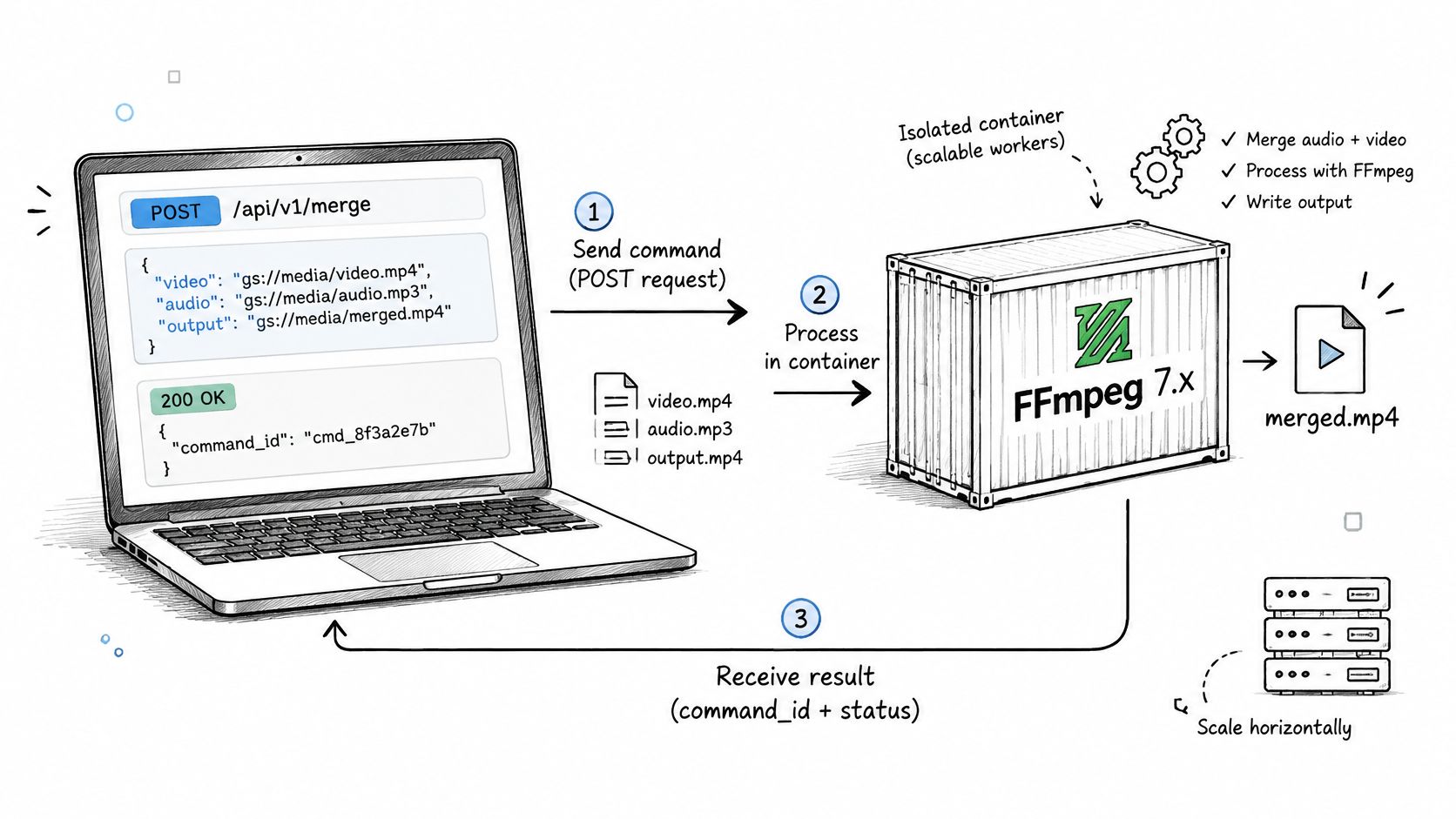
Placeholders replace local paths. Input and output files are referenced with {{placeholder}} syntax, which maps them to file URLs. You submit a job by sending a POST request with your FFmpeg command and those mappings:
ffmpeg -i {{video}} -i {{audio}} -map 0:v:0 -map 1:a:0 -c:v copy -c:a aac -b:a 192k -shortest {{output}}
The body carries that command text, an input_files object, and an output_files object. Authenticate with an X-API-KEY header. Only the URL mappings change between clips. Poll for status or use a webhook. The request shape is the short version of the API quick start.
Watch the same failure mode remotely. When a command fails, the complete FFmpeg stderr output is returned, so a clean status is not the only record you keep. Proprietary codecs such as libfdk-aac are typically unavailable. Keep the native aac encoder.
Teams cutting many versions with tools for faceless video ad production often need one voice track on a whole set of videos. A laptop queue stops making sense there. The parallel endpoint runs up to 10 FFmpeg commands at once. Each element in the commands array has its own input_files, output_files, and ffmpeg_command. I would match every output duration to the length you planned before anything is published. One API call with one FFmpeg command counts as one command, regardless of file size.
RenderIO runs your FFmpeg merge in the cloud, including mapped audio and video, stream copy, and AAC encodes, and it returns full stderr when a job fails. Use it when a silent or truncated file would otherwise ship because a local exit code looked fine. Start with the same command on RenderIO.