Your first request returns 200, so you check the output folder. There's no video. You run the request again, and now you might have duplicate jobs, but still no file in your application.
The missing piece is completion tracking. Learning how to use an API quick start means more than getting an authenticated request through. For video processing, you need to connect submission, execution, retrieval, and recovery without losing track of the job.
Table of Contents
- The Request Lifecycle at a Glance
- Authenticate and Send Your First FFmpeg Command
- What Each Status Code Tells You
- Observe Completion and Fetch the Output
- Retry Timing, Idempotency and Dead Letters
- Securing Keys, Signed URLs and Webhooks
- Confirm Your First Job Before Scaling Up
The Request Lifecycle at a Glance
A successful HTTP response tells you that the request succeeded according to that endpoint's contract. It doesn't necessarily mean the video finished encoding. An asynchronous submission endpoint can return successfully while the job is still queued.
Start with a small, predictable transformation:
ffmpeg -i input.mp4 -vf scale=-2:720 -c:v libx264 -crf 23 output.mp4
This sample scales the video while preserving its aspect ratio. For the API version, use a stable output name such as output_720.mp4 and map the input through the service's documented file mechanism.
| Stage | What your application must do |
|---|---|
| Submit | Send the authenticated job request with a deterministic idempotency key |
| Persist | Store the returned job identifier |
| Observe | Receive a webhook or poll with controlled spacing |
| Retrieve | Fetch the signed output URL before it expires |
| Close | Record terminal status and error text |
You need an API key, a terminal with curl or another HTTP client, and a test input file the service can fetch. Use a short, known-good clip rather than an unfamiliar upload with uncertain codecs or permissions.
The asynchronous processing guide provides the model to use when separating request acceptance from execution.
Finish line: A completed sample job, a validated output file, and a durable status record. A successful submission alone isn't enough.
Keep that lifecycle visible in your application. Otherwise, a timeout during submission and a codec failure during execution can end up looking like the same error, even though they require different recovery actions.
Authenticate and Send Your First FFmpeg Command
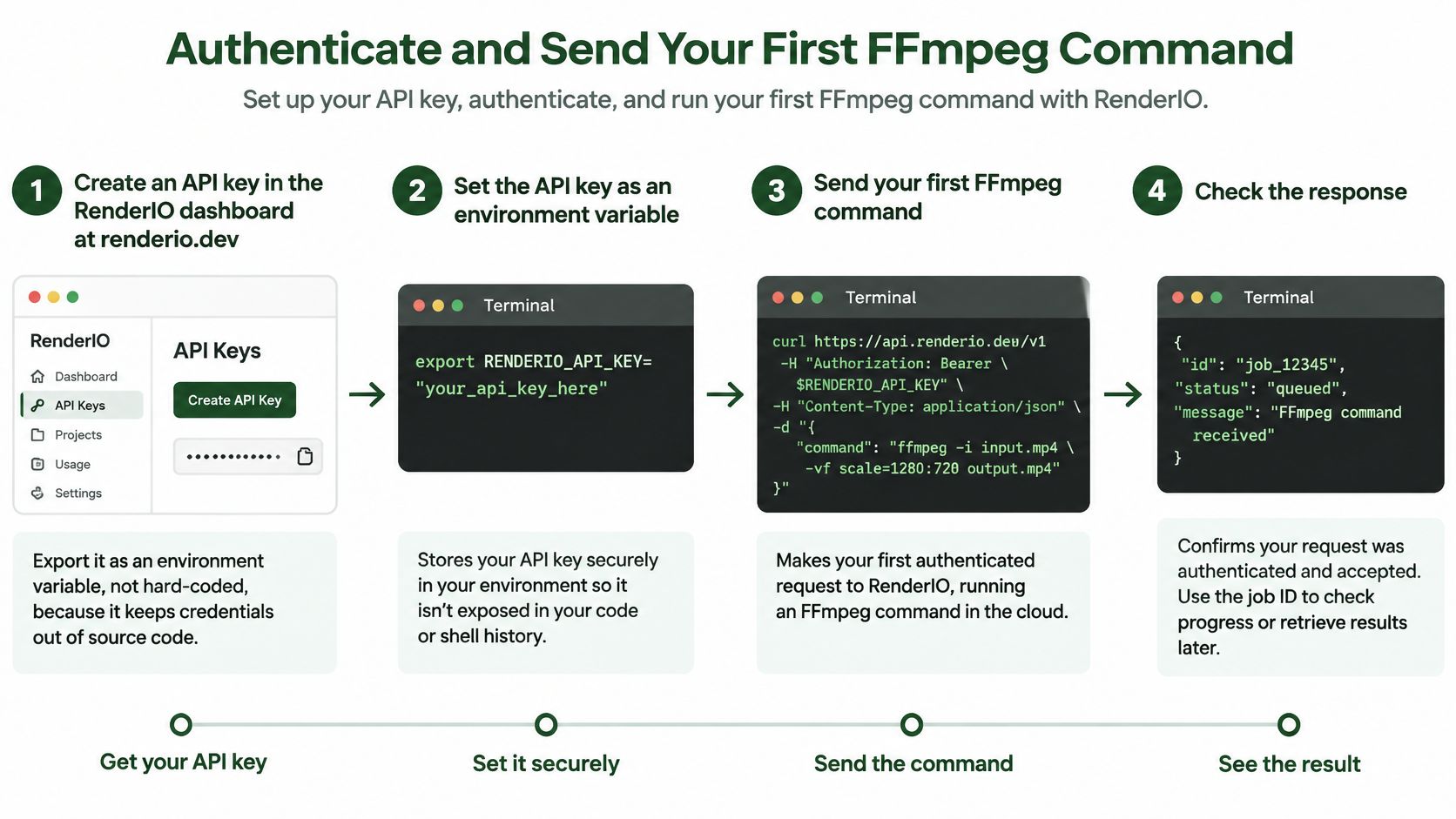
Use the dashboard's current quick-start example as the authority for endpoint paths, payload fields, and authentication. Don't infer those details from another provider's tutorial.
The setup flow looks like this:
Build a Repeatable Submission
Create the key and load it securely. Create an API key in the dashboard, then load it into a server-side environment variable such as
MEDIA_API_KEY. In an interactive Bash session,read -rs MEDIA_API_KEY; export MEDIA_API_KEYavoids typing the secret directly into a command saved in shell history.Keep the command fixed. Use
ffmpeg -i input.mp4 -vf scale=-2:720 -c:v libx264 -crf 23 output_720.mp4as the sample transformation. Pass it through the documented JSON field or argument-array interface rather than assembling a shell expression from user text.Derive a stable operation key. Hash a canonical representation of the input identity, command, and relevant settings. Include tenant identity in your application's deduplication scope, and save the resulting key before submission.
Send the authenticated POST. Use the API's documented
X-API-KEYheader, not an assumedAuthorization: Bearerscheme. Supply the idempotency key through the documented mechanism, because generating a key locally doesn't make the server deduplicate requests.Inspect both status and body. Capture response headers, HTTP status, and JSON separately. A successful submission needs a usable job identifier, not merely a response body that happens to parse.
Persist before continuing. Store the job ID, operation key, submission timestamp, and initial state in durable storage. Only then hand the job to your completion tracker.
Keep the HTTP Plumbing Explicit
With JOB_ENDPOINT set to the documented submission URL and request.json containing the documented payload, a useful diagnostic request is:
curl -sS -D response.headers -o response.json -w '%{http_code}\n' -X POST "$JOB_ENDPOINT" -H "X-API-KEY: $MEDIA_API_KEY" -H "Content-Type: application/json" --data-binary @request.json
Add the documented idempotency mechanism before enabling automatic submission retries. This command deliberately leaves endpoint and payload details configurable rather than inventing an API contract.
For audio workflows, Isolate Audio's resource on scope tokens for audio processing is useful context when deciding how narrowly to grant automation access.
Keep the output filename unchanged across retries. A retry should represent the same operation, not a subtly different request.
A healthy submission ends with a stored job ID and an initial state such as queued or running.
What Each Status Code Tells You
Every response needs one of three decisions from your client: proceed, fix, or retry. Read the HTTP class first, then the specific code, then the body.
HTTP defines five status classes, 1xx through 5xx, listed in MDN's reference on HTTP response status codes. An accepted submission is a successful request, not a finished encode. The status code classifies the HTTP exchange; the job result classifies the media work.
HTTP status classes and the action each one requires
| Status | What it means | Action in your code |
|---|---|---|
| 2xx | Job accepted or request succeeded | Hand the stored job ID to your completion tracker |
| 3xx | Redirect to another location | Follow only if the client handles redirects; otherwise log as configuration error |
| 408 | Request timeout | Retry with backoff, reusing the same idempotency key |
| 429 | Rate limit reached | Wait for Retry-After if supplied, then retry |
| 5xx | Server-side failure | Retry with backoff only if an idempotency key was sent |
Separate Request Errors From Job Errors
A 400 points at the request itself: missing parameters or malformed content. Authentication and permission failures appear as 401 or 403. Sending the same payload again changes nothing for any of these, so fix the construction before resubmitting.
A redirect deserves the same skepticism. Your HTTP client may rewrite the method or drop the body on a 302, and following it blindly can forward your API key to a different host. Treat an unexpected redirect as a configuration problem, not a step in the flow.
The 408, 429, and 5xx rows describe retry candidates, not blanket permission to resend. Deduplication must hold server-side for that operation, and your retry budget must allow another attempt. Without an idempotency key in place, a retried 5xx can submit a second job for the same operation.
Diagnostic rule: A rejected submission may never have reached the processing queue. Don't label it an encoding failure unless you have a job result showing that execution failed.
Store the status, the machine-readable error code, and the message from the body alongside your own classification. A support engineer should be able to tell whether the fix belongs in credentials, request construction, service availability, or the FFmpeg template without re-running the job.
Observe Completion and Fetch the Output
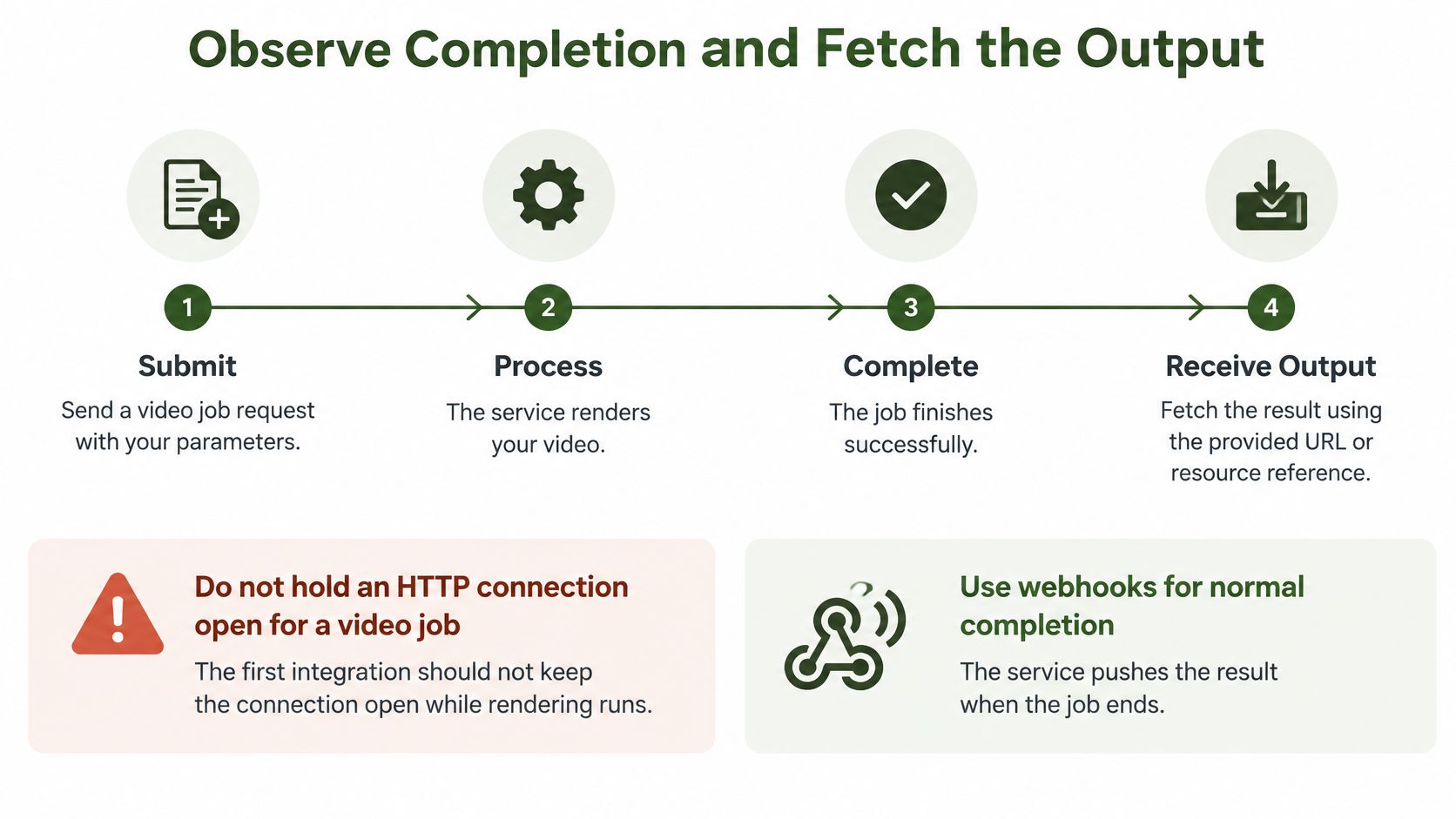
Don't keep the submission connection open while the video renders. Let your application track a durable job resource instead of relying on a network connection surviving the entire encode.
Use this lifecycle as the operational model:
| Method | Useful property | Operational trade-off |
|---|---|---|
| Webhook | No repeated status requests while waiting | Requires a reachable endpoint and signature verification |
| Polling | Works without an inbound route | Consumes requests and needs a deadline |
Use webhooks for normal completion and polling to reconcile missed notifications. Treat your stored state as authoritative application bookkeeping, then update it from verified events or status responses.
Poll With a Deadline
The following is an example fallback policy, not a provider latency guarantee. Apply terminal-state handling on every check, regardless of which example state appears in the table.
Fallback polling schedule for a submitted job
| Check | Wait before check | Action on status |
|---|---|---|
| 1 | About 2 seconds plus jitter | Queued: keep waiting; failed: read stderr and stop |
| 2 | About 4 seconds plus jitter | Running: keep waiting |
| 3 | About 8 seconds plus jitter | Running: keep waiting |
| 4 | About 16 seconds plus jitter | Succeeded: fetch and validate output; failed: record error |
| After check 4 | About 16 seconds plus jitter per check | Repeat until the client-side deadline, then mark unresolved |
Fixed, aggressive polling wastes requests without making the encoder finish sooner. A deadline means unresolved, not automatically failed.
For encoder-level diagnostics, FFmpeg's documentation describes machine-readable progress output and configurable reporting intervals. Keep full stderr available in restricted diagnostic storage.
Validate the Download
After a succeeded result, download the current signed URL:
curl -fS -o output_720.mp4 "$OUTPUT_URL"
Check the download's HTTP result and verify that the file isn't empty with test -s output_720.mp4. Then inspect its video height:
ffprobe -v error -select_streams v:0 -show_entries stream=height -of default=noprint_wrappers=1:nokey=1 output_720.mp4
For this sample, expect 720. An expired URL is a retrieval failure, so request a refreshed result URL if supported rather than launching another encode.
Use the walkthrough below alongside your own persisted job record:
Make download and publication idempotent. A duplicate callback must not publish the same asset again.
Retry Timing, Idempotency and Dead Letters
Only retry operations that are demonstrably idempotent. A header with a promising name isn't sufficient unless the server documents and enforces its behavior.
For job submission, the original request must carry the supported deduplication key. If the connection disappears after the server accepts the request, resend the same operation with that same key rather than creating a new identity.
Google's retry strategy guidance ties automatic retries to response conditions and idempotency, and recommends truncated exponential backoff with jitter. Its timing model supports the example below: roughly five retries within a 60-second budget, subject to request duration and server-directed waiting.
Retry schedule with truncated exponential backoff
| Attempt | Approximate delay | Cumulative time | Next step |
|---|---|---|---|
| Retry 1 | About 1 second plus jitter | About 1 second | Resend with the same idempotency key |
| Retry 2 | About 2 seconds plus jitter | About 3 seconds | Resend with the same idempotency key |
| Retry 3 | About 4 seconds plus jitter | About 7 seconds | Resend with the same idempotency key |
| Retry 4 | About 8 seconds plus jitter | About 15 seconds | Resend with the same idempotency key |
| Retry 5 | About 16 seconds plus jitter | About 31 seconds | Resend with the same idempotency key |
| After retry 5 | None | Under the 60-second deadline | Write to the dead-letter queue and alert |
The cumulative values are illustrative sums of the base waits. Jitter, network time, and Retry-After increase actual elapsed time, so enforce the deadline independently and stop earlier when necessary.
Preserve Enough Context to Recover
Retry timeouts, rate limits, and transient server failures only when the operation is safe to repeat. Don't retry invalid credentials, malformed commands, or deterministic media failures such as an unavailable encoder.
When attempts run out, write a dead-letter record containing:
- Request identity: Tenant, operation key, and job ID if one exists.
- Execution context: Sanitized request, template version, and input reference.
- Failure evidence: Last error, attempt history, and timestamps.
A dead-letter handling workflow should support review and controlled replay, not an endless second retry loop. Reconcile uncertain submissions before an operator requests new work.
A failed job is a processing result. An unavailable API is a transport or service problem. Give them different alerts and different owners.
Securing Keys, Signed URLs and Webhooks
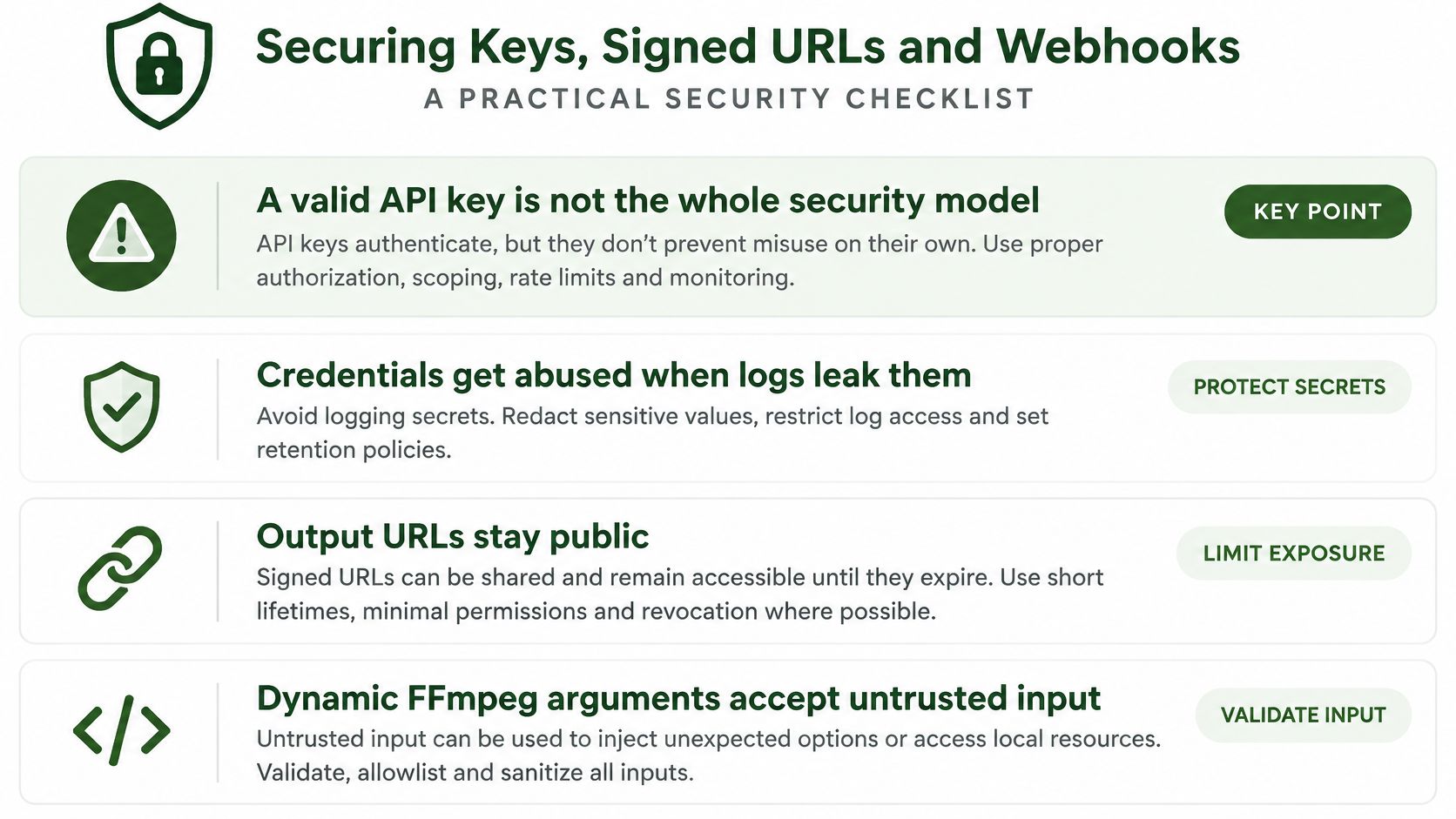
A leaked key can pass authentication and still submit work. Treat the credential as the outer door, then control inputs, outputs, callbacks, and logs as separate checks before production traffic touches the API.
Use this checklist before allowing production inputs:
Protect Every Boundary
- Secrets: Keep keys in n8n, Zapier, Make, or Pipedream credential storage, or in server-side environment variables. Never expose them in browser code, query strings, or copied webhook payloads.
- Signed URLs: Download promptly because the URL expires, and treat the whole string as a secret. Keep it out of shared workflow logs and ticket comments.
- Input sources: Allowlist permitted media locations and validate output destinations. Reject internal-network targets and unsafe redirects.
- Command construction: Insert validated values into trusted FFmpeg templates. Never execute raw user-supplied shell text.
- Callbacks: Verify the webhook signature with the documented procedure before changing job state, and record the event identity so a repeated delivery cannot trigger the same downstream action twice.
- Authorization: Use least-privilege credentials per automation and check tenant ownership on every job and file access.
- Retention: Set media expiration policies and audit who submitted or downloaded assets.
- Diagnostics: RenderIO returns full FFmpeg stderr for debugging, so restrict raw stderr access and redact sensitive paths or upstream URLs from shared logs.
The API security practices guide turns these controls into deployment checks. Keep enough stderr detail to debug a failed encode, and share it only inside the boundary that already owns the job.
Confirm Your First Job Before Scaling Up
Your finish line is a usable asset with an explainable history. You should be able to start from the application's operation record and identify the request, remote job, terminal result, downloaded file, and publication outcome.
Run the sample transformation end to end before enabling parallel submissions. If you can't explain where a single job stopped, a batch will only produce more ambiguous failures.
Prove the Recovery Paths
- Complete the happy path: Submit, persist the identifier, observe success, download, and probe the output.
- Verify callback handling: Confirm a legitimate delivery is accepted and an invalid signature is rejected.
- Exercise duplicate delivery: Replay an event and confirm it doesn't trigger another publication.
- Test recovery: Simulate an interrupted status request and a failed download without resubmitting the encode.
- Inspect dead letters: Confirm exhausted operations contain enough context for safe manual review.
Then add concurrency deliberately. Keep submission workers separate from completion handlers so slow downloads don't block new status events.
Measure Before Increasing Volume
Track success rate per command template, median time to completion, and retries per job. Separate queue time, processing time, and retrieval time where the API exposes them.
A rising retry count needs diagnosis, not a larger retry budget. It can indicate throttling, connectivity trouble, or a client incorrectly treating permanent errors as transient.
The same lifecycle fits n8n, Zapier, Make, and Pipedream HTTP steps. Keep durable state outside a single execution's temporary variables so another worker can resume the job after an automation restarts.
Use an available free trial to exercise this full loop before committing to volume, and check its current terms in the dashboard. Today's action is concrete: submit the sample job, save its ID, and check its status until you have a validated file or an actionable terminal error.
RenderIO offers a cloud FFmpeg and yt-dlp API for video automation, with job tracking through polling or webhooks. Visit RenderIO to try the sample transformation and connect submission, completion, and output retrieval before expanding your pipeline.