You're exporting a video, the upload box is open, and the platform asks for captions or subtitles. You probably know you need text on screen. What's less obvious is which kind of text.
That choice matters more than most creators expect. If your video has a joke that lands because of a pause, a reveal because someone knocks off screen, or a tutorial where one speaker interrupts another, dialogue alone won't carry the full meaning. A subtitle track can tell a viewer what was said. A closed caption track can tell them what was heard.
That's where people get tripped up. They see words on screen and assume the job is done. But if a viewer is watching on mute in a feed, if another viewer needs translation, and someone else can't hear the soundtrack at all, one text treatment rarely serves all three audiences equally well. That's why the question isn't just “subtitles or captions?” It's “what does this viewer need in order to fully understand this video?”
Table of Contents
- Why This Distinction Matters Before You Press Publish
- What Subtitles and Closed Captions Actually Mean
- How Subtitles and Closed Captions Compare Side by Side
- File Formats and How They Reach the Viewer
- Where the Split Came From and Why Workflows Still Differ
- Choosing and Creating the Right Track for Your Video
- Putting It All Together and Shipping Accessible Video
Why This Distinction Matters Before You Press Publish
A simple example shows the gap.
A creator posts a short interview clip. The on-screen text translates the speaker's words perfectly. Then the guest stops, looks to the side, and laughs because a glass shatters off camera. The subtitle track keeps showing only dialogue. A hearing viewer understands the moment because they hear the crash. A deaf viewer misses the reason everyone reacts.
That's the practical difference. Subtitles usually cover spoken language. Closed captions cover the audio experience.
The wrong choice creates different kinds of failure
Sometimes the failure is accessibility. A viewer can read every spoken line and still miss the point because key sound information never appears on screen.
Sometimes the failure is product design. A mobile viewer scrolling with autoplay muted may need burned-in text to understand anything at all. A viewer on your site may need a toggleable track instead, so they can turn it on, switch languages, or use accessibility settings.
Practical rule: If the soundtrack carries meaning beyond spoken words, dialogue-only text isn't enough.
There's also a workflow cost when teams use the terms loosely. A producer says “add subtitles,” a developer uploads a dialogue-only SRT, and later someone realizes the deliverable needed accessibility cues, speaker labels, or a separate closed track. The video may still look fine in review, but it won't serve the same audience.
Mixed audiences are where the old rule breaks down
Most quick definitions say something like this:
- Subtitles are for translation.
- Closed captions are for accessibility.
That's useful, but incomplete.
Many videos now serve mixed audiences at once. A product demo may need same-language accessibility captions on YouTube, translated subtitles on a landing page, and open text baked into a vertical clip for social. A single asset often gets repackaged across several players, feeds, and languages.
That's why “what's the difference between subtitles and closed captions” isn't just a terminology question. It affects what you write, what file you export, whether the viewer can toggle it, and whether your video still makes sense when the audio is missing, unfamiliar, or inaccessible.
What Subtitles and Closed Captions Actually Mean
Start with the simplest version.
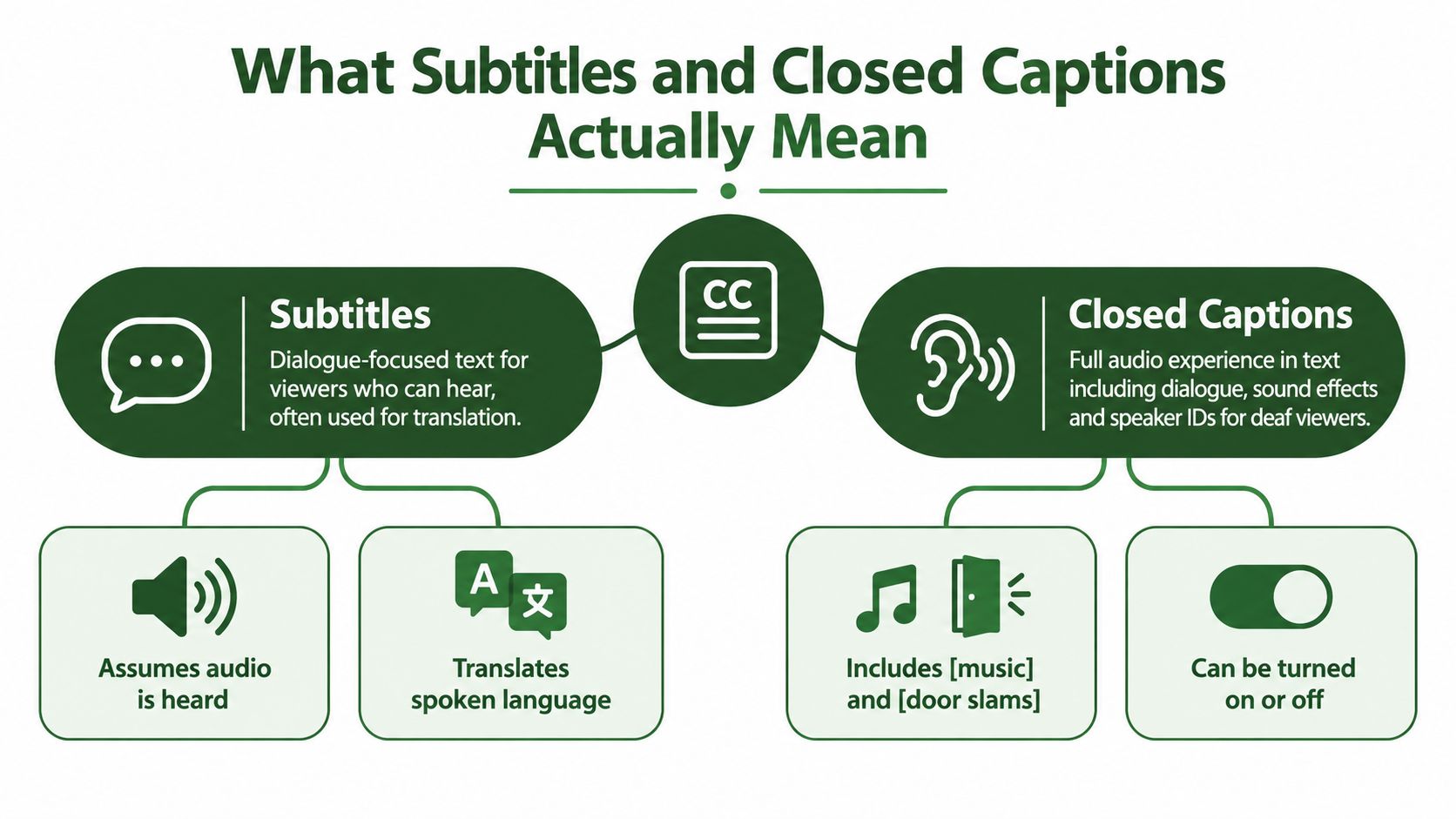
Subtitles are text for viewers who can hear the audio but need help understanding the language being spoken. That may mean translation into another language, or same-language subtitles for viewers who process spoken dialogue better when they can also read it.
Closed captions are text for viewers who may not be able to hear the soundtrack. So they don't stop at dialogue. They also include sound effects, speaker identification, music cues, laughter, and other audible details. The W3C accessibility guidance makes that distinction directly: subtitles focus on spoken dialogue, while captions include non-speech audio cues for viewers who may not be able to hear the program at all, which is why captions function as accessibility assets rather than simple language overlays in WCAG guidance on timed text alternatives.
Think of it as script versus soundstage
A useful analogy is this:
- Subtitles are the script of what people say
- Closed captions are the script plus the stage directions for what people hear
If a line reads, “I'm fine,” the subtitle may stop there.
A closed caption version might add context:
- [voice trembling] I'm fine
- [door slams]
- Maya: I'm fine
- [music builds]
That extra layer isn't decorative. It carries meaning. In many scenes, the audio cue changes how you interpret the line.
The audience assumption is different
Subtitles assume the viewer has access to the soundtrack. The missing piece is language comprehension.
Closed captions assume the viewer may not hear the soundtrack. The missing piece is the full audio layer itself.
That's why the same dialogue can need two different treatments. A French-speaking viewer watching an English commercial might need translated subtitles. A deaf English-speaking viewer needs closed captions in English. A multilingual viewer watching in a social feed may benefit from open captions that combine readability with translation strategy.
A related creative challenge shows up in music and short-form edits. If you're working on stylized feed text, this guide on how to style lyrics for feed captions is useful because it treats text as part accessibility layer, part visual storytelling choice.
After the concept is clear, it helps to see the mechanics in motion:
Why people mix the terms up
The confusion is understandable because both appear as on-screen text. In everyday conversation, people often use “subtitles” to mean any text at the bottom of a video.
But from an accessibility and production standpoint, they aren't interchangeable. The key question is not where the text sits. It's what information the text contains and who it's meant to support.
A good test is simple. If you mute the video and still understand every meaningful sound event from the text alone, you're closer to captions than subtitles.
How Subtitles and Closed Captions Compare Side by Side
Definitions help, but decisions happen at the edge cases. You're usually choosing between deliverables, not dictionary entries.
One video may need translated dialogue for global viewers. Another may need same-language accessibility text for a course platform. A third may need both, depending on where it's published and who's watching.
Subtitles vs Closed Captions at a Glance
| Feature | Subtitles | Closed Captions |
|---|---|---|
| Primary purpose | Help viewers understand spoken language | Help viewers access the full audio experience |
| Assumed audience | Viewers who can hear the audio | Viewers who may not be able to hear the audio |
| Includes dialogue | Yes | Yes |
| Includes sound effects | Usually no | Yes |
| Includes speaker identification | Usually no | Yes |
| Includes music and audible cues | Usually no | Yes |
| Often used for translation | Yes | Sometimes, but accessibility comes first |
| Accessibility role | Limited | Core purpose |
| Viewer control | Can be delivered as closed tracks | Typically delivered as toggleable closed tracks |
| Common failure mode | Leaves out important audio context | Can be too sparse if written like subtitles |
The biggest difference is scope
Subtitles answer one question: what was said?
Closed captions answer a broader one: what would a viewer know if they could hear everything?
That scope affects editing. With subtitles, you can often work from speech alone. With captions, someone has to decide which sounds matter, label speakers when needed, and preserve timing in a way that reflects the audio rhythm.
Toggleability is a separate question
A common source of confusion is that people mix up content type with delivery type.
“Subtitles” versus “captions” describes the content inside the text track.
“Open” versus “closed” describes whether the viewer can turn that text off.
So you can have:
- Closed subtitles, which are toggleable translation tracks
- Open captions, which are burned into the picture
- Closed captions, which are toggleable accessibility tracks
That means the right choice often comes from two separate decisions:
- What information should the text include?
- Should the viewer be able to switch it on and off?
Legal and platform expectations aren't the same thing
Accessibility requirements usually care about captions, not just any on-screen text. That's because a dialogue-only track doesn't replace the full audio layer for a deaf or hard-of-hearing viewer.
At the same time, platform behavior pushes teams toward other choices. Social feeds often reward immediate legibility. A landing page may need language options. A video app may need player-level controls and multiple text tracks.
If your team says “we added subtitles,” ask a follow-up question. “Do you mean translated dialogue, or a full accessibility caption track?”
A quick decision lens
Use subtitles when the audio is available to the viewer and the problem is language.
Use closed captions when the viewer needs access to meaningful audio details, not just words.
Use both when one video serves multiple audiences in different contexts. That's increasingly common, especially for courses, demos, interviews, explainers, trailers, and repurposed short-form clips.
File Formats and How They Reach the Viewer
Once you know what kind of text you need, the next question is how that text gets to the screen.
Many teams accidentally combine the wrong ideas. They talk about subtitles and captions as if the only difference is wording. In practice, delivery matters just as much. A text track can travel as a separate file the viewer toggles, or it can be burned directly into the video image.
Open versus closed is about delivery
BBC guidance puts the distinction plainly: closed subtitles can be switched off and are commonly delivered as separate files, while online and broadcast workflows may require standards such as EBU-TT-D and related EBU-TT versions, and ATSC A/343 defines technical carriage for closed caption and subtitle tracks in modern transport systems, as outlined in the BBC's subtitles guidance for products and services.
That leads to a practical split:
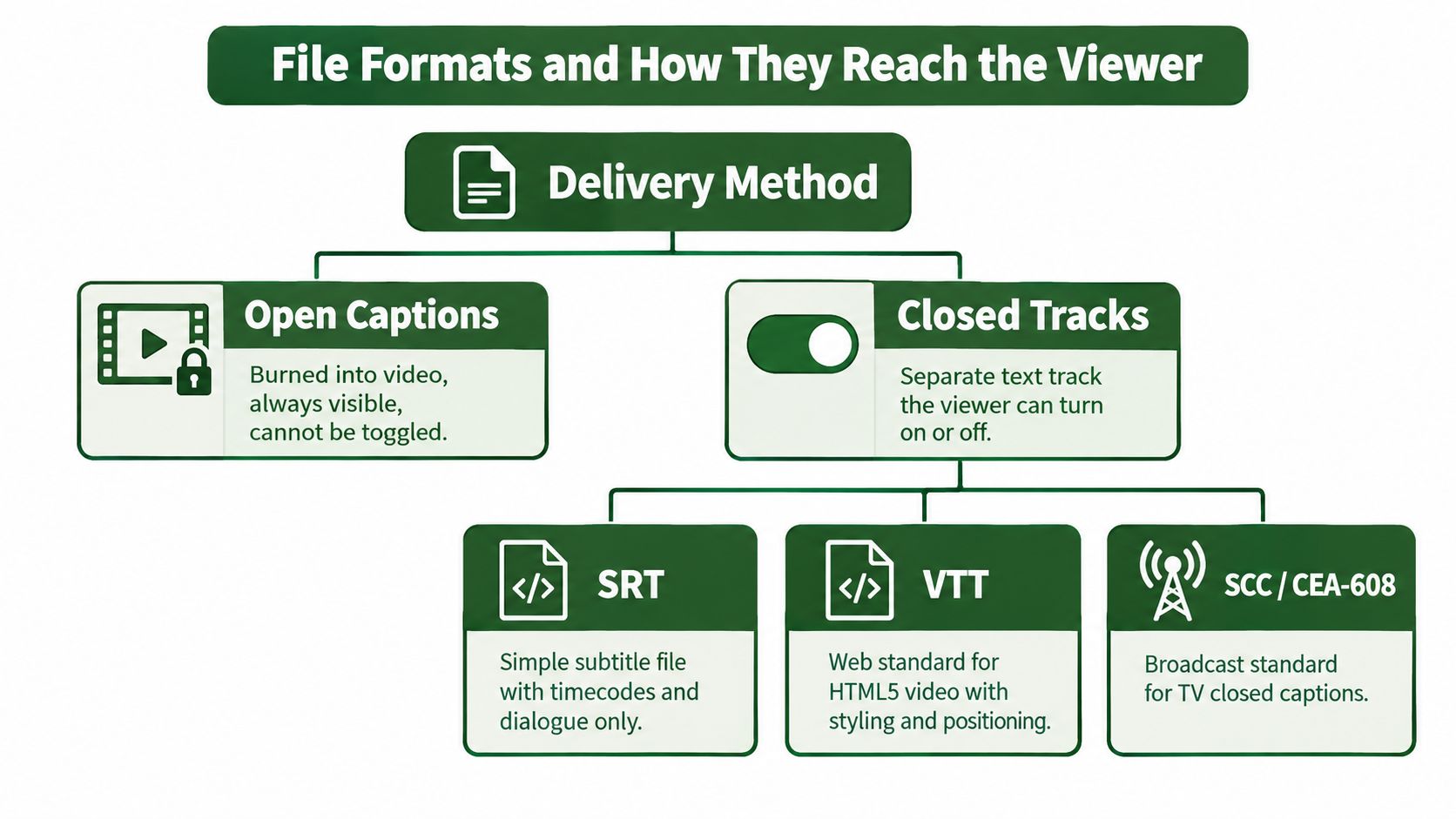
- Open captions are part of the image itself. They're always visible.
- Closed tracks sit beside the video. The player renders them when needed.
If you've ever uploaded a vertical clip to a social platform and noticed the app ignored your sidecar file, you've seen why open captions are still common.
Common formats in everyday workflows
You'll see a few format names repeatedly:
- SRT is the plain workhorse. It's widely supported and easy to move between tools.
- VTT or WebVTT is closely tied to web video and HTML5 players.
- Broadcast-oriented caption formats carry more technical requirements in television and related delivery chains.
For creators and developers, the main lesson is simple. The file extension doesn't tell the whole story. You still need to know whether the track contains dialogue only, full audio context, or text permanently baked into frames.
If you're dealing with existing containers and trying to inspect or recover embedded text tracks, this walkthrough on extracting subtitles from MKV files is a practical starting point.
Choose the delivery method based on viewing conditions
Closed tracks are better when you need flexibility:
- multiple languages
- accessibility support
- user control
- easier updates without re-rendering video
Open captions are better when you need certainty:
- silent autoplay in feeds
- in-player support is unreliable
- the platform strips sidecar tracks
- you want every viewer to see the text immediately
Burned-in text solves distribution problems. Separate tracks solve accessibility and reuse problems.
That's why many teams end up exporting more than one version of the same asset. One for a social feed. Another for a website. Another with alternate language tracks.
Where the Split Came From and Why Workflows Still Differ
A viewer opens the same short video in three different places. On television, the text track is expected to meet accessibility rules. On a social app, the video autoplays on mute, so the text also has to carry the story without sound. On a multilingual site, another viewer needs translation at the same time. The labels may look familiar, but the job of the text changes with the setting.
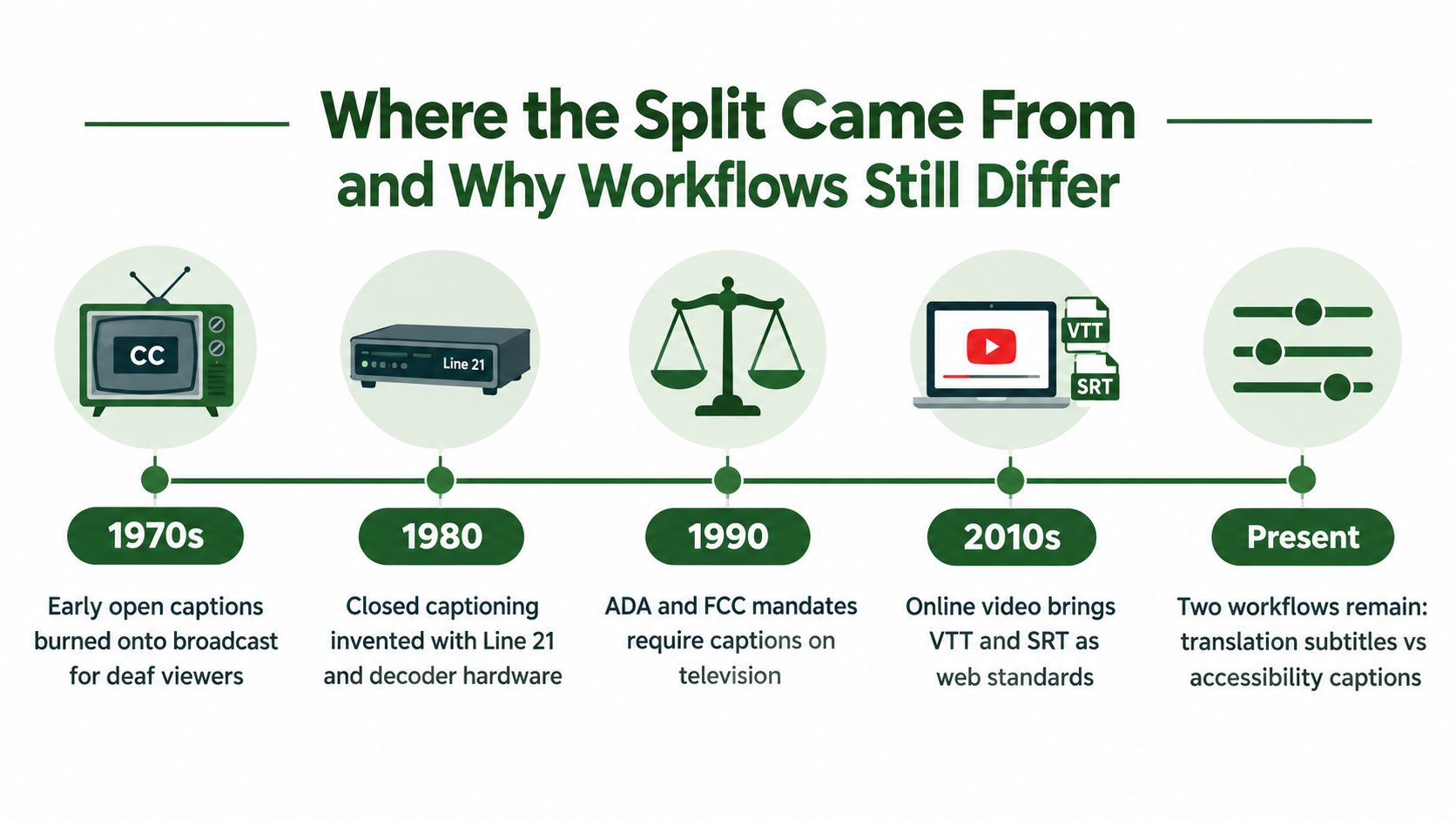
The split between subtitles and captions grew out of that older broadcast history. In the United States, closed captioning developed as an accessibility system inside television itself, with rules about how captions were delivered and displayed. The FCC's record traces early open-caption demonstrations in the early 1970s, later reservation of line 21 for closed captions, and receiver requirements that pushed caption support into consumer devices, as described in the FCC's closed captioning order and background record.
Accessibility made captions part of the delivery system
That origin changed the workflow.
A subtitle track can be treated like translated dialogue. A caption track has to carry more of the sound world, such as speaker changes, music cues, and meaningful effects, because some viewers are using it in place of hearing. The difference is similar to the difference between translating a script and preparing stage directions. One helps you follow the words. The other helps you follow the whole scene.
Broadcast standards reinforced that distinction for years. In the UK, broadcasters often used the word subtitles for what U.S. teams would call captions, especially in Teletext-era television services, as explained by the BBC history of subtitling. That regional difference is one reason cross-functional teams still talk past each other.
Why the workflow difference survived the shift to web and social video
Modern web players are more flexible than old broadcast systems, but the old expectations stayed attached to the words.
Editors still hear "subtitles" and think translation. Accessibility specialists still hear "captions" and think complete audio context. Product teams then run into the mixed-audience case that older definitions do not explain very well. A single video in a muted feed may need to help a Deaf viewer, a hearing viewer who cannot turn sound on, and a viewer who does not understand the spoken language.
That is why workflows still diverge. One track is often written to mirror speech in another language. Another is written to represent audio access. Sometimes a team merges those jobs into one on-screen text treatment because the platform leaves no other choice. The historical split still matters because it explains why that merged version is harder to write well, review accurately, and label clearly.
Choosing and Creating the Right Track for Your Video
The practical decision usually starts with one question: what will break first for this viewer?
If the viewer can hear but not understand the language, subtitles solve the problem.
If the viewer can't hear the audio clearly, or at all, you need captions that include meaningful sound information.
If the viewer is in a muted autoplay feed and also may not understand the source language, you may need a combination strategy. That's the mixed-audience case many teams miss.
A simple decision checklist
Use this checklist before export:
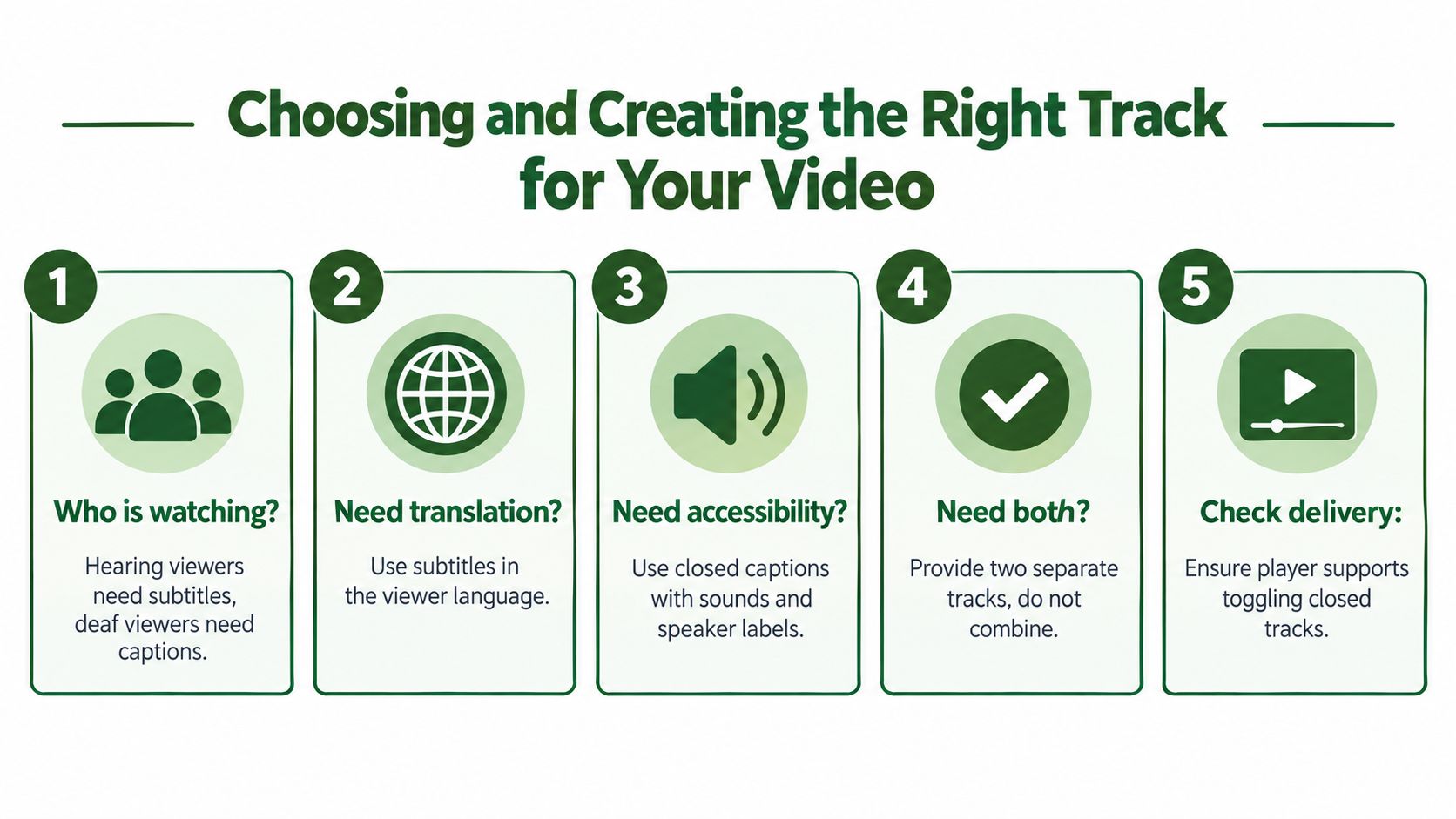
- Language barrier only. Create subtitle tracks focused on dialogue.
- Accessibility need. Create closed captions with speaker labels and non-speech audio cues.
- Silent feed distribution. Consider open captions burned into the video so viewers don't need to enable anything.
- Multiple platforms. Keep a master sidecar track for reuse, then render open-caption variants where needed.
- Multiple audiences at once. Don't force one track to do every job if the platform supports more than one.
The common mistake is trying to cram translation and accessibility into a single minimal subtitle export. That usually leads to a track that is too sparse for accessibility and too rigid for localization.
A good workflow starts with one strong transcript
In production terms, the cleanest path is:
- transcribe the spoken dialogue
- mark speaker changes where they matter
- add meaningful sound cues
- edit for timing and readability
- export the right format for each platform
That middle step matters most. Captioning isn't only transcription. It's deciding which audible events a viewer needs in order to follow the scene.
Treat captions like product content, not an afterthought. They need review, timing, and platform-specific export choices.
If you're building this into a repeatable pipeline, FFmpeg-based tooling can help with track conversion and burn-in workflows. For example, teams often use tools and APIs to automate subtitle overlays, sidecar packaging, and alternate exports. If you want a practical walkthrough, this guide on adding subtitles to video covers the mechanics. RenderIO is one option for teams that need to run FFmpeg commands through an API rather than managing their own processing infrastructure.
For mixed audiences, ship more deliberately
For many short-form videos, the best answer isn't choosing one label. It's shipping the right combination:
- a caption-grade master track
- translated subtitle versions where needed
- an open-caption social render for autoplay feeds
That gives you flexibility without flattening every audience need into one compromise file.
Putting It All Together and Shipping Accessible Video
The clearest way to remember the difference is this:
Subtitles usually tell you what was said. Closed captions tell you what was heard.
That's the core distinction behind all the file choices, workflow debates, and platform decisions. If you keep that one sentence in mind, most confusing edge cases become easier to sort out.
A final pre-publish audit
Before you ship a video, check these points:
- Viewer need. Is the barrier language, audio access, or both?
- Content scope. Does the text include only dialogue, or the meaningful sound layer too?
- Delivery method. Should the text be toggleable, burned in, or both?
- Platform fit. Will the player preserve text tracks, or do you need an open-caption version?
- Reuse path. Can this track be repurposed into translations, transcripts, or alternate exports later?
If your team is still relying on “subtitles” as a catch-all term, that's the first thing to fix. Clear language upstream produces better video downstream.
And if you're turning existing media into accessible assets, a reliable transcript-first workflow helps. This guide on video automatic transcription is a useful place to start when you're building that process.
RenderIO helps teams automate video workflows that often sit behind caption and subtitle delivery, including FFmpeg-based burn-ins, format conversions, and batch processing through an API. If you need to turn one text source into platform-specific video outputs without managing the media infrastructure yourself, visit RenderIO.