Captions are time-synchronized text shown with a video to represent spoken dialogue and important non-speech sounds.
If every spoken word is correct, but viewers can't tell who's speaking or hear the alarm that changes the scene, have you really captioned the video? That gap explains why captions need more than a transcript.
For creators, the useful way to think about captions is as a second, timed narrative track. They must communicate what matters in the soundtrack while leaving viewers enough time and space to follow the picture.
Table of Contents
- Captions Defined and How They Differ From Subtitles
- Why Captions Are Required and Where Their Story Began
- What Captions Do for Viewers and Search Visibility
- Caption File Formats Explained SRT and WebVTT
- Timing and Styling Rules That Keep Captions Readable
- Workflows for Captioning Video at Scale
- Pick Your Caption Workflow and Test It First
Captions Defined and How They Differ From Subtitles
Captions carry the audible parts of a story into text. That includes dialogue, but also a speaker's identity when it isn't visually obvious, meaningful music, and sounds such as a door slamming offscreen.
Think of text displayed during a foreign-language opera: it helps you understand the words without replacing the performance. Captions take that idea further by describing relevant sounds for someone who can't rely on hearing them. A cue such as [glass shatters upstairs] can explain why a character suddenly stops talking.
Caption types compared
People asking “what are captions?” often encounter several overlapping labels. Subtitles usually help viewers understand spoken language, while captions also communicate relevant non-speech audio.
| Type | What It Carries | Main Audience | Can Viewers Turn It Off |
|---|---|---|---|
| Subtitles | Translated or transcribed dialogue | Viewers who hear the audio but not the language | Usually yes |
| Captions (SDH) | Dialogue plus speaker names and sound effects | Deaf and hard-of-hearing viewers | Usually yes |
| Closed captions | Separate text track decoded on playback | Broad, including accessibility users | Yes, viewer selects them |
| Open captions | Text burned into the video frames | Anyone, on any player or feed | No, always visible |
SDH means subtitles for the deaf and hard of hearing. You'll encounter that label on tracks that include dialogue, speaker identification, and sound descriptions, although platforms don't always use terminology consistently.
The table also separates content from delivery. A translated track can include accessibility information, and a complete caption track can be delivered either separately or inside the picture.
Practical rule: If viewers can switch the text off, it's closed. If the text is part of the video's pixels, it's open.
When you need that permanently visible version, MyKaraoke Video's guide explains how to burn captions directly into videos. Keep an editable caption file too, so future corrections don't require transcribing everything again.
Correct words aren't enough
The FCC's television captioning guide identifies accuracy, synchronization, completeness, and placement as caption-quality dimensions. Words must match the audio, arrive with the relevant speech and sounds, continue throughout the program, and avoid obscuring important visual information.
A perfectly spelled sentence can still be inaccessible if it appears after the speaker has changed. Missing speaker labels can make a conversation confusing, while text covering a demonstration can hide the very action it explains. Caption accessibility is a whole-screen design problem, not just a transcription score.
Why Captions Are Required and Where Their Story Began
Say you're preparing a training film for viewers who can't hear its soundtrack. Handing them a script would provide the words, but they'd still need to work out which sentence belongs to which scene.
Early caption advocates addressed that exact access problem by putting text alongside the moving picture. The National Court Reporters Association's history of captioning traces the modern U.S. story to 1949, when administrators at deaf schools in Hartford and New York persuaded Hollywood to produce films containing text.
The timeline highlights the shift from advocacy toward an expectation of access.
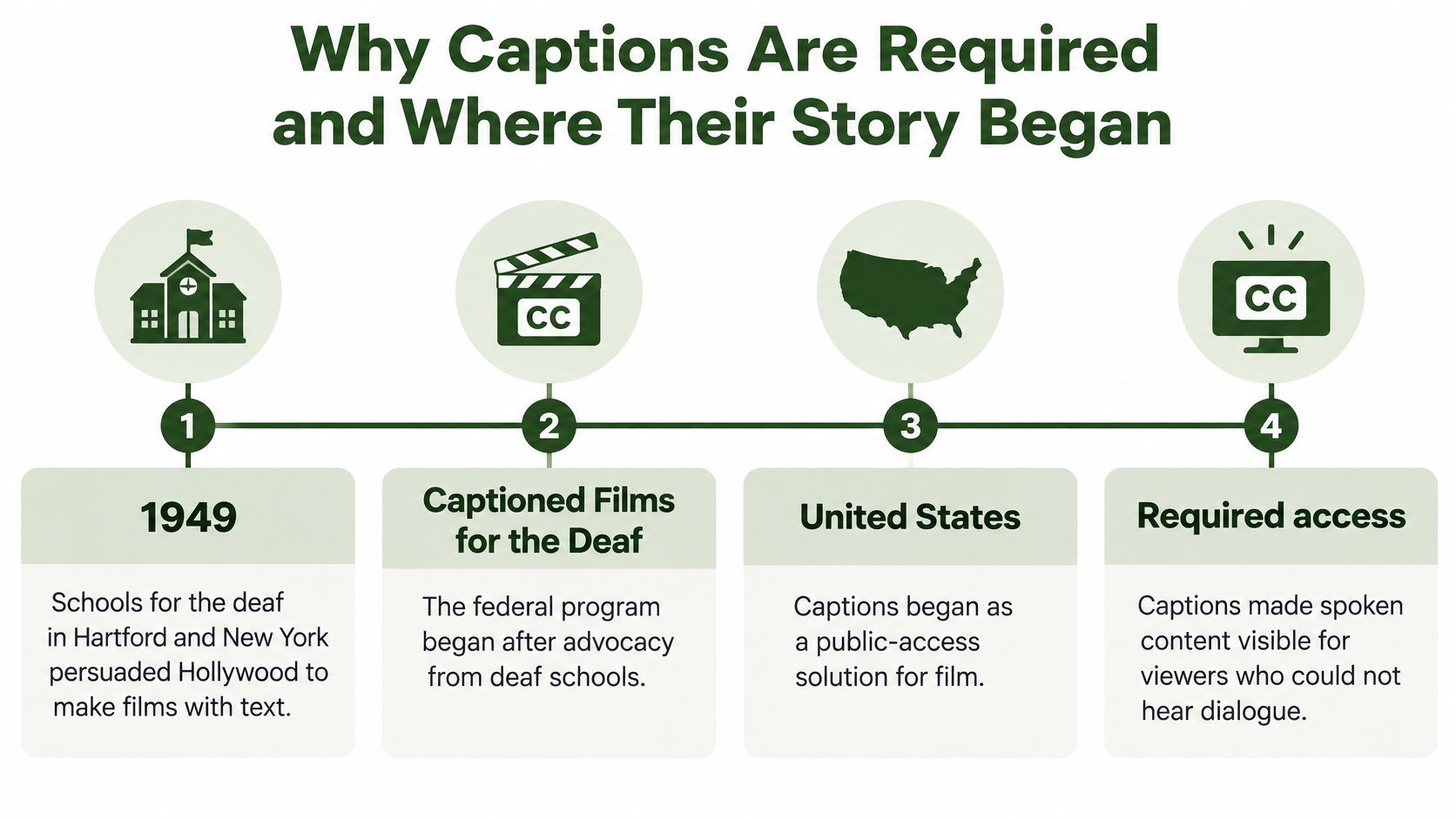
From captioned films to selectable television text
The federal Captioned Films for the Deaf program gave that work an organized public role. Captioning then moved beyond preparing text for individual films toward distributing text through television systems.
Experiments at Boston's WGBH and development at PBS helped establish closed captioning. Unlike text permanently printed into a film image, closed captions could remain hidden until a viewer selected them. That distinction made captions part of a shared broadcast rather than a separate viewing experience.
The sequence involved several kinds of work:
- Advocates established the need. Deaf schools pushed for access to films that hearing audiences already enjoyed.
- Broadcasters developed delivery methods. Caption text had to travel with programming and appear at the right moment.
- Equipment makers enabled playback. Viewers needed televisions capable of displaying the transmitted text.
Technology approval, the creation of the National Captioning Institute, and regular captioned broadcasts helped turn that effort into an ongoing service. Caption-decoding capability later became part of television manufacturing requirements rather than something viewers always had to obtain separately.
What that history means for creators
Captions became an accessibility expectation because viewers needed dependable access, not occasional accommodation. That's why treating them as an optional decoration misses their purpose.
For a current project, establish which accessibility obligations apply before production begins. Television distribution, an educational contract, an employer's accessibility policy, and a social-media campaign can involve different requirements and review processes.
Ask who owns caption approval, which delivery formats the distributor accepts, and how corrections will reach already-published versions. For work distributed across markets, get qualified advice about the rules that apply to each destination rather than assuming that a single export satisfies every obligation.
The practical lesson is straightforward: budget for captions alongside editing, audio, and delivery. If nobody owns that task, access is easily lost between the final cut and publication.
What Captions Do for Viewers and Search Visibility
Captions help people understand and retain video content, not merely recognize individual words. A review presented to the Maryland legislature describes more than 100 empirical studies finding benefits across comprehension, attention, memory, vocabulary, fact recall, inference, and emotion identification.
Those benefits become concrete in everyday viewing situations. Someone on a noisy commute needs help following dialogue; a parent watching beside a sleeping child needs the message without sound. A child practicing reading or an adult learning a language may use text and audio together.
Different viewers use captions differently
Don't assume everyone reads captions in the same way. A language learner may depend on the written sentence to understand unfamiliar speech, while a more proficient viewer may glance between the speaker, the demonstration, and the text.
That difference matters when you edit educational material. A highlighted keyword can support a lesson, but it doesn't replace a complete caption track for someone who needs access to the whole explanation.
- For a demonstration, synchronize terminology with the action that illustrates it.
- For an interview, preserve meaningful phrasing and make offscreen speakers identifiable.
- For a promotional clip, make sure decorative emphasis doesn't remove information needed to understand the offer.
Captions should make the message available, not force viewers to choose between reading and watching.
Sound-off viewing is another useful production test. Mute the export and ask whether a viewer can understand the claim, the context, and the requested action without guessing.
Measure engagement through your own platform analytics. Compare completion, watch time, and viewer feedback across comparable videos rather than promising that adding captions will automatically improve performance.
Searchable text needs a discoverable home
Captions and transcripts can also support search visibility, but uploading a caption file isn't a ranking guarantee. A private sidecar file that a search engine can't access won't function like visible page content.
For a tutorial about replacing a microphone cable, a useful transcript can preserve the connector names, troubleshooting terms, and product references spoken in the video. Publishing that text on an accessible, indexable page gives readers a way to find and inspect the explanation without playing the entire recording.
A workflow to extract text from video can help create that starting material. Review the output before publication, especially model names and technical vocabulary, and organize it into readable paragraphs.
Don't stuff search phrases into captions that weren't spoken. Keep captions faithful to the soundtrack, then use the surrounding page copy to provide additional context.
Caption File Formats Explained SRT and WebVTT
A caption file stores text alongside instructions for when it should appear. Each timed unit is called a cue, with a start time, an end time, and the text to display.
The format determines how those instructions are written and which presentation features can travel with them.
Common caption file formats
| Format | Structure | Styling Support | Best For |
|---|---|---|---|
| SRT | Numbered cues with timestamps in hours:minutes:seconds,milliseconds | Minimal, mostly plain text | Uploads to video platforms and editors |
| WebVTT (.vtt) | WEBVTT header, cues with timestamps in hours:minutes:seconds.milliseconds | Positioning and CSS styling | Web players and HTML5 video |
| SCC | Broadcast format with frame-based timing | Limited by broadcast constraints | North American broadcast delivery |
| TTML or DFXP | XML-based timed text | Rich styling and regions | Broadcast and streaming workflows needing precise layout |
SRT is a practical starting point when a platform or editor accepts a straightforward timed-text upload. Its cues contain a sequence number, a timestamp line, and caption text, with blank space separating cues.
WebVTT is designed for web-oriented timed text. The W3C's WebVTT concepts guide describes its WEBVTT header, cue timestamps, and optional positioning settings, which let a player process text separately from the encoded video.
The small syntax differences matter. SRT uses a comma before milliseconds; WebVTT uses a period. Renaming a file extension doesn't convert the content inside it.
Choose for the destination, not the filename
Ask the receiving platform for its accepted formats before building the export step. A web player may work naturally with WebVTT, while a broadcast delivery specification may require SCC or a particular TTML profile.
Richer formatting doesn't guarantee a better result. The receiving player must support the settings you include, and a conversion can discard styling that the target format cannot represent.
A sidecar file stays separate from the video, making corrections and additional language tracks easier to manage. A burned-in version is useful when the destination won't preserve text tracks, but changes require another video render.
Import check: A file that looks sensible in a text editor can still fail in the player that must display it.
Before investigating an elaborate pipeline failure, check the basics:
- Encoding: Save text as UTF-8 so names and accented characters survive the handoff.
- Syntax: Confirm the required header, timestamp punctuation, cue separators, and valid ordering.
- Conversion: Use an appropriate tool such as FFmpeg to convert supported formats rather than changing the extension.
- Playback: Import the result into the actual destination and inspect both dialogue and sound cues.
Treat transcoding and editing as potential timing changes. Trimming an introduction, changing playback speed, or generating a shorter social cut can leave a previously correct caption file attached to the wrong moments.
Preserve the source caption file and associate each export with its matching video version. A clear version relationship prevents an old track from reappearing during a later upload.
Timing and Styling Rules That Keep Captions Readable
How can captions stay readable without covering the action or giving away what happens next? Treat them as a second, timed narrative track: the words, timing, and placement all shape what viewers can follow. Use a platform's documented specification where it gives numerical limits; otherwise, check each cue against the pace of the speech and the picture.
Caption readability guidelines
| Parameter | Guidance | Why It Matters |
|---|---|---|
| Reading speed | Match text density to the audience and delivery specification | Viewers must finish reading before the next cue |
| Lines per caption | Keep the caption block compact | More lines hide the picture |
| Characters per line | Break at natural phrases and keep each line easy to scan | Awkward breaks slow reading |
| Cue duration | Keep captions visible long enough to read and align them with the associated audio | Too short flashes past; too long lags speech |
| Gap between cues | Follow the delivery specification and check visual separation | Stops consecutive cues becoming confusing |
| Background and contrast | Use a semi-opaque box and high contrast | Keeps text readable over bright or busy frames |
| Safe area | Keep captions clear of faces, graphics, and platform UI | Stops captions covering important information |
Shape phrases around meaning
Break lines where a reader naturally pauses. Keep a person's name together, avoid separating an article from its noun, and don't strand a short word because an automatic wrapping tool reached its character limit.
If a dense cue passes too quickly, inspect its segmentation before shrinking the font. Divide the text at a phrase boundary, or revise the edit so viewers have time to process the explanation.
Timing also carries narrative information. A caption that reveals the end of a joke early can spoil the punchline; one that appears late can miss an interruption or reaction.
For overlapping dialogue, identify speakers clearly instead of presenting an undifferentiated block of text. Use concise bracketed sound descriptions such as [phone vibrates] when a sound adds information that the picture does not provide.
- Describe the relevant sound. An offscreen crash may matter more than continuous background ambience.
- Avoid interpretation. Describe audible evidence rather than inventing a character's intention.
- Check the whole composition. Move captions away from a chart label, demonstration detail, or existing lower-third.
Preserve viewer control
For covered equipment in the United States, the FCC's caption display-settings notice sets a compliance deadline of August 17, 2026, for requirements addressing easier access to those settings. This applies to covered equipment, not every creator's caption files.
The agency identifies discoverability, previewability, proximity, and consistency or persistence as relevant factors. In practice, viewers should be able to find caption controls, preview changes, reach settings conveniently, and retain their preferences.
Support adjustable font size, color, opacity, background, and edge style where the player permits it. Avoid baking a decorative appearance into every delivery just because it matches the brand.
For vertical social video, inspect the published interface as well as the clean export. Buttons, descriptions, and account information may cover space that looked empty in the editing application.
Workflows for Captioning Video at Scale
Choose a production route according to the consequences of an error and the amount of review your team can sustain. Automation determines how work moves, but it doesn't independently establish caption quality.
Caption workflows compared
| Workflow | Typical Accuracy | Speed | Relative Cost | Best For |
|---|---|---|---|---|
| Manual typing and timing | Strong control with careful review | Labor-intensive | High labor requirement | Legal, broadcast or high-stakes content |
| ASR only | Sensitive to audio quality, accents and overlapping speakers | Rapid draft generation | Low direct transcription effort | Drafts, internal use, high volume |
| Human plus ASR | High after review of timing, names and line breaks | Automated draft followed by editing | Balances machine and reviewer costs | Public-facing content at scale |
| API or no-code automation | Determined by the selected engine and review process | Supports batch processing | Usage-based services plus review | Pipelines run with n8n, Zapier, Make or Pipedream |
The diagram summarizes the production routes, but none removes the need to define acceptance criteria.
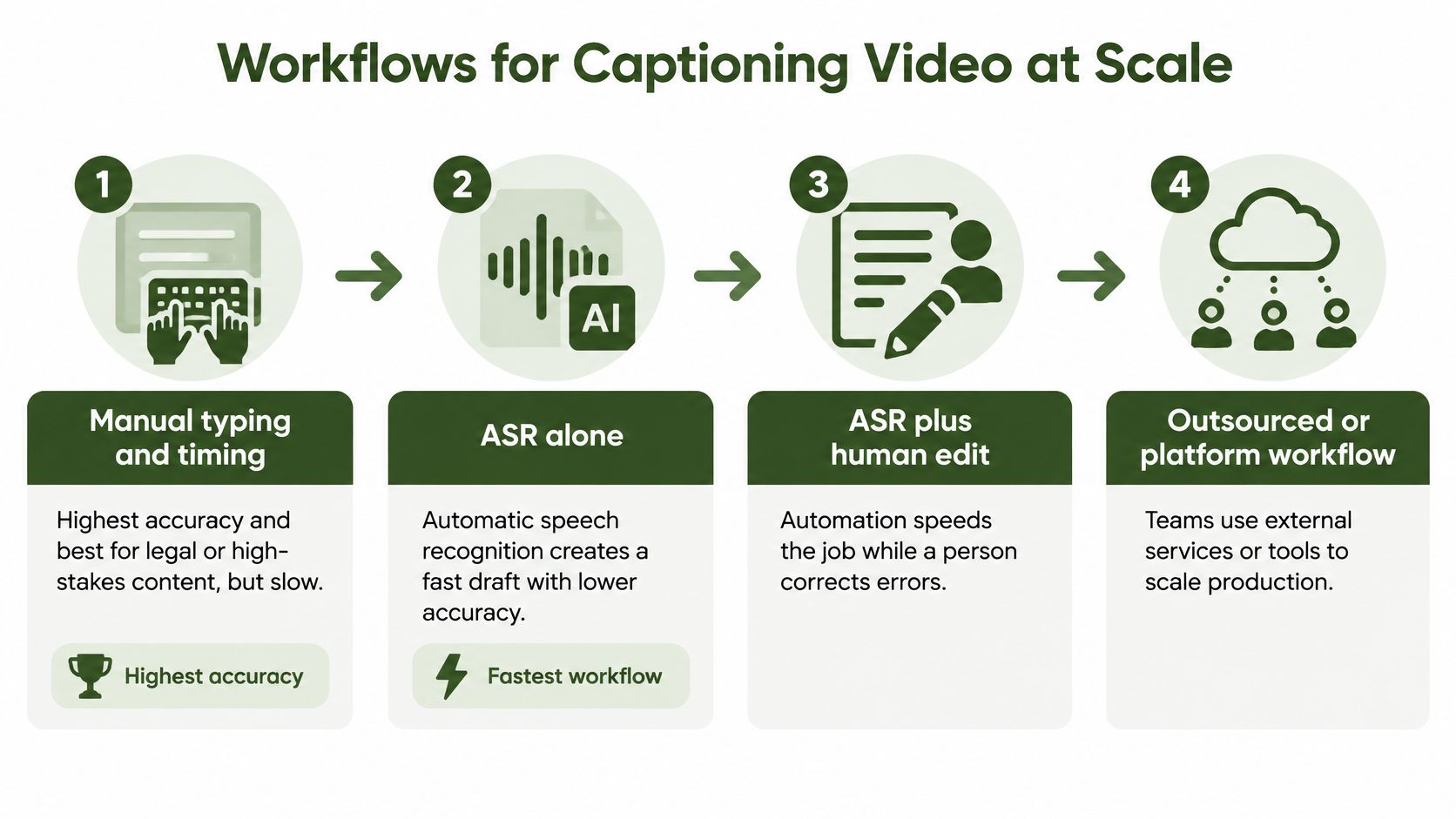
Captioning is already part of many organizational video workflows: in 2024, 90% of 450 surveyed organizations across education, corporate, media and entertainment, and government reported captioning at least some video, according to 3Play Media. That finding describes adoption among respondents, not proof that every published track met a quality standard.
Build a reviewable pipeline
Start by extracting the audio from the final or clearly versioned edit. FFmpeg can handle that preparation, while an ASR service generates the transcript and initial timing.
A video automatic transcription workflow should include a handoff for correction, not just a successful API response. Give the reviewer the video, the proposed cues, and a terminology list containing names, product terms, and abbreviations.
A practical production sequence is:
- Prepare the input. Associate the audio with a specific video version and preserve its timing.
- Generate a draft. Record the language and transcription settings so the job can be reproduced.
- Review against playback. Correct words, speaker changes, significant sounds, and awkward segmentation.
- Export the deliverables. Produce the accepted sidecar format and any required burned-in variant.
- Validate before release. Check file parsing, timing boundaries, output rendering, and destination playback.
- Publish approved assets. Keep the video and its matching caption track together through scheduling.
For a visual companion to the production process, watch the embedded walkthrough.
Automate the handoffs, not the judgment
Use n8n or Zapier to move files between transcription, review, rendering, and storage. Make and Pipedream can coordinate similar steps through HTTP requests and webhooks.
Add explicit status fields such as awaiting review, approved, and failed validation. A completed transcription job shouldn't automatically mean a video is ready to publish.
If you schedule YouTube videos ahead with Social Media Scheduler, make caption approval part of the release checklist rather than an afterthought. Leave room to correct a rejected file before the scheduled publication.
Test representative footage before comparing costs. A clean narration and a noisy panel discussion can demand very different amounts of reviewer attention, even when their running times are similar.
Pick Your Caption Workflow and Test It First
Choose human-reviewed captions for public-facing material where an error could mislead viewers, undermine access, or fail a delivery requirement. For an internal draft, ASR with an appropriate checking process may be sufficient, but don't reuse that draft track for a public release.
Choose the delivery path according to the destination. Preserve editable text tracks wherever possible, and generate a rendered variant when the publishing surface requires permanently visible text.
Define what passing looks like
A useful prepublication checklist checks the viewer's experience, not merely whether a caption file exists.
- Audio alignment: Text follows the associated speech without exposing upcoming dialogue.
- Narrative coverage: Relevant sounds and otherwise unclear speaker changes are represented.
- Ending integrity: The last sentence survives the export and any platform trimming.
- Visual clearance: Captions remain readable around the actual interface and visual content.
- Destination acceptance: The uploaded track imports and plays correctly.
For example, a creator repurposing interviews could generate ASR drafts, have an editor verify guest names and specialist terms, and then create platform-specific exports from the approved track. A YouTube Shorts automation workflow should preserve that approval gate while handling repetitive processing.
Run a small, revealing test
Choose representative material with clean narration, unfamiliar names, background noise, and speaker changes. Process the same material through competing workflows, then compare correction effort, timing errors, missing sounds, and failed imports.
Keep the workflow that reliably passes your checklist with a review burden your team can sustain. Save the corrected examples as regression tests, so a future engine change or rendering update doesn't reintroduce problems you've already solved.
RenderIO offers a cloud FFmpeg API for processing video, including extracting audio and burning approved caption files into rendered outputs. Visit RenderIO to test the processing stages of your caption pipeline with representative footage before scaling publication.