The popular advice is that encoding and transcoding are interchangeable terms. They aren't. The difference tells you whether your pipeline starts with frames or first has to decode an existing compressed stream, and that changes compute, quality, storage, and failure modes.
Encoding compresses raw or uncompressed video into a digital bitstream. Transcoding decodes an already-encoded file and re-encodes it into a different codec, bitrate, resolution, frame rate, or container. In production, many jobs called “encoding” are technically transcoding jobs because camera, partner, and user uploads usually arrive already compressed, as documented in this video encoding guide for streaming developers.
That distinction matters most when a 4K H.264 upload comes back looking worse after a “reencode,” or when a cloud job consumes unnecessary processing because a container change could have used stream copy. The right question isn't “Which word should I use?” It's “What data enters this stage, and what must leave it?”
Table of Contents
- Why the Transcode vs Encode Question Is More Than Semantics
- How Encoding and Transcoding Actually Work in FFmpeg
- Side-by-Side Comparison of Encoding and Transcoding
- Real FFmpeg Examples for Each Operation
- Quality, Bitrate, and Performance Tradeoffs
- Implications for Cloud and Edge Video Workflows
- How to Decide Which One Your Pipeline Needs
Why the Transcode vs Encode Question Is More Than Semantics
The label on a video job can hide its real cost. Encoding is the first compression step: raw camera frames, an image sequence, or a near-lossless mezzanine enters an encoder and becomes a compressed stream such as H.264, HEVC, or AV1.
Transcoding begins with compressed media. A decoder reconstructs frames, filters may change them, and a second encoder produces the output. That decode and re-encode path consumes more processing and gives the output encoder a source that has already discarded information.
Practical rule: If the input is compressed and the command includes a video encoder, the job is a transcode, regardless of whether the queue calls it “encode.”
The distinction reflects how digital video standards evolved. H.261, introduced in 1988 and first used in 1990, targeted video conferencing. MPEG formed in 1988, MPEG-1 followed in 1991, H.264/AVC was standardized in 2003, HEVC/H.265 arrived in 2013, and VVC/H.266 in 2020, as described in this history of video coding standards. Each generation addressed different delivery constraints, including conferencing, optical media, streaming, mobile playback, and higher-resolution video.
Where textbook definitions break
The definition becomes useful only when applied to pipeline stages. A production workflow might ingest an H.264 camera file, scale it, add a watermark, create an HEVC rendition, generate an HLS package, and copy the resulting segments into a delivery container. The scaling, watermarking, and codec conversion require decoded frames and re-encoding, so they are transcodes. Packaging and container-only changes can be remux operations.
That distinction changes how engineers debug failures. Blocking inherited from the source will not disappear because the second encoder receives a better quality setting. If a job only changes the stream's wrapper, re-encoding adds processing time and another opportunity for quality loss without changing the video itself.
Place encoding where raw or near-lossless media becomes a compressed master. Use transcoding when that master must fit playback targets, device limits, network conditions, or distribution formats. Calling both stages “encoding” obscures hardware requirements, workload estimates, and the point where quality degradation entered the pipeline.
How Encoding and Transcoding Actually Work in FFmpeg
You can usually identify the operation by reading the FFmpeg input and codec options together. The command's shape matters more than the job label.
A fresh encode starts with frames
A fresh encode receives raw video, an image sequence, or another uncompressed frame source. FFmpeg may perform pixel-format conversion and frame-rate handling, but the encoder is the first stage that compresses the video into a codec bitstream.
A raw input might look like this:
ffmpeg -f rawvideo -pix_fmt yuv420p -s 1920x1080 -r 30 -i input.yuv -c:v libx264 -preset medium -crf 23 output.mp4
The input doesn't contain an H.264 stream waiting to be decoded. FFmpeg reads raw frames and sends them to libx264. That's encoding.
A transcode decodes before it encodes
With a compressed input, FFmpeg performs a different sequence:
- The demuxer reads packets from the container.
- The decoder reconstructs compressed video into frames.
- Filters can scale, crop, deinterlace, denoise, or alter pixel formats.
- The target encoder compresses the processed frames.
- The muxer writes the new stream into its output container.
For example, -c:v libx265 paired with an H.264, ProRes, or other encoded file tells FFmpeg to produce a new HEVC stream. If the input is compressed, that job is a transcode. A scale filter makes the distinction even clearer because FFmpeg must work with decoded frames before it can resize them.
The practical distinction between video encoding and transcoding is useful here, but the command line remains the source of truth. A job called encode-upload can still be a transcode if its input is an MP4.
Remuxing skips both operations
A container change doesn't automatically require transcoding. This command copies compressed packets without decoding or re-encoding them:
ffmpeg -i input.mkv -c copy output.mp4
The video and audio streams remain untouched. The muxer places them in a different container, assuming the codecs and stream features are compatible with that container. This is commonly called remuxing, transmuxing, or stream copy.
The limitation is important. -c copy can't change resolution, bitrate, codec, frame rate, or picture characteristics. It also fails when the target container doesn't support the input streams or metadata arrangement. When that happens, the correct response isn't to assume every container conversion needs a full transcode. Inspect the streams first, then choose a compatible target or re-encode only the incompatible stream.
Side-by-Side Comparison of Encoding and Transcoding
The fastest way to make a transcode vs encode decision is to inspect the source, target, and required transformations. Container changes sit in a separate category because they can often use stream copy.
| Dimension | Encoding | Transcoding |
|---|---|---|
| Input | Raw frames, image sequences, or near-lossless mezzanine media | An already-encoded video stream |
| Core path | Frame processing followed by one compression stage | Decode, optional filtering, then re-encode |
| Output | A compressed master or first-generation deliverable | A rendition adapted for codec, bitrate, resolution, or device needs |
| Compute footprint | One primary encode stage | Decoder, frame processing, and encoder stages |
| Quality impact | Determined mainly by source quality and encoder settings | Inherits source limitations and can add another lossy generation |
| Typical trigger | Capture ingest or mezzanine compression | ABR ladder creation, codec conversion, resizing, or bitrate adaptation |
| Container-only change | Usually unnecessary if the source is already compressed | Use remuxing with -c copy when streams are compatible |
Encoding works best when you control the source before compression. A high-quality mezzanine can tolerate a carefully chosen delivery encode because the encoder starts with more recoverable detail. Transcoding a low-bitrate delivery file into another delivery file doesn't recover that detail, even if the output file is larger.
CPU demand also differs because transcoding adds decoding and frame handling. The exact cost depends on resolution, filters, codec complexity, hardware acceleration, and concurrency, so it shouldn't be reduced to a universal multiplier. Memory pressure rises too, since decoded frames and filter buffers must move through the pipeline.
A container is a wrapper, not a codec. Changing
.mkvto.mp4may be a remux, while changing H.264 to HEVC is a transcode.
For readers who regularly confuse file extensions with compression technologies, this difference between codecs and containers gives useful context. A file extension alone doesn't tell you whether FFmpeg must decode and re-encode the media.
The operational distinction also appears in tooling. A system designed for video encoding software workflows should expose whether it is performing a fresh encode, a transcode, or a packet-level copy. Hiding that detail makes capacity planning and quality control harder.
Real FFmpeg Examples for Each Operation
The command tells you what the pipeline is doing. A fresh encode starts with uncompressed frames.
ffmpeg -f rawvideo -pix_fmt yuv420p -s 1920x1080 -r 30 -i input.yuv -c:v libx264 -preset medium -crf 23 output.mp4
FFmpeg reads raw YUV frames and passes them to libx264. The encoder creates the first compressed video stream. This fits capture devices and frame servers that provide uncompressed data. In production, that source boundary determines whether the job is an encode or a transcode, regardless of what the application calls it.
Codec-to-codec conversion is a transcode:
ffmpeg -i input.mov -c:v libx265 -preset slow -crf 28 -c:a aac -b:a 128k output.mp4
If input.mov already contains encoded video, FFmpeg decodes it, processes the frames, and encodes them with libx265. It also creates a new AAC audio stream as needed. The -crf setting controls the target encoder's quality behavior. It cannot restore detail or remove artifacts already present in the input.
The remux path
A container-only change uses stream copy:
ffmpeg -i input.mkv -c copy -c:s copy output.mp4
FFmpeg copies the compressed packets without re-encoding video or audio. The operation is fast and lossless at the stream level, but compatibility still depends on the target container, codecs, subtitles, timestamps, and other stream properties. An incompatible -c copy command returns an error. It does not convert the streams.
Resizing and bitrate laddering
Scaling requires decoded frames, so creating a delivery rendition is a transcode:
ffmpeg -i input.mp4 -vf scale=1280:720 -c:v libx264 -b:v 2500k -c:a aac -b:a 128k output-720p.mp4
The scale filter changes the frame dimensions, while the bitrate options configure a new compressed stream. An adaptive bitrate workflow repeats the same basic operation for each rendition, with settings chosen for the content and playback devices. That is why many jobs labeled “encoding” in cloud workflows are transcoding in practice.
Hardware encoding changes the implementation, not the operation:
ffmpeg -i input.mp4 -c:v h264_nvenc -preset p4 -b:v 2500k -c:a aac -b:a 128k output-gpu.mp4
The input is already encoded, so this remains a transcode. NVDEC, VAAPI, and other hardware decode paths can reduce CPU work, but pixel formats, filters, driver support, and session limits still need verification. A GPU encoder does not automatically move every pipeline stage onto the GPU.
For a nontechnical overview of resizing a file for a specific HD target, this guide to HD 1080p video conversion provides useful terminology. Production pipelines still require explicit codec, filter, and bitrate decisions.
| Operation | Example FFmpeg command | What actually happens |
|---|---|---|
| Fresh encode | ffmpeg -f rawvideo -pix_fmt yuv420p -s 1920x1080 -r 30 -i input.yuv -c:v libx264 -preset medium -crf 23 output.mp4 |
Raw frames become the first compressed stream |
| Codec transcode | ffmpeg -i input.mov -c:v libx265 -crf 28 output.mp4 |
Existing video is decoded and encoded again |
| Remux | ffmpeg -i input.mkv -c copy output.mp4 |
Compressed packets are copied into another container |
| Resolution transcode | ffmpeg -i input.mp4 -vf scale=1280:720 -b:v 2500k output.mp4 |
Frames are decoded, resized, and re-encoded |
| GPU transcode | ffmpeg -i input.mp4 -c:v h264_nvenc output.mp4 |
Existing video is decoded and encoded with a hardware encoder |
Quality, Bitrate, and Performance Tradeoffs
Production decisions come down to three measurable constraints: visual quality, output size, and processing speed. Benchmarking should compare all three, using methods such as rate-distortion and frames-per-second analysis, rather than treating a smaller file as an automatic improvement.
Newer codecs can deliver comparable perceptual quality with less data, but the saving comes with real operating costs. HEVC is commonly associated with roughly 30–40% lower bitrate than H.264, while VVC targets about 50% lower bitrate than HEVC. Those reductions can lower storage and delivery volume. They can also increase encode time, require more capable playback hardware, complicate licensing, and reduce compatibility. A codec choice is therefore a workflow decision, not just a compression setting.
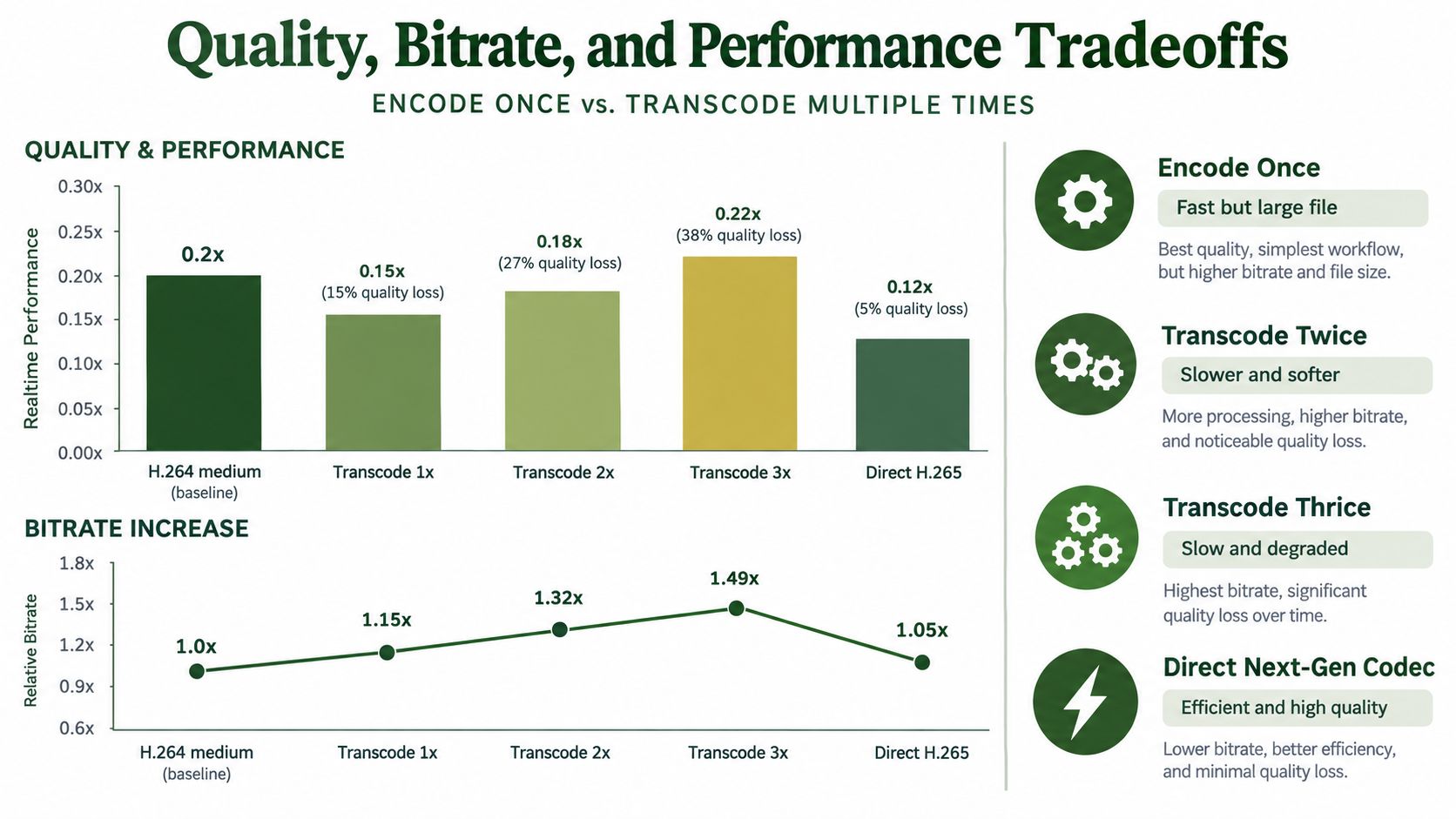
Quality loss is a pipeline property
A lossy transcode starts with the output of an earlier compression stage. Increasing the destination bitrate can avoid another aggressive compression pass, but it cannot recover texture, edges, or motion detail already discarded. Generate the delivery ladder from the original master whenever possible. Building it from a low-bitrate rendition gives every later encoder worse source material.
Encoder settings shift the balance between compute and throughput. Slower software presets spend more time evaluating compression decisions, while hardware encoders generally favor predictable latency and higher throughput. Live pipelines often need bounded processing time. VOD libraries can justify slower analysis when storage and egress costs matter more than completion speed.
Compare the complete ladder
Evaluate the path from master to playback, not one FFmpeg command in isolation:
- Source quality: Use the highest-quality practical master rather than a delivery rendition.
- Codec target: Select newer codecs only where the audience and playback stack support them.
- Rendition count: Create resolutions and bitrates that serve defined delivery requirements.
- Measurement: Compare quality per bit, processing speed, compatibility, and failure rates.
- Generation count: Avoid feeding one lossy output into another unless the workflow requires it.
A direct encode from the master may cost more than copying an existing stream, yet it can avoid repeated transcodes and preserve quality across the ladder. In production, the strongest optimization is usually reducing unnecessary generations, then selecting encoder settings that fit the latency, hardware, and delivery constraints.
Implications for Cloud and Edge Video Workflows
Cloud architecture should reflect where frames first become compressed and where delivery variants are created. An edge ingest node may receive a raw or mezzanine stream, perform the primary encode, and send a compressed master to cloud storage. The cloud processing layer then transcodes that master into device and network renditions.
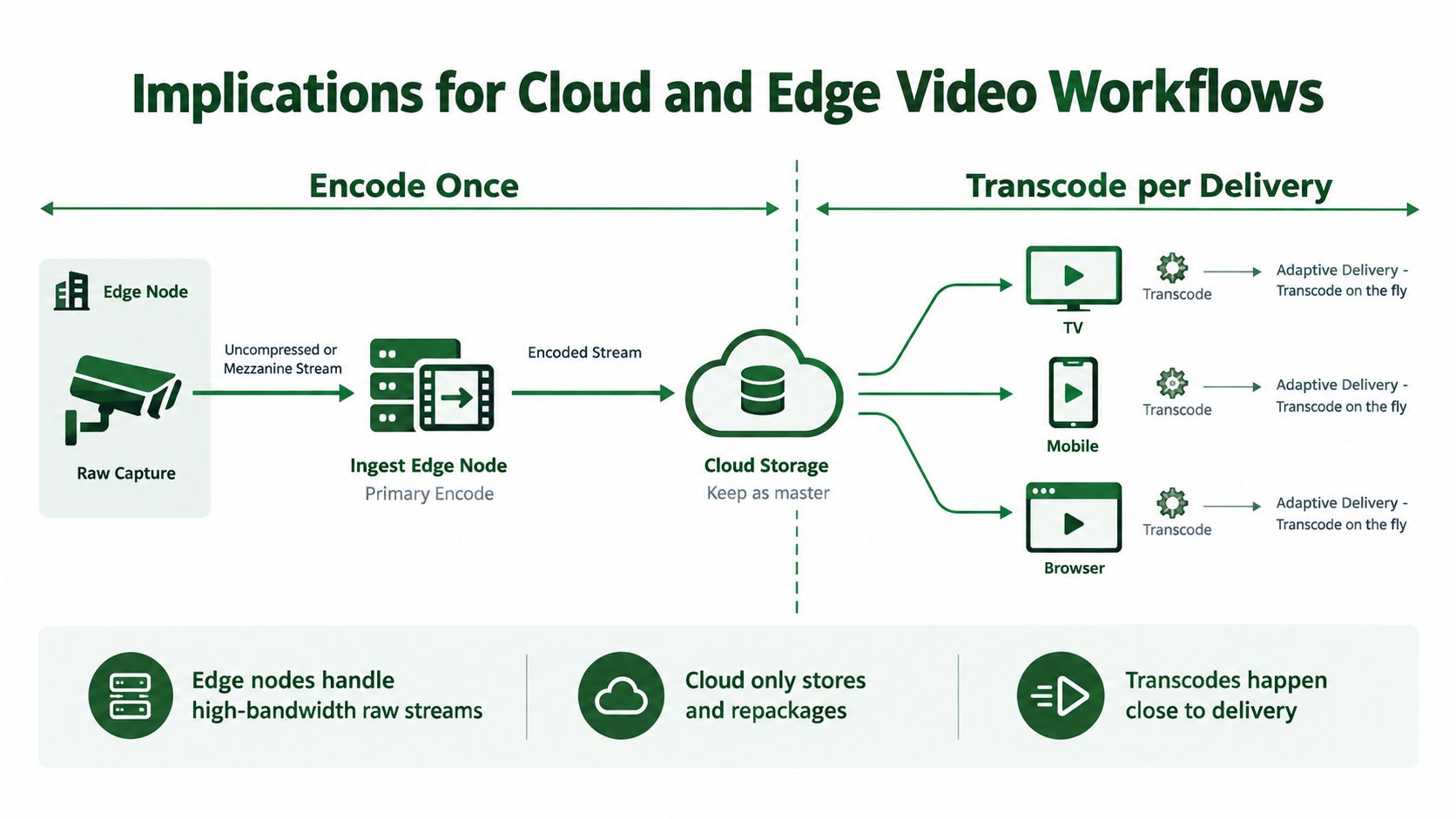
That separation prevents a common architectural mistake: re-encoding the same asset at every service boundary. If an ingest service only needs a different container, it should attempt remuxing first. If a playback service needs a different codec, resolution, bitrate, HDR profile, or rendition ladder, it needs a transcode stage.
Route the asset by required work
A useful router classifies each request into one of three paths:
- Copy-remux: The compressed streams already meet delivery requirements, and only the container or packaging changes.
- Fresh encode: The input is raw or near-lossless, so one encoder creates the compressed master.
- Full transcode: The source is compressed and the output requires different video parameters or a different codec.
This classification influences instance selection. CPU workers may suit lighter jobs and broad codec compatibility. GPU workers can make sense for high-volume or latency-sensitive transcodes, but only after measuring the full pipeline, including upload, decode, filter, encode, synchronization, and output handling.
Cloud and edge placement also changes data movement. Keeping a master in cloud storage and creating renditions close to delivery can reduce unnecessary movement of large intermediate files. Edge computing can be evaluated separately from codec decisions, and this overview of edge computing advantages provides broader architectural context.
A cloud FFmpeg service such as RenderIO's cloud video encoding workflow can fit the processing layer when a team wants to submit FFmpeg commands without managing its own worker and queue infrastructure. The important design choice remains explicit routing. A managed service doesn't remove the need to know whether a request is a copy, encode, or transcode.
How to Decide Which One Your Pipeline Needs
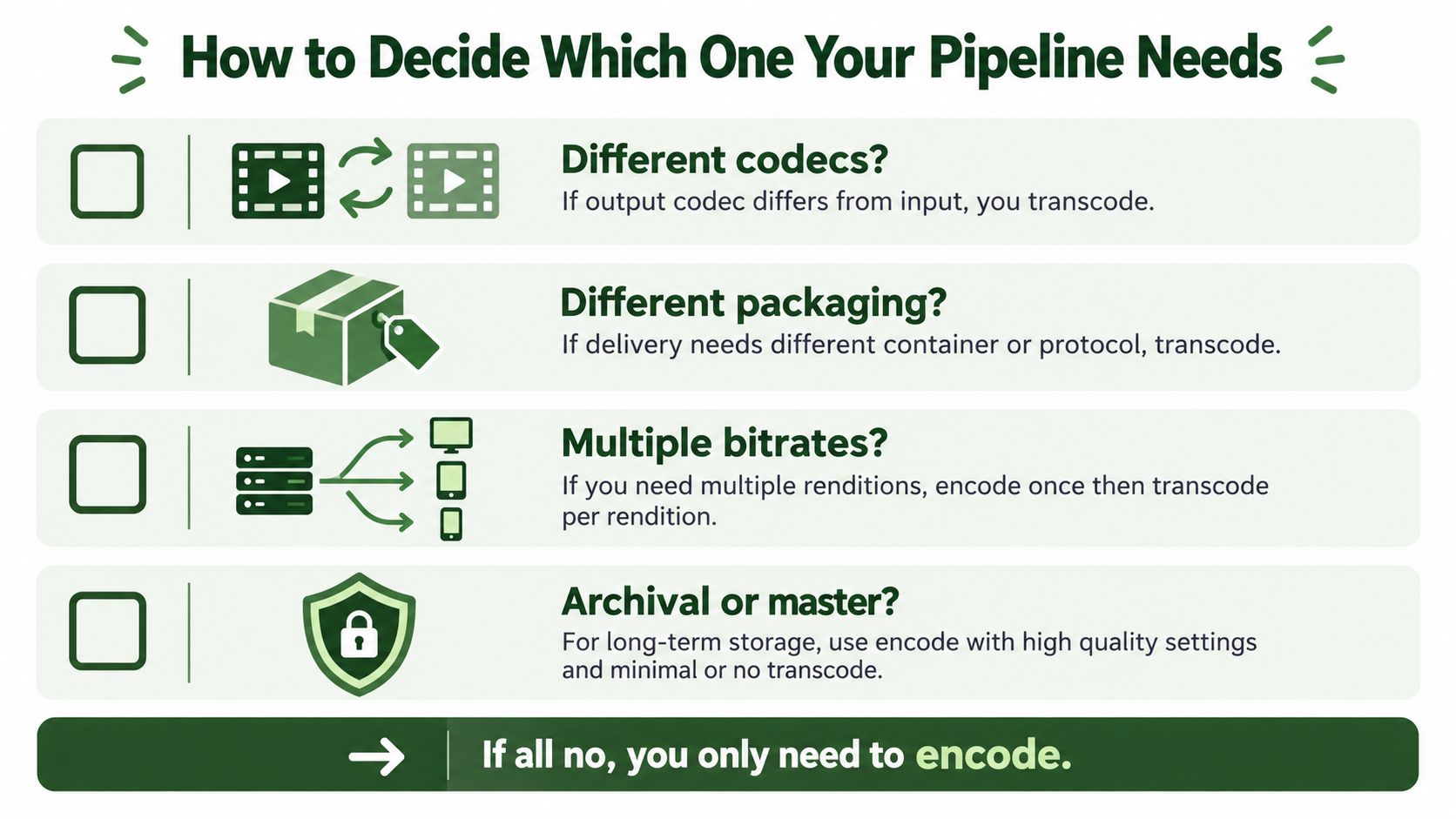
Before touching FFmpeg, answer four questions:
- Is the output codec different from the input? If yes, you need a transcode.
- Does the target require a new resolution, bitrate, frame rate, or HDR profile? If yes, FFmpeg must process decoded frames and encode a new stream.
- Is the source raw, mezzanine, or already a delivery file? Raw and mezzanine inputs may need a fresh encode. A compressed delivery file requires transcoding for parameter changes.
- Does packaging only need a compatible container or streaming format? If the streams already fit, try remuxing or stream copy before scheduling a full transcode.
Match the operation to the scenario
| Scenario | Recommended operation | FFmpeg signal |
|---|---|---|
| Live event ingest from raw or mezzanine frames | Encode at ingest, then transcode for delivery renditions | Raw input with -c:v at the ingest stage, later -vf, bitrate, or codec changes |
| VOD mezzanine processing | Encode a delivery master, then derive required renditions from that master | -i mezzanine with a selected encoder, followed by separate transcode jobs |
| Social-media clipping | Transcode the existing source because clipping, scaling, and platform constraints change the output | -ss, -t, -vf scale, and an explicit video encoder |
| Archival migration between compatible containers | Remux without re-encoding | -c copy |
| Archival migration to a new codec | Transcode from the best available master | A new codec such as libx265 or libsvtav1 on a compressed input |
The decision can flip within one workflow. A VOD job may transcode a master into a rendition, then use stream copy while packaging that rendition into a compatible delivery container. Conversely, a packaging step may require a re-encode if the source codec, pixel format, timestamps, or stream structure doesn't meet the target.
Log the selected operation and inspect the actual FFmpeg output. Look for decoder and encoder initialization, filter graphs, stream mapping, and whether -c copy was honored. A clean pipeline makes re-encoding an explicit decision rather than an accidental side effect of a default preset or a generic “convert” endpoint.
RenderIO lets teams submit FFmpeg 7.x commands through a cloud API for transcoding, resizing, watermarking, thumbnail generation, audio extraction, and batch conversion, with polling or webhook progress handling. If you want to route assets into explicit remux, encode, and transcode paths without managing the underlying workers and queues, visit RenderIO and test the workflow against your own media.