TikTok's automated moderation systems actioned 93.8% of violating content without human review in the second half of 2025, and 97% of those automated enforcement decisions were confirmed correct, according to TikTok's EU transparency reporting as covered by EUobserver. The layer that judges your account is itself software. It doesn't read intent. It reads cadence, device fingerprints, media characteristics and the shape of your posting behavior.
That asymmetry frames every decision in tik tok automation. The platform runs machines on its side of the table. Teams run machines on theirs. Whether your machines get treated as a legitimate publisher or a spam operation comes down to which part of the workflow you hand over, and whether a person signs off before anything goes live.
The split I'd draw is between production work and engagement work, and the two deserve completely different treatment. Per-account quotas and a human approval checkpoint belong in the architecture from the first diagram, not bolted on after the first takedown.
Table of Contents
- What TikTok Automation Covers, Task by Task
- Platform Limits That Shape Your Publishing Queue
- Build a Four-Stage Pipeline From One Master Video
- Where Automation Crosses Into Platform Manipulation
- Checking Originality and AI Disclosure Before You Scale
- Choose Your First Automation Step This Week
What TikTok Automation Covers, Task by Task
One 2024 estimate placed TikTok at approximately 1.58 billion monthly active users worldwide, including about 170 million monthly active users in the United States, and reported more than 2.05 billion registered users globally against 652.5 million in 2019, according to Tech Tips With Tea's TikTok user statistics. The same estimate put Asia-Pacific above 682 million users, Europe near 238 million and Latin America over 207 million. One clip rarely ships once. It ships as a vertical cut, a caption set per market, a thumbnail per account.
Tik tok automation, in the sense worth building, is software that runs the repeatable technical steps of producing and publishing short video while a person still decides what the video says. Think assembly line. Machines cut, resize, label and pack. Someone designs the product and signs off before it leaves the building. A line that decides for itself what to manufacture isn't a factory, it's a hazard.
Here's how the common tasks sort.
| Task | Automation Fit | Typical Method | Human Role |
|---|---|---|---|
| Thumbnail and frame extraction | Fully automatable | FFmpeg command through an API | Choose the final frame |
| Caption and metadata files | Partly automatable | Template filled from a spreadsheet or CMS | Write and approve the copy |
| Batch variants from one master video | Automatable with limits | Chained or parallel commands | Decide which variants are truly distinct |
| Scheduled publishing | Automatable through an authorized interface | TikTok Content Posting API or an approved scheduler | Approve the queue before it runs |
| Performance reporting | Automatable | Analytics export into a sheet or database | Interpret results and decide next tests |
| Creative direction and final sign-off | Not automatable in practice | Review queue | Owns the decision |
Read it as a map, not a checklist. A two-person team posting three times a week needs automation for maybe the first and last rows. A studio pushing hundreds of variants a month needs all six, with the review step sized accordingly. The rows don't change with volume. The depth of review behind each row does.
The two media rows are where teams often recover their week, and they're pure processing. A resize-and-transcode step through the RenderIO TikTok video API replaces the manual export loop without touching a single decision a reviewer owns.
Platform Limits That Shape Your Publishing Queue
At 15 posts per day per account, a batch of 100 finished videos takes at least seven days to clear through one account. Rendering those 100 files might take an afternoon. The queue sets your campaign timeline, so model it before you buy more render capacity.
The public-video endpoint of TikTok's Content Posting API caps publishing at six posts per minute and 15 posts per day per account, and it only accepts MP4, MOV and WebM inputs up to 1 GB, with durations from 3 to 600 seconds, minimum dimensions of 360 x 360 pixels and frame rates between 23 and 60 FPS, per TikTok's Content Posting API documentation. Every one of those numbers maps to a check your pipeline should run before submission, not after a failed call.
| Constraint | Limit | Pipeline Response |
|---|---|---|
| Posts per minute per account | 6 | Per-account token-bucket limiter |
| Posts per day per account | 15 | Daily quota enforced before items enter the queue |
| Accepted formats | MP4, MOV, WebM | Transcode any other format first |
| Maximum file size | 1 GB | Compress oversized masters before upload |
| Video duration | 3 to 600 seconds | Query max_video_post_duration_sec for each account |
| Minimum dimensions | 360 x 360 pixels | Reject smaller sources during validation |
| Frame rate | 23 to 60 FPS | Normalize every source to 30 FPS before submission |
| URL-based ingestion | Publicly accessible, verified URL | Keep signed URLs valid through the retrieval window |
Duration is the row teams trip over most, because the 600-second ceiling is an endpoint maximum rather than an account guarantee. Read max_video_post_duration_sec for each account and treat the smaller number as your real limit. The guide to TikTok's maximum video length walks through how the account cap interacts with the endpoint ceiling.
Two infrastructure details matter for large files. Chunked upload exists because a 900 MB master over a flaky connection needs resumable transfer. URL-based ingestion requires a publicly reachable, verified URL, so a signed URL with a short expiry can die mid-retrieval and fail the job. Set the expiry generously, or upload chunks instead.
Practical rule: if a job can't publish today because the account has already spent its daily quota, it shouldn't be sitting in the render queue either. Hold it upstream, where a reviewer can still swap the hook or pull it entirely.
Then write validation as code: format allowlist, file size ceiling, duration bounds, minimum dimensions, frame rate range, and a per-account token bucket that refills daily. Jobs that fail validation get rejected before submission and never consume quota.
Build a Four-Stage Pipeline From One Master Video
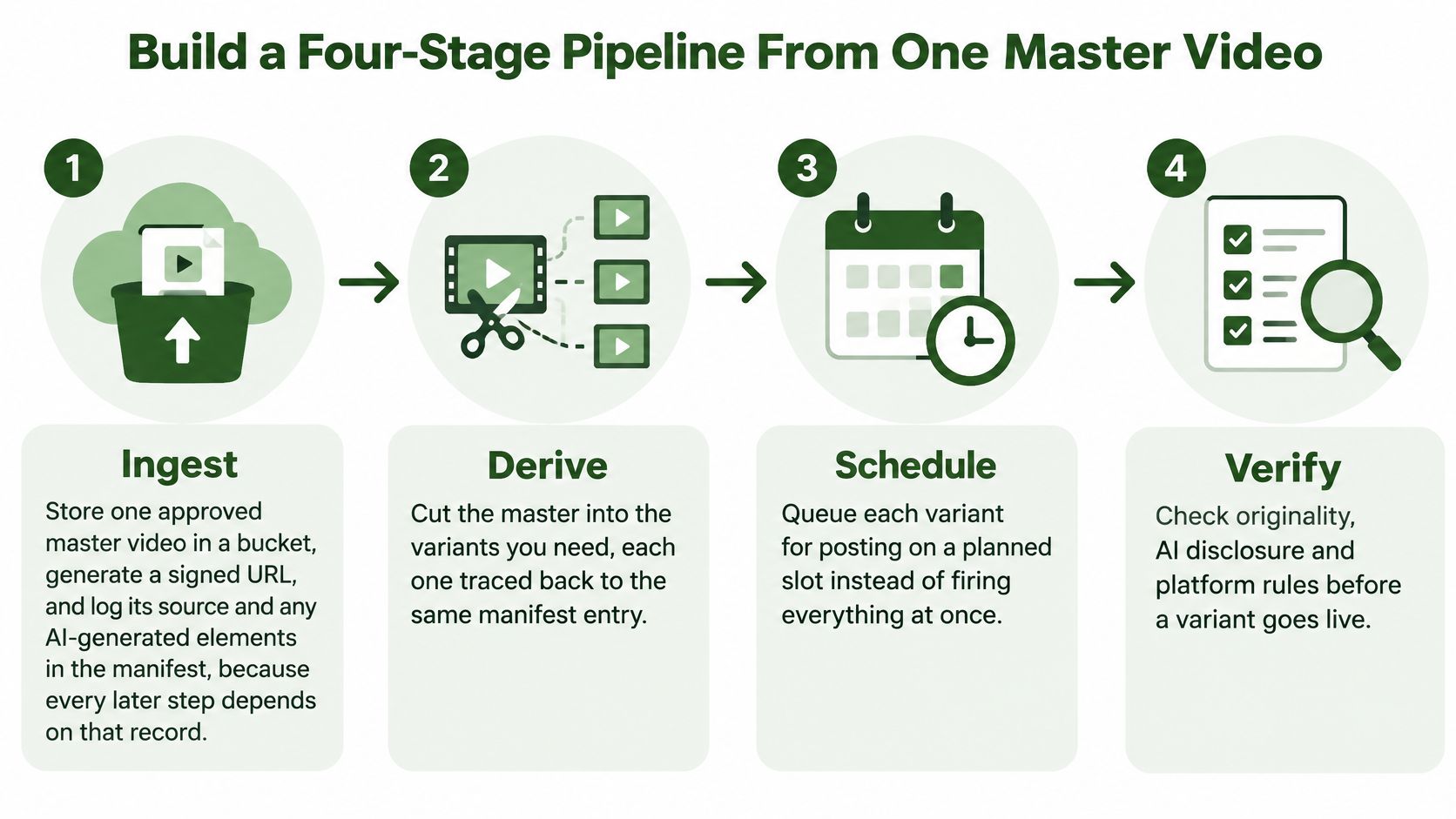
The pipeline that survives contact with real volumes is short. One approved master goes in, a set of reviewed variants comes out, and every step leaves a record.
The Four Stages and Why Each Exists
- Ingest and record provenance. The master lands in object storage and the pipeline writes a manifest entry with its source, its destination account, any AI-generated elements and a deterministic job ID derived from the master plus the variant parameters. Nothing downstream can be audited if that record doesn't exist, so it comes first.
- Normalize into a compliant file. One transcode to MP4 with H.264 video and AAC audio, 1080 x 1920 for vertical output, frame rate pinned at 30 FPS, loudness evened out. Duration gets checked against the account's
max_video_post_duration_secright here. Normalizing the master once is cheaper than discovering six different problems across six variants. - Generate variants that differ for a reason. Chained or parallel commands produce the crops, the alternate hooks, the burned-in captions and the thumbnails, each with its own manifest entry and job ID so a retry never duplicates work. A mirror flip isn't a variant. A different opening line, a tighter cut and a new framing are.
- Queue for human approval. Every output waits in a review queue that fills itself from a webhook when processing finishes. Only approved items reach an authorized publishing interface, and only within the account's remaining quota. The reviewer sees the file, the caption, the disclosure flag and the account, then makes one decision.
Stage three is also where repurposing pays off. The same master usually needs a 9:16 cut, a cleaner caption set and a fresh thumbnail, which is why repurposing existing video content across formats beats shooting per account.
If the variant you need isn't a crop of your own footage at all, a faceless reels generator can produce the base asset, and the pipeline still owns normalization, disclosure and review.
A pipeline that can't tell you which master produced which file isn't automation. It's an unattended export.
One 45 Second Master Through the Whole Pipeline
Say a two-person team has a single 45-second master video and a plan for six posts across two accounts. Three distinct hooks times two caption sets gives six outputs, each tied to the same master and each carrying its own job ID. Ingest runs once. Normalization runs once, because the source is fine once and compliant once.
Variant generation is where it gets real. One output fails with a codec error. The team reads the full FFmpeg stderr, spots an odd source encoding in the audio track, fixes it at the source and reruns only that job. The other five variants are untouched because the IDs are deterministic and completed work isn't repeated.
The six approved files then publish three per account across the day, comfortably inside the daily quota and the per-minute ceiling. Nothing gets retried in a loop and nothing publishes without a person having seen it.
Here's the same four stages assembled end to end if you'd rather watch the mechanics than read them.
The Test Run Before You Scale
Push one master through all four stages before you touch a second account. You'll find the format problem, the frame rate mismatch, the headline that reads badly as a burned-in caption and the reviewer who doesn't know what they're approving. All of that is cheaper to fix on one video than on two hundred.
Then measure one thing: which hook held attention longest, read from your own analytics export. Decide the next test from that number. No engagement automation enters the loop at any point, and no bot ever touches a like, a follow or a comment.
Where Automation Crosses Into Platform Manipulation
TikTok prohibits using automation to register or operate accounts in bulk, and it prohibits fake engagement such as artificially increasing followers, likes or other metrics, per the New York Attorney General's published TikTok policy report. The same policy materials flag large account networks controlled by one entity or by automation, and repetitive or irrelevant posting, as enforcement risks.
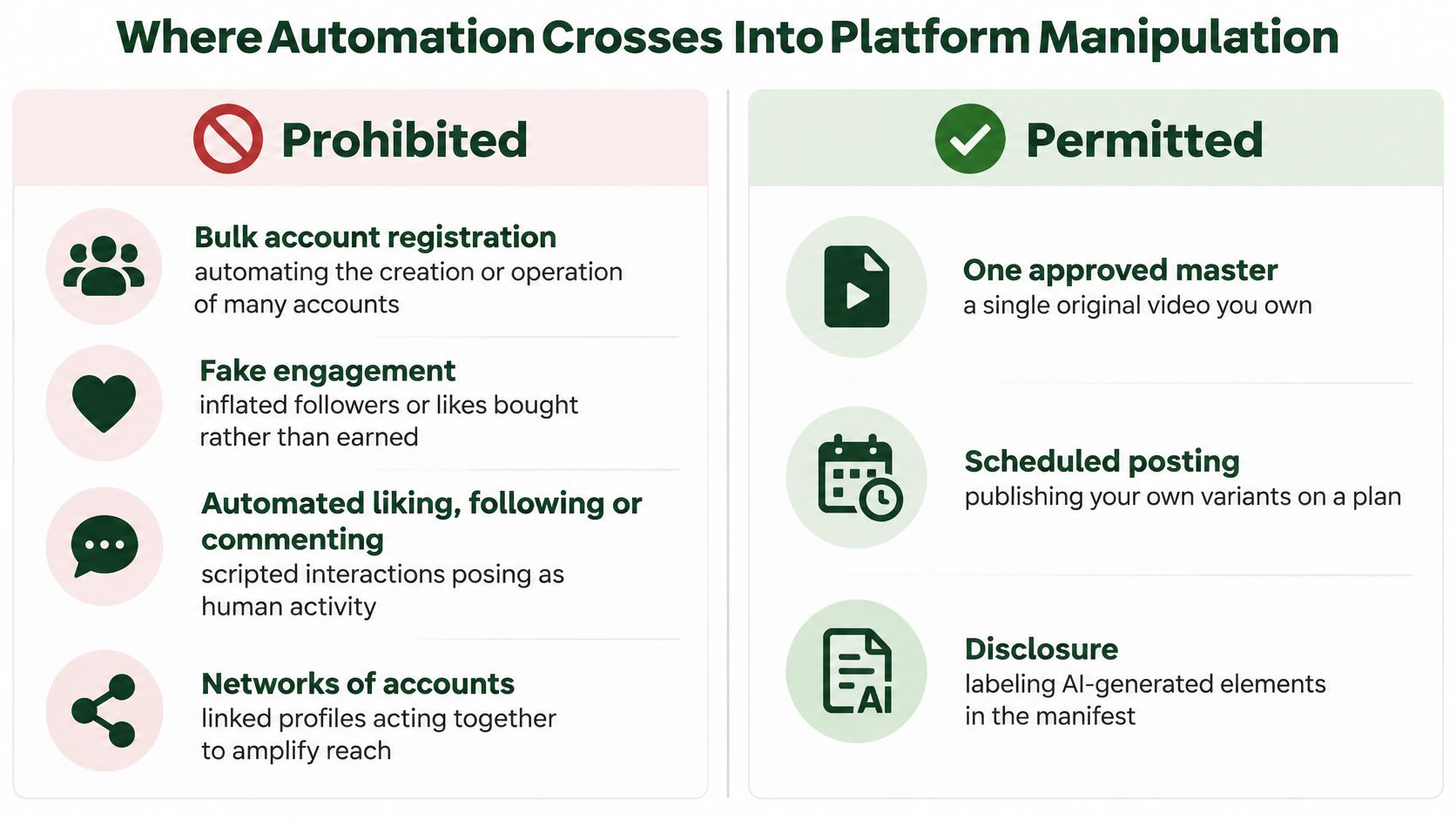
The prohibited side is short and specific:
- Bulk account operation: creating or driving many accounts from one automated system.
- Fake engagement: purchased or scripted followers, likes, views and shares.
- Automated interactions: scripted likes, follows and comments posing as human activity.
- Coordinated account networks: linked profiles amplifying each other's reach.
- Repetitive publishing: the same or near-identical content pushed at volume.
The risk comes from behavior, not from the tool that produced it. Enforcement can mean content removal, account bans or restricted features, and a restricted business account loses advertising, Shop and monetization access in one move.
The safe side is equally concrete: multiple creative variants from one master, transcoding into compliant formats, caption and metadata preparation, submission through authorized interfaces inside explicit per-account quotas, and analytics pulled to steer the next creative test. Watch-through and interaction signals are exactly what a recommendation system is built to read, which is why manufacturing them is the thing being policed. Improve retention with better openings instead.
The test I'd apply: if a step changes what viewers see from the people making the content, it's production. If it manufactures signals that look like audience behavior, it's manipulation.
Run that test over your own workflow, step by step, and delete anything on the wrong side. It's usually one integration nobody wants to own.
Checking Originality and AI Disclosure Before You Scale
Disclosure rules don't just improve transparency. They change output. A study of tens of thousands of creators found TikTok's AI transparency policy was associated with 4.3% fewer videos and 7.2% fewer video seconds, while only 0.27% of videos carried a label, according to the SSRN paper on TikTok's AI transparency policy.
Read those three numbers together. Output fell at the margin, and almost nobody labels. Either most content isn't AI-assisted, or disclosure is being skipped at scale. The second possibility is the one that should worry a team shipping generated footage.
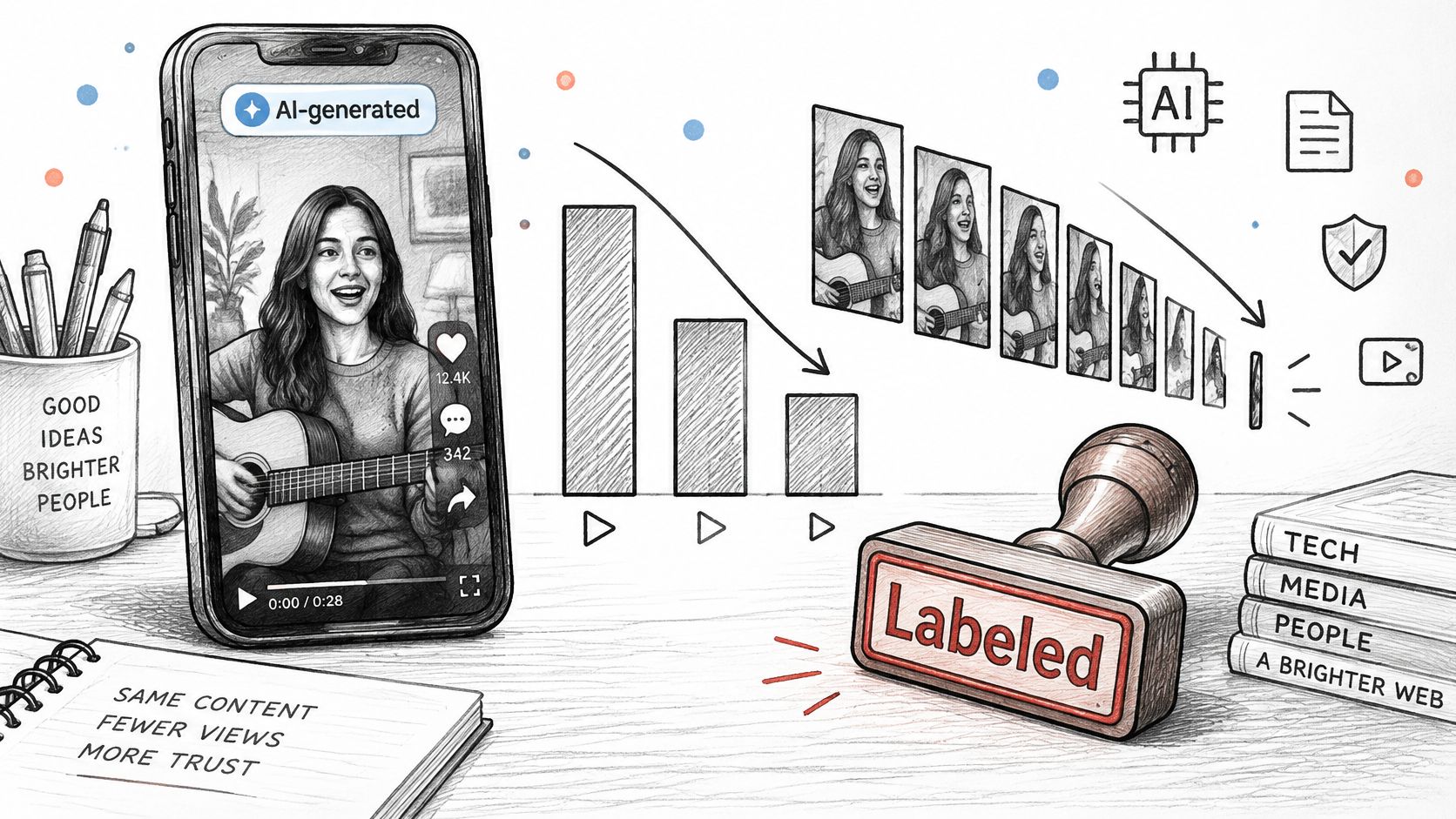
TikTok's own materials emphasise disclosure, automatic labeling and Content Credentials for AI-assisted media. Treat that as a data problem before it becomes a policy problem. The manifest you built at ingest is the natural place to record which elements were synthetic: the voice, the avatar, the background, the whole clip.
The Audit for Each Batch
Before a batch leaves review, four questions need a documented answer per variant:
- What changed from the master? A new hook, a different crop, a re-recorded voice, a synthetic presenter. Specific answers only.
- Why did it change? A creative hypothesis you intend to test, not a cosmetic tweak made to inflate the variant count.
- Who approved it? A named reviewer, with the timestamp and the version they saw.
- How is it labeled? The disclosure flag applied, the source attribution preserved, and Content Credentials attached where the platform supports them.
Vary treatment on purpose. A different opening three seconds and a different pacing curve are real tests. A mirrored frame and a slightly shifted saturation level produce near-duplicates that compete with each other and teach you nothing.
Keep a hard rule for realistic synthetic people, voices or events: a human watches the whole clip before it publishes, every time. That single checkpoint catches more problems than any automated classifier you'll wire in.
Choose Your First Automation Step This Week
Pick one task off the map and automate only that. Resizing to vertical is the usual starting point because it's mechanical, measurable and immediately removes an hour of manual exports per batch. Then choose the shape of the tooling by who's doing the work.
| Approach | Best For | Main Trade-off |
|---|---|---|
| No-code workflow tools (n8n, Zapier, Make, Pipedream) | Teams without developers | Less control over error handling at each step |
| Direct REST API calls from your own code | Developers building SaaS features or internal pipelines | You own retries, queues and monitoring |
| Scheduler-only tools | Small teams posting a few videos a day | Little help with media preparation or review |
RenderIO fits the first two rows. It resizes videos for TikTok, batch processes variations and converts any format, and any automation tool with an HTTP Request node can call it, so an n8n or Pipedream workflow gets the same media processing a custom pipeline would. Commands can be chained so each output feeds the next step, or run in parallel when the variants are independent.
Four actions for this week:
- Choose one task from the map and automate nothing else until it runs cleanly.
- Write the per-account limits down as constants: format allowlist, size ceiling, duration bounds, daily quota, per-minute rate.
- Insert the review step before the publish call, even if the reviewer is you and the queue is a spreadsheet.
- Measure one result from the first batch, hook retention or completion rate, and let that decide the second task.
RenderIO runs FFmpeg over a plain REST API, so the resize, transcode, thumbnail and variant steps in this article become one HTTP call each, with signed URLs, webhook notifications and full stderr returned when a job breaks. If you're standing up a TikTok pipeline and want the media layer off your plate, push one master video through it end to end before you scale. Visit RenderIO to see the API and start a free trial.