Building an API starts with a clear contract, not code. Define resources, requests, responses, authentication, and failure states before connecting your video worker.
Table of Contents
- Design the Video API Blueprint
- Apply Permissions and Rate Limits
- Return Immediately and Notify Reliably
- Sync vs Async Processing Comparison
- Show Complete Requests
- Maintain Trust Over Time
- What Is the Best Way to Make an API for Video Processing?
- Should I Upload Videos Through the API?
- How Do I Prevent Duplicate Renders?
- How Should API Errors Look?
- Can RenderIO Replace My Video Worker?
Design the Video API Blueprint
For a video pipeline, treat the API as the product boundary between your application and the processing infrastructure. A frontend, a Zapier workflow, or some SaaS backend should be able to submit a render job without knowing (or caring) how FFmpeg runs behind the scenes.
Sketch the journey first:
- Accept a source file or a pre-signed storage URL.
- Create a render job with the commands, output settings, and an idempotency key.
- Return a job identifier immediately.
- Process the task in a background worker.
- Expose status, progress, errors, and downloadable results.
- Notify the client through a webhook once processing finishes.
Use resource names that describe things—/videos, /jobs, /renders. Standard HTTP methods make the contract easier to reason about, and JSON keeps responses portable across languages. If you need a refresher on how stateless requests and methods fit together, Postman's REST API examples walk through it well.
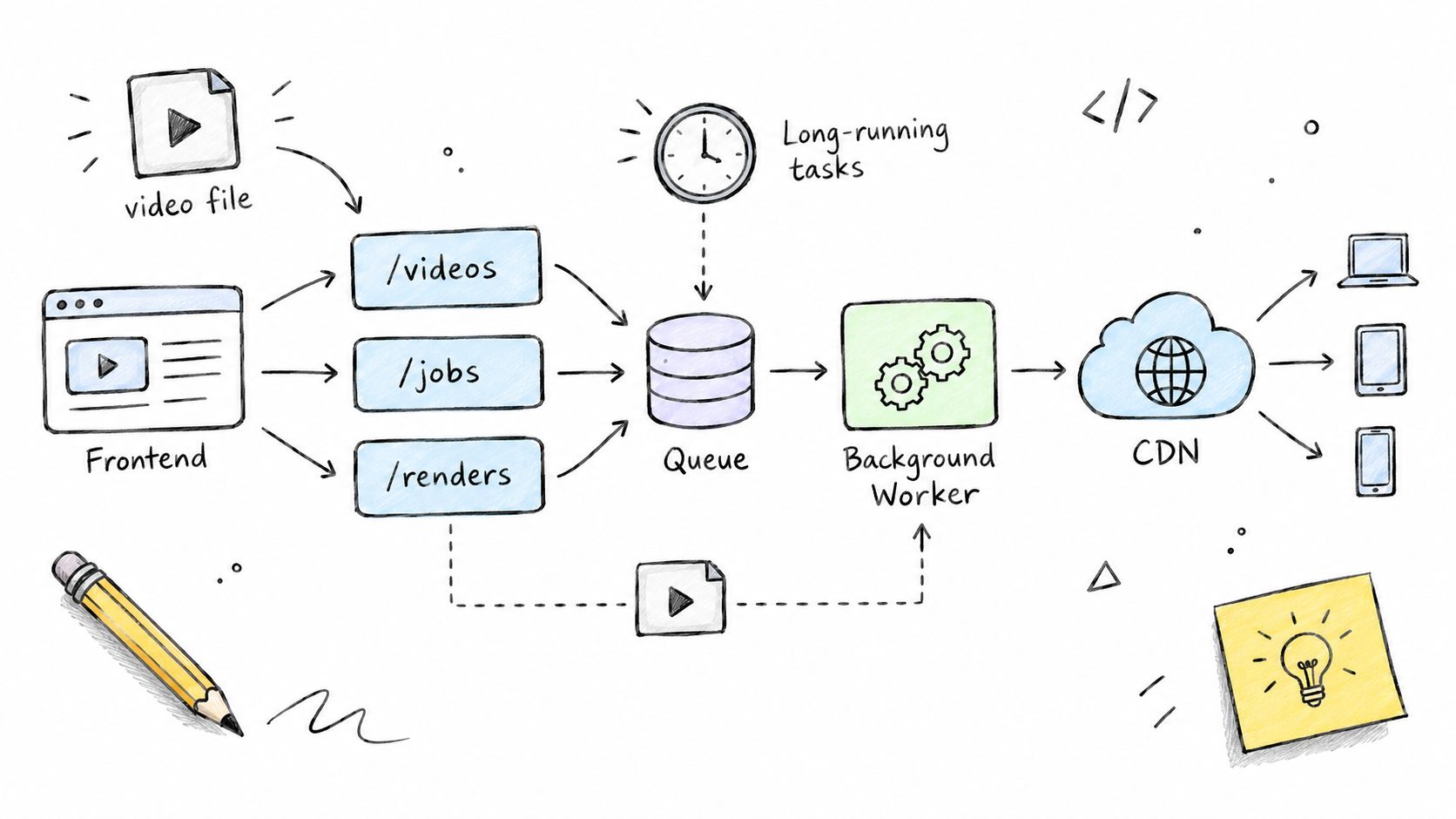
Write out the request and response examples for each route before you implement the endpoint.
For every route, document:
- Required fields and accepted formats
- Authentication and permission rules
- Status codes, retry behavior, and error shapes
- Storage expiration and webhook delivery expectations
This kind of planning also forces a practical decision: will you run FFmpeg yourself, or hand it off to a managed service? I've seen teams go back and forth on this more than almost anything else. Spend some time thinking through the tradeoffs—especially around volume and maintenance burden—before committing. Dig into the options in the video processing frameworks and pipeline design overview if you're not sure where to start.
REST gives your video API a clear map of resources and actions. Define /videos, /jobs, and /renders as nouns, then use GET to retrieve data, POST to create work, PATCH to update status, and DELETE when removal is supported. This uniform interface keeps clients readable and works across browsers, mobile apps, and automation tools, as Postman's REST API examples explain.
For a render request, return a job identifier instead of making the client wait for FFmpeg. A stateless request can include the source URL, output format, filters, authentication, and an idempotency key. Your worker then processes the command separately while the client checks /jobs/{id} or receives a webhook.
A practical resource flow looks like this:
POST /jobscreates a render task.GET /jobs/{id}returns progress and errors.GET /renders/{id}provides an expiring signed download URL.POST /webhooksregisters completion notifications.
Keep the API contract stable, even when the processing engine changes.
REST works especially well when cloud storage and CDN delivery handle large files outside your application server. For broader context, what are web scraping APIs explains endpoint-based API mechanics that parallel this resource design.
If your pipeline needs flexible relationships, GraphQL may help, but REST's predictable URLs, HTTP semantics, and stateless behavior usually make it the safer starting point for video automation. Keep FFmpeg or RenderIO behind the contract, so clients depend on business resources rather than internal commands.
{
"id": "job_abc123",
"status": "queued",
"output_format": "mp4",
"created_at": "2026-09-27T10:00:00Z"
}
Authentication is what stands between an attacker and your video files, render jobs, and storage URLs. When you learn how to make an API, match the credential model to the client: API keys for trusted server-to-server integrations, OAuth 2.0 for delegated access, JWT bearer tokens for short-lived sessions.
For a RenderIO-style pipeline, issue a scoped API key to your backend — never to browser JavaScript. Store it in a secret manager, send it through an Authorization: Bearer header over HTTPS, and rotate it whenever staff, vendors, or deployments change. Skip query-string credentials altogether. URLs have a habit of ending up in server logs and browser history.
Assume every client-side value is public. Keep permanent secrets on your server.
JWTs are handy for carrying tenant and permission claims, but keep the lifetime short and validate the issuer, audience, signature, and expiration on every request. If users need to connect their own storage or publishing accounts without handing over passwords, OAuth 2.0 with authorization code flow and PKCE fits better.
Apply Permissions and Rate Limits
Authentication answers "who is calling." Authorization answers "can they touch this job." Check ownership before returning status data or a signed download URL, and put destructive actions — deleting renders, registering webhooks — behind their own permission checks.
Add per-key limits and return 429 Too Many Requests with retry guidance. One lesson worth learning early: cap job creation separately from status reads, or a dashboard polling every few seconds will starve new renders of capacity.
- Log request IDs, not secrets.
- Redact authorization headers and FFmpeg URLs.
- Expire signed files quickly.
- Test invalid, revoked, and cross-tenant credentials.
For more implementation guidance, read best practices for API security before launching your first production endpoint.
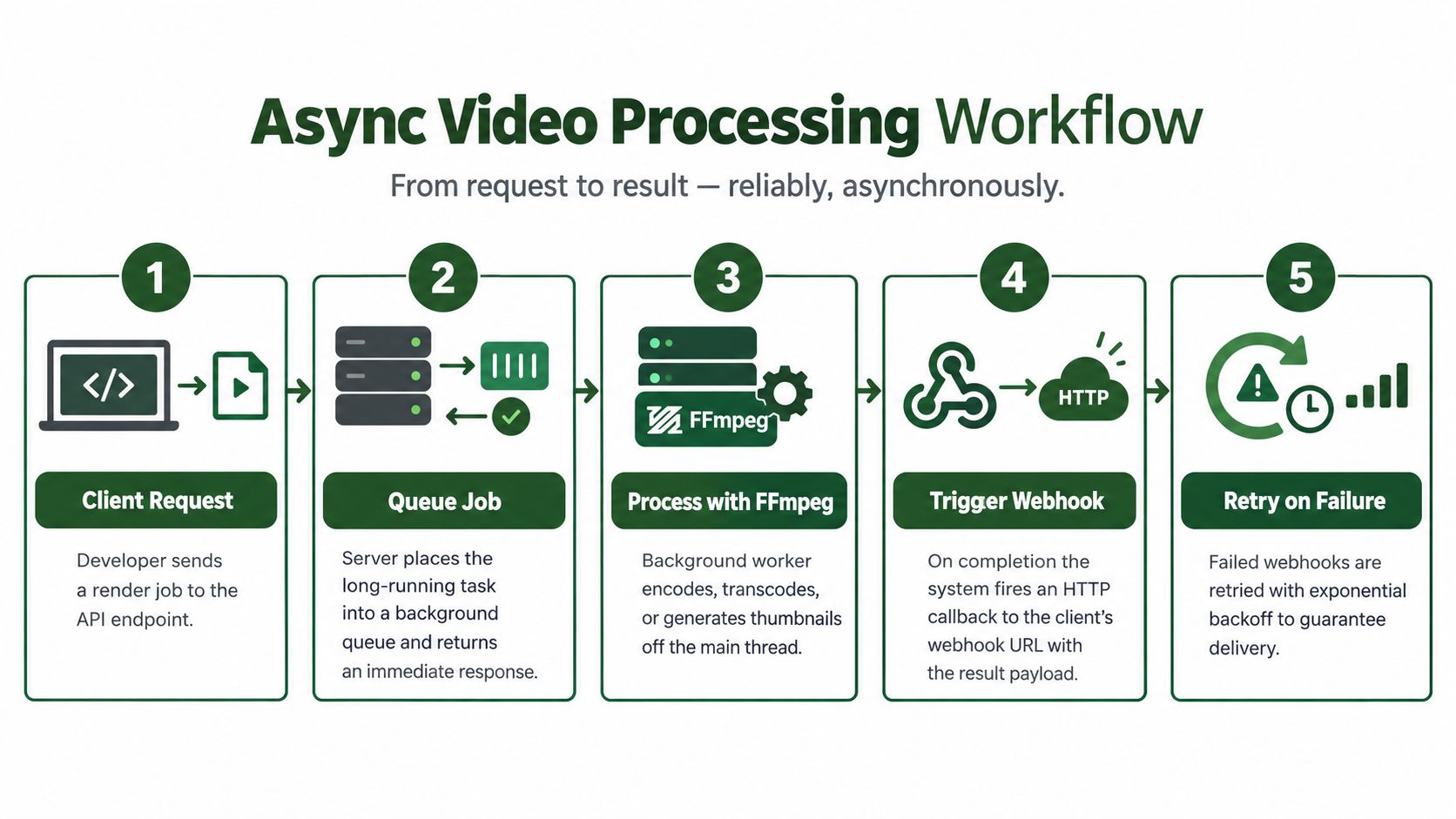
Video rendering can take minutes, so your API should acknowledge the request and keep FFmpeg work away from the request thread. Create a job record, place it on a queue, and return 202 Accepted with a stable job ID.
The client can then retrieve /jobs/{id}, while a background worker downloads the source, runs FFmpeg or RenderIO, stores the result, and updates progress. Include an idempotency key when creating jobs, so a network retry doesn't start duplicate renders.
Return Immediately and Notify Reliably
A useful response might contain:
job_id, status, and creation time- A status URL for fallback checks
- The accepted webhook event types
- An estimated expiration for output URLs
Ask clients to expose a webhook endpoint such as /callbacks/render-complete. Send a signed JSON payload containing the job ID, final status, output metadata, and an expiring download URL. Consumers should verify the signature and treat duplicate events as harmless.
Webhook delivery needs the same care as job processing. Retry temporary failures with exponential backoff, record each attempt, and move permanently failing events into a dead-letter queue. RenderIO includes automatic retries and dead-letter handling, which can save you from maintaining that machinery yourself.
Design webhook handlers to be idempotent, because successful delivery can still be followed by a duplicate.
For polling and webhook patterns, read RenderIO's guide to polling and webhooks. This async design improves responsiveness, protects your API from long timeouts, and lets workers scale independently as render volume grows.
Sync vs Async Processing Comparison
Choosing between synchronous and asynchronous processing shapes everything about how your API behaves under load. Here's how they stack up:
| Feature | Sync Processing | Async Processing |
|---|---|---|
| Response time | Blocks until completion | Immediate acknowledgment |
| Client complexity | Simple, single request | Requires status polling or webhooks |
| Timeout risk | High for long jobs | Minimal |
| Scalability | Limited by connection pool | Workers scale independently |
| Failure handling | Client must retry entire job | Retry at job level |
| Resource usage | Ties up request threads | Frees threads quickly |
| Best for | Fast operations (< 5s) | Video rendering, encoding, batch jobs |
Synchronous processing works fine for quick operations like metadata checks or small file conversions. But once you're dealing with FFmpeg transcoding or video encoding jobs that run for minutes, async is the only sane approach. The client gets an immediate response, your API stays responsive, and a worker handles the heavy lifting in the background.
Most production video APIs lean heavily async. Sync endpoints tend to stick around for validation, presigned URL generation, and anything that needs a fast round-trip. Mixing both gives you the best of each world.
{
"error": {
"code": "FFMPEG_INVALID_INPUT",
"message": "The source video could not be decoded.",
"retryable": false,
"request_id": "req_123"
}
}
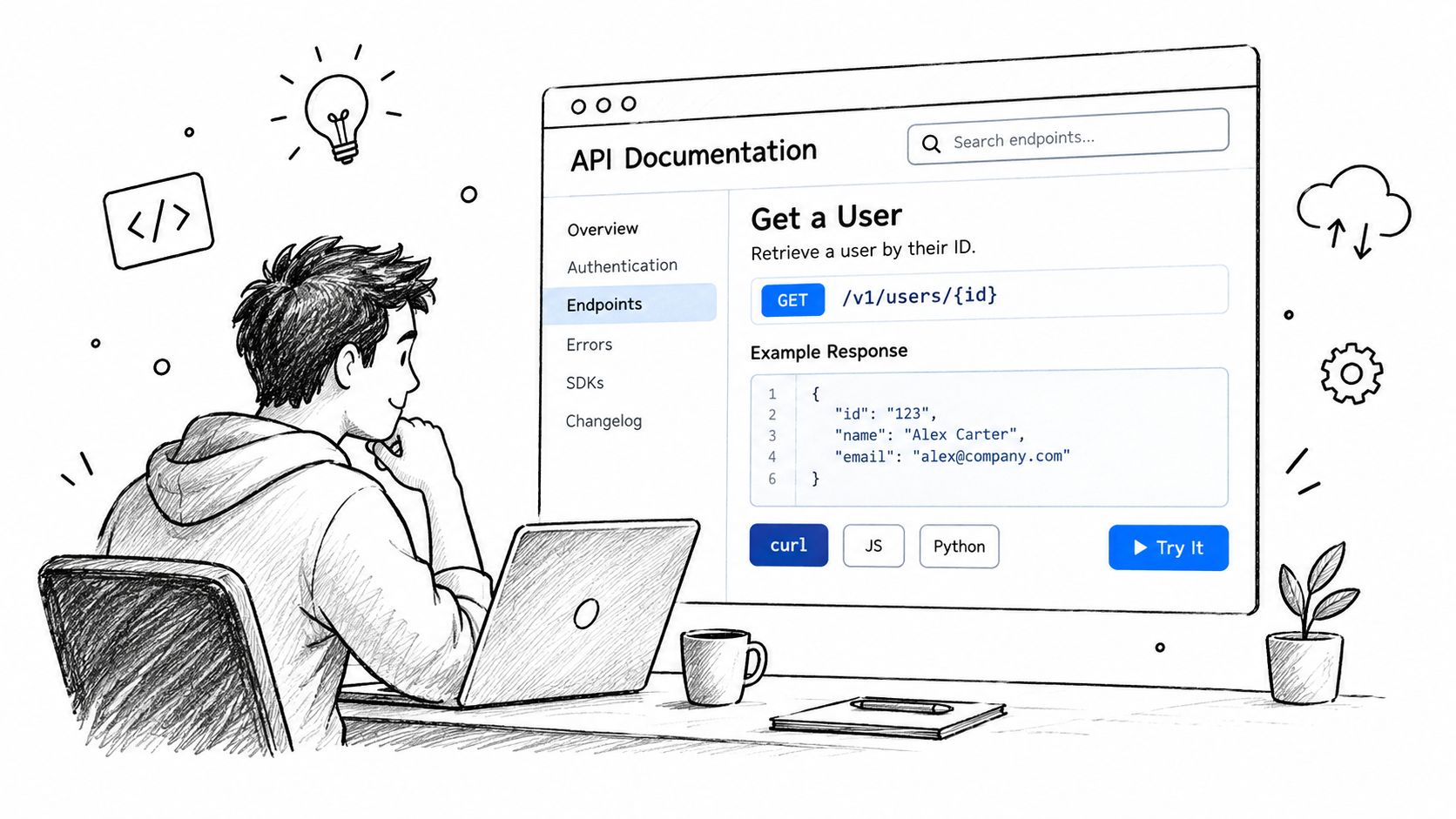
Clear documentation is what separates a functional API from one developers actually want to use. When you're figuring out how to make an API, document the full workflow — not just a list of endpoints. For a video service, walk through the complete flow: uploading a source, creating a render job, checking status, and retrieving an expiring result.
Show Complete Requests
Each endpoint page needs more than a parameter table. Developers need context.
At minimum, include:
- Purpose, authentication, required fields, and rate limits
- A working request with a realistic JSON response
- Status codes, error codes, retry rules, and webhook behavior
- Signed URL expiration windows and idempotency expectations
For a video API, explain that POST /jobs returns 202 Accepted, then show what the polling request looks like and what the completion webhook payload contains. Developers should see exactly where an FFmpeg command, output format, or source URL fits in the request body.
A copyable example beats a page of descriptions every time.
Provide examples in cURL, JavaScript, and Python. Use environment variables for credentials — never hardcode keys in documentation. Postman collections let readers import and run the workflow immediately, and an OpenAPI specification can generate reference pages and client libraries automatically.
Maintain Trust Over Time
Version your documentation alongside the API itself. Flag breaking changes clearly, keep older references accessible, and publish migration notes before removing fields or altering error behavior. Run every documented example through CI — including edge cases like invalid media and failed renders — so your docs don't silently drift from what production actually does.
RenderIO's video processing API handles much of the boilerplate your readers would otherwise need to build themselves: FFmpeg execution, signed storage URLs, polling, and webhook retries, all behind a REST contract. Publish a small "first render" tutorial, then link out to the deeper reference pages. That path takes someone from zero to a working integration without ever filing a support ticket.
What Is the Best Way to Make an API for Video Processing?
Model the API around a /jobs resource, not around an FFmpeg command. The request carries a source URL, the output settings, and an idempotency key; the response is 202 Accepted with a job ID. A worker picks the job up from there, and clients follow progress through polling or webhooks.
Should I Upload Videos Through the API?
In most cases, no. Hand the client a short-lived signed storage URL so the upload goes straight to storage, then pass that URL to the worker. Routing multi-gigabyte files through your application server is a reliable way to hit timeouts and memory limits you never planned for.
How Do I Prevent Duplicate Renders?
Persist the idempotency key alongside a fingerprint of the request and the job it created. When a client retries — and clients always retry — return the existing job instead of kicking off a second FFmpeg or RenderIO run. Duplicate renders waste compute and leave confusing extra files in your output bucket.
How Should API Errors Look?
Use one JSON shape for every failure: an error code, a human-readable message, a retryable flag, and the request ID. Include FFmpeg stderr when a render fails, since it's usually the fastest route to the real cause — but strip out credentials and private URLs before it leaves your system.
Webhook deliveries can and will arrive more than once. Verify signatures, and make every handler idempotent.
Can RenderIO Replace My Video Worker?
Yes. RenderIO runs FFmpeg commands in isolated environments, manages signed output URLs, and covers polling, webhook retries, and dead-letter handling. You end up with a working video processing API without building queues or babysitting servers.