You're probably here because the stream looks fine in your test tab, then stalls in production under conditions that feel annoyingly ordinary. A viewer hits play, gets a few clean seconds, then the spinner shows up. They wait, switch tabs, and often don't come back.
That reaction window is brutally short. A 2022 Bitmovin survey found that 47% of Americans had unsubscribed from a streaming service because of buffering, and viewers began considering cancellation after 13.5 seconds of buffering on average. The same research estimated buffering and poor video quality could cost streaming services up to $390 million per month in lost revenue pressure, which is why buffering is an operational problem, not just a player annoyance (Bitmovin buffering research).
The mistake many teams make is treating every stall like a bitrate problem. It usually isn't. Buffering belongs to a layer of the stack, and the layer that owns the stall determines the fix. If you guess wrong, you ship a “solution” that only changes symptoms.
Table of Contents
- Why Your Stream Keeps Buffering
- Diagnosing the Root Cause Layer by Layer
- Encoding and Packaging Fixes with FFmpeg
- CDN, Caching, and Origin Tuning
- Automating Transcoding and Delivery with RenderIO
- Monitoring and Testing Your Stream
- Troubleshooting Playbook and Next Steps
Why Your Stream Keeps Buffering
The spinner is the symptom. The cause usually sits in one of four places: network, encoder, player, or CDN.
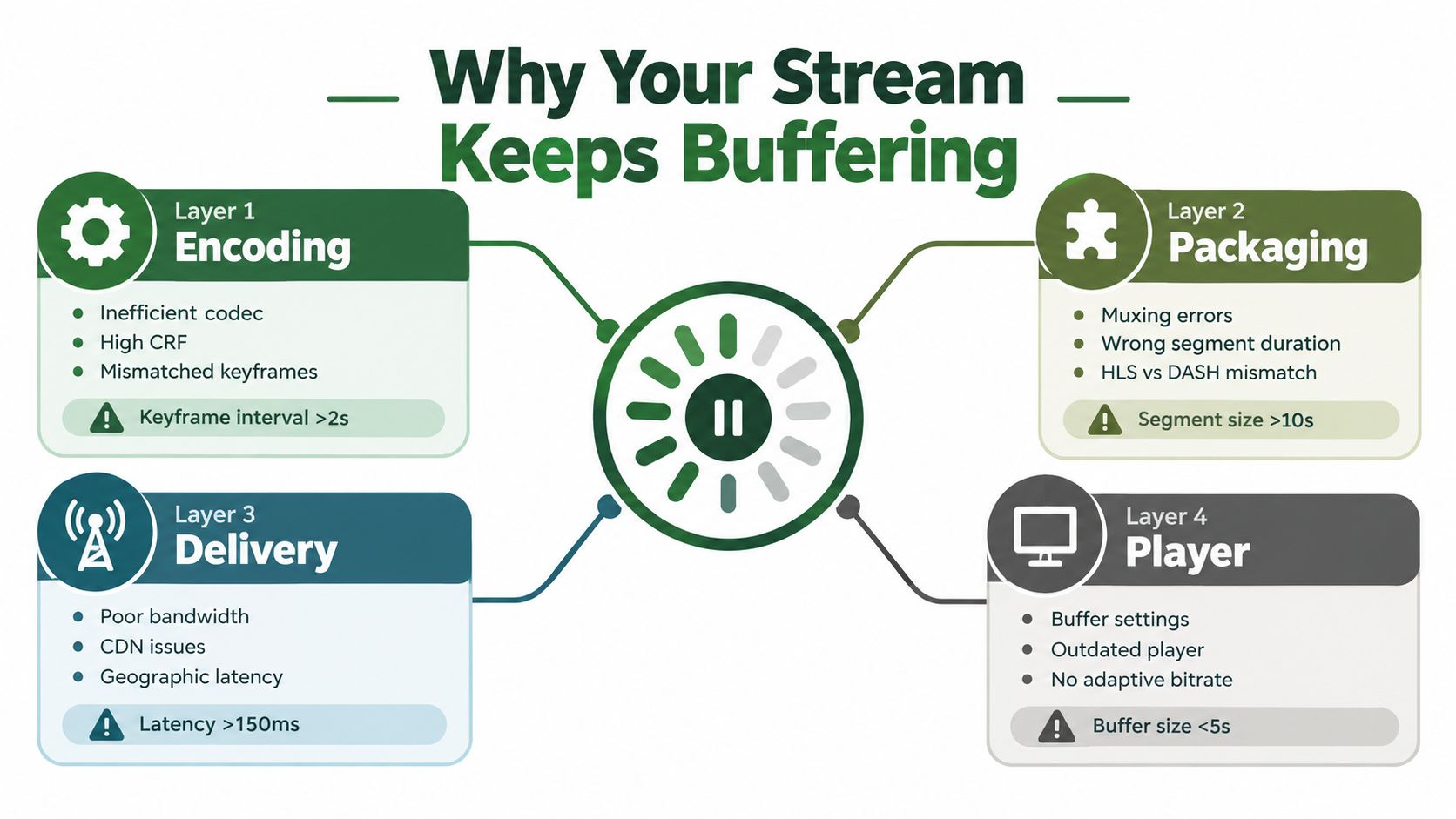
The same stall can come from very different failures
A network-owned stall has a familiar signature. Segment requests start arriving late, throughput swings hard, and retries stack up. The player burns through its forward buffer, then freezes. Lowering the top rendition might reduce pain, but it won't fix unstable delivery if packet timing is the problem.
An encoder-owned stall looks different. The manifest loads, the CDN responds, but switches between renditions don't land cleanly because keyframes aren't aligned, timestamps drift, or one rendition has a GOP pattern that doesn't match the others. In logs, that often appears as repeated quality changes followed by a buffer underrun.
Ownership matters more than generic advice
Player-owned stalls usually come from bad adaptation logic or conservative buffer settings. I've seen perfectly healthy streams stall because the player kept chasing transient bandwidth spikes, climbed too aggressively, then dropped too late. Netflix published one of the clearest lessons here: in a large client experiment, a buffer-occupancy-based control strategy reduced rebuffer rates by 20% while holding video rate constant, mainly because buffer level was a better control signal than trying to predict network capacity directly (Netflix buffer-based ABR paper).
Practical rule: Don't ask “how do I eliminate buffering?” until you can answer “which layer owns this stall?”
CDN-owned stalls show up when edges miss cache, manifests expire poorly, origin response drifts, or a regional edge gets overloaded. Those failures often masquerade as “internet problems” because the player only sees delayed bytes.
For teams handling live inputs and real-time transforms, adjacent media processing can also interfere with stream stability if it's bolted together carelessly. If your workflow includes voice cleanup or track isolation before packaging, Isolate Audio processing explained is a useful read on how real-time processing pipelines behave under load. The lesson carries over to video. Every stage needs timing discipline.
If you need a quick refresher on what the delivery layer is doing, this overview of how a content delivery network works in video delivery is worth keeping handy.
Diagnosing the Root Cause Layer by Layer
A stall at 8:13 into a stream is not one problem. It is a failure at a specific layer. Treating every freeze as a bitrate problem is how teams waste a day retuning ladders when the issue is a slow edge POP, a bad timestamp, or an ABR client chasing noise.
The fastest path is to isolate ownership. Check the network, then the encoder and packager, then the player, then the CDN. That order matches how bytes turn into frames. It also keeps you from blaming the wrong system.
Start with the network
Test from the viewer region and access type that failed. Home fiber, office Wi-Fi, carrier NAT on mobile, and hotel Wi-Fi produce different request patterns and different failure modes. I want segment-level timing, packet loss, jitter, and latency spread. A single speed test from the office tells me almost nothing.
Recent industry reporting still points to the same pattern. Streams fail under unstable delivery conditions far more often than raw advertised bandwidth would suggest, especially during congestion windows and on mobile paths (Bitmovin developer report PDF).
Use a short checklist:
- Measure effective throughput where viewers are: test from the affected geography and ISP class.
- Check stability, not just peak rate: loss, jitter, retransmits, and latency swings decide whether segments arrive before deadline.
- Compare protocol paths: QUIC, TCP, Wi-Fi, and carrier NAT each break in their own way.
- Capture request timing: if segment fetch time is erratic while encode output is clean, the network probably owns the stall.
Then inspect the encode and package
Encoder-owned stalls are common, and they often get misdiagnosed as CDN or player problems. Pull the manifest and a handful of segments. Verify segment duration, IDR placement, GOP cadence, audio-video timestamp alignment, and codec signaling. If one rendition cuts at different keyframe boundaries than the others, the player can switch into garbage.
For live streaming, stall time is usually measured against watch time, and the quality impact has been documented for years. Ahmed et al. examined large-scale live-streaming behavior and showed how often short stalls appear during peak periods and how quickly they degrade the viewing session (live-streaming buffering analysis by Ahmed et al.).
The checks that catch real faults are boring and specific:
- Keyframe alignment across renditions: switches should land on matching IDR boundaries.
- Stable segment cadence: target duration, actual duration, and playlist signaling should agree.
- Clean timestamps: watch for negative PTS, drift between audio and video, or discontinuities the player was never told about.
- Accurate manifest metadata: codec strings, bandwidth declarations, resolution tags, and segment paths need to match reality.
If your pipeline also does heavy FFmpeg transforms before packaging, watch the processing layer too. CPU starvation, queue buildup, or disk I/O contention can delay segment production long before the CDN sees a request. That is one reason some teams offload transcoding and packaging to RenderIO instead of babysitting their own workers.
Pull player logs before you touch the CDN
Player-owned stalls have a distinct signature. The CDN returns bytes on time, the encoder output looks clean, but the client still underruns because ABR logic climbed too fast, MSE append lagged, decode fell behind, or a device-specific bug blocked buffer growth.
Collect session logs from hls.js, Shaka Player, AVPlayer, or ExoPlayer around the failure window. Look for bufferUnderrun, repeated upshift-downshift cycles, append errors, long gaps between request completion and append completion, and decode starvation on lower-end devices.
When the network is stable and the player still oscillates, I inspect ladder spacing and segment boundaries before I call the ISP. That pattern usually belongs to the player or the encode.
Focus on metrics that reflect what the viewer felt: startup delay, rebuffer ratio, stall duration, and failure rate by region and device. Average bitrate is useful, but it does not explain a freeze.
Check CDN behavior last, but check it hard
By the time you get here, you should already know whether the stream entering the CDN is healthy. Now the question is delivery efficiency. Are manifests and hot segments served from edge cache. Is origin TTFB creeping up. Are cache keys fragmented by query strings or headers. Are low-TTL live objects expiring so aggressively that the edge keeps going back to origin?
This layer often fools people because player logs only show late bytes. They do not tell you whether the delay came from the last mile, the edge, or the origin.
| Symptom | Most Likely Layer | First Check |
|---|---|---|
| Stalls only during peak regional traffic | Network | Regional throughput and packet stability |
| Frequent rendition switching before a freeze | Player or encoding | Player ABR logs and keyframe alignment |
| Clean startup, then random mid-stream pauses | CDN or network | Segment request timing and edge cache behavior |
| Playback fails after quality change | Encoding | GOP alignment and independent segments |
| Long time to first segment | CDN | Edge miss and origin response timing |
| Audio continues but video hangs | Encoding or player | Track timestamps and append errors |
Encoding and Packaging Fixes with FFmpeg
A stream can have plenty of bandwidth and still freeze because the encoder handed the player a bad ladder. I see this pattern a lot. The stall gets blamed on the ISP, but the root cause lives in the encoding and packaging layer: misaligned GOPs, messy timestamps, or segments cut in ways the player cannot switch across cleanly.
For HLS, the safe baseline is still H.264, fixed GOP alignment, scene-cut suppression, AAC audio, and short segments. Those settings do not solve every buffering case, but they remove a large class of encoder-owned stalls before you start tuning the player or CDN.
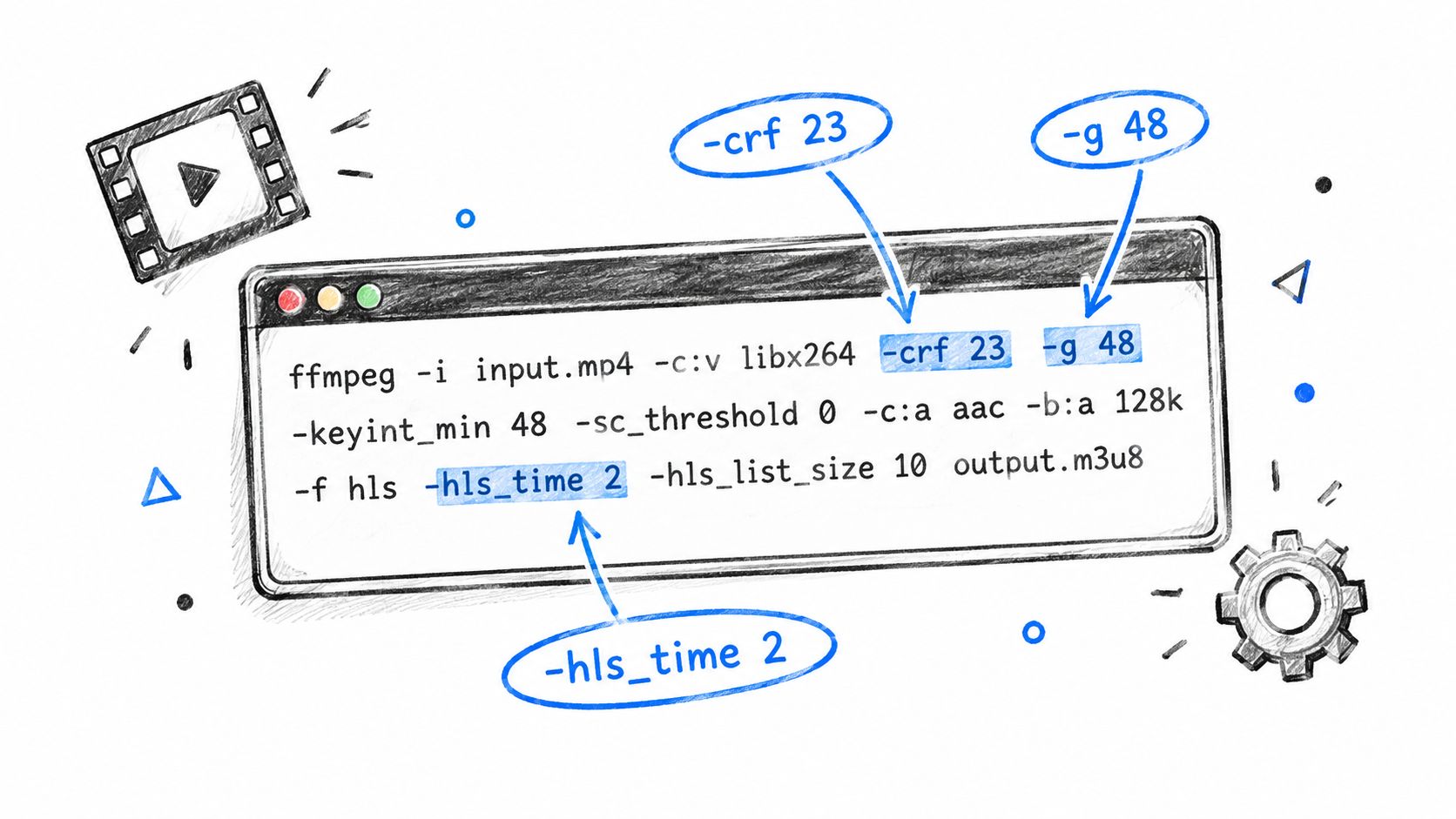
A practical HLS baseline
Use a command pattern like this for a single rendition:
ffmpeg -i input.mp4 \
  -c:v libx264 -preset medium -crf 23 \
  -g 48 -keyint_min 48 -sc_threshold 0 \
  -c:a aac -b:a 128k -ar 48000 \
  -f hls -hls_time 2 -hls_playlist_type vod \
  -hls_flags independent_segments \
  -hls_segment_type mpegts \
  out.m3u8
What each flag is doing:
-crf 23is a reasonable starting point for H.264 VOD. Adjust from there based on content complexity, not habit.-g 48 -keyint_min 48forces a fixed GOP. At 24 fps with 2-second segments, that puts keyframes on segment boundaries.-sc_threshold 0stops scene-cut keyframes from drifting between renditions and breaking switch points.-hls_time 2keeps segment duration short enough for responsive startup and adaptation, without exploding request volume.-hls_flags independent_segmentsmarks segments as independently decodable, which reduces failures during rendition changes.
If your team needs a command-level reference, RenderIO's guide on using FFmpeg for production workflows covers the moving parts clearly.
Build an ABR ladder that switches cleanly
An ABR ladder fails at the player when the encoder made switching expensive. The player can only jump between renditions where timing, GOP structure, and segment boundaries line up.
For an HLS set, map each rendition explicitly and keep GOP structure identical across all outputs. Declared bandwidth also needs to be honest. If you overstate it, the player climbs too aggressively, then falls into rebuffering when the next segment misses budget.
ffmpeg -i input.mp4 \
  -filter_complex "\
  [0:v]split=5[v1][v2][v3][v4][v5]; \
  [v1]scale=w=426:h=240:force_original_aspect_ratio=decrease[v1out]; \
  [v2]scale=w=640:h=360:force_original_aspect_ratio=decrease[v2out]; \
  [v3]scale=w=854:h=480:force_original_aspect_ratio=decrease[v3out]; \
  [v4]scale=w=1280:h=720:force_original_aspect_ratio=decrease[v4out]; \
  [v5]scale=w=1920:h=1080:force_original_aspect_ratio=decrease[v5out]" \
  -map [v1out] -c:v:0 libx264 -crf:0 23 -g 48 -keyint_min:0 48 -sc_threshold:0 0 -maxrate:v:0 500k -bufsize:v:0 1000k \
  -map [v2out] -c:v:1 libx264 -crf:1 23 -g 48 -keyint_min:1 48 -sc_threshold:1 0 -maxrate:v:1 900k -bufsize:v:1 1800k \
  -map [v3out] -c:v:2 libx264 -crf:2 23 -g 48 -keyint_min:2 48 -sc_threshold:2 0 -maxrate:v:2 1400k -bufsize:v:2 2800k \
  -map [v4out] -c:v:3 libx264 -crf:3 23 -g 48 -keyint_min:3 48 -sc_threshold:3 0 -maxrate:v:3 2800k -bufsize:v:3 5600k \
  -map [v5out] -c:v:4 libx264 -crf:4 23 -g 48 -keyint_min:4 48 -sc_threshold:4 0 -maxrate:v:4 5000k -bufsize:v:4 10000k \
  -map a:0 -c:a aac -b:a 128k -ar 48000 \
  -f hls -hls_time 2 -hls_flags independent_segments \
  -var_stream_map "v:0,a:0 v:1,a:0 v:2,a:0 v:3,a:0 v:4,a:0" \
  -master_pl_name master.m3u8 \
  -hls_segment_filename "v%v/seg_%03d.ts" \
  v%v/index.m3u8
This fixes a specific encoder-layer problem. It does not fix poor last-mile throughput, and it does not compensate for a player with bad ABR logic. What it does do is remove the packaging mistakes that make every quality switch risky.
Verify the parts people assume are fine
Do not guess on keyframes. Check them.
ffprobe -select_streams v -show_frames -show_entries frame=pts_time,key_frame -of csv input.mp4
If keyframes drift away from your target cadence, fix the encode before you tune anything downstream. I have seen teams spend days on player heuristics when the issue was one rendition cutting IDRs a few frames late.
Timestamp drift is the other common encoder-layer stall source. The symptom is ugly: audio keeps going, video hangs, or the player throws append errors after a quality change. A repair pass can look like this:
ffmpeg -i input.mp4 -c:v copy -c:a aac -async 1 fixed.mp4
-async 1 is useful on ugly source files with damaged or inconsistent audio timing. On clean mezzanine inputs, I would rather fix the ingest or remux path than hide the problem here.
For DASH, keep the output just as deterministic:
ffmpeg -i input.mp4 \
  -c:v libx264 -crf 23 -g 48 -keyint_min 48 -sc_threshold 0 \
  -c:a aac -b:a 128k \
  -f dash -use_template 1 -use_timeline 1 \
  -adaptation_sets "id=0,streams=v id=1,streams=a" \
  manifest.mpd
Codec choice is a cost and compatibility decision, not a purity test. H.264 still has the broadest device support. HEVC and AV1 cut delivery bitrate on supported devices, but they raise encode cost and complicate fallback paths. VP9 remains useful for browser-heavy distribution. If you want a practical companion read on how platform transcodes reshape uploaded video, YouTube compression explained by AI Video Detector is worth reading.
One more trade-off matters here. If your pipeline is FFmpeg-heavy and your team keeps babysitting workers, stalled jobs, and capacity spikes, the bottleneck is no longer just the encoder config. It is the operating model around the encoder. That is where offloading jobs to RenderIO starts to make sense, especially when you need repeatable transcode behavior without running your own fleet.
CDN, Caching, and Origin Tuning
A CDN isn't just a pipe. For streaming, it's a buffered reverse proxy with rules you either tune deliberately or pay for during peak traffic.
TTLs decide whether your edge helps or hurts
Manifest TTL and segment TTL should behave differently. The manifest changes often enough that you want freshness. Segments are immutable once published, so you want them sticky at the edge.
As a working rule:
| Asset Type | Cache TTL | Query String Handling | Notes |
|---|---|---|---|
| Master playlist | Short, tied to update cadence | Include only playback-relevant parameters | Keep fresh so variant availability stays accurate |
| Variant playlist | Short to medium | Normalize nonessential query parameters | Avoid stale sequence windows |
| Media segments | Longer than playlists | Ignore noise, preserve auth inputs only if required | Immutable assets should be easy to hit from cache |
| Sprite sheets and thumbnails | Longer | Ignore marketing query strings | Low risk, high cache value |
| MP4 fallback objects | Medium to long | Preserve range-related behavior, normalize the rest | Validate partial content handling |
The exact TTL values depend on your update model, auth scheme, and whether you're serving live or VOD. What matters is the relationship. Playlists need freshness. Segments need persistence.
Shield the origin before prime time teaches you why
Origin shield is one of the most effective knobs in live delivery. Without it, a cache miss at many edges becomes a thundering herd against your origin. With it, the CDN collapses demand through a shield tier and protects the backend from request fan-out.
If you serve viewers in Australia or nearby regions, hosting location and edge proximity affect perceived stalls long before anyone opens player logs. This piece on reducing page stall for AU customers with low-latency hosting is useful context for why regional path length still matters.
Cache keys and range requests need explicit policy
Don't let your CDN build different cache objects for every irrelevant query string. Variant playlists and media segments usually need different cache key logic. Signed tokens, session-bound parameters, and localization flags may belong in the key. Tracking parameters usually don't.
Also verify range request handling if you still expose MP4 fallback playback. A lot of “random” buffering reports on long-tail devices come from poor partial-content behavior at the edge or origin.
For teams tuning HLS delivery strategy, this guide to adaptive bitrate streaming design trade-offs is a good companion when you're aligning cache behavior with ladder behavior.
Automating Transcoding and Delivery with RenderIO
Many teams shouldn't be running a hand-built transcoding fleet unless video infrastructure is the product. FFmpeg pipelines fail in the same dull ways over and over: bad source inputs, queue backlogs, inconsistent environments, missing retries, and outputs that don't package the same way every time.
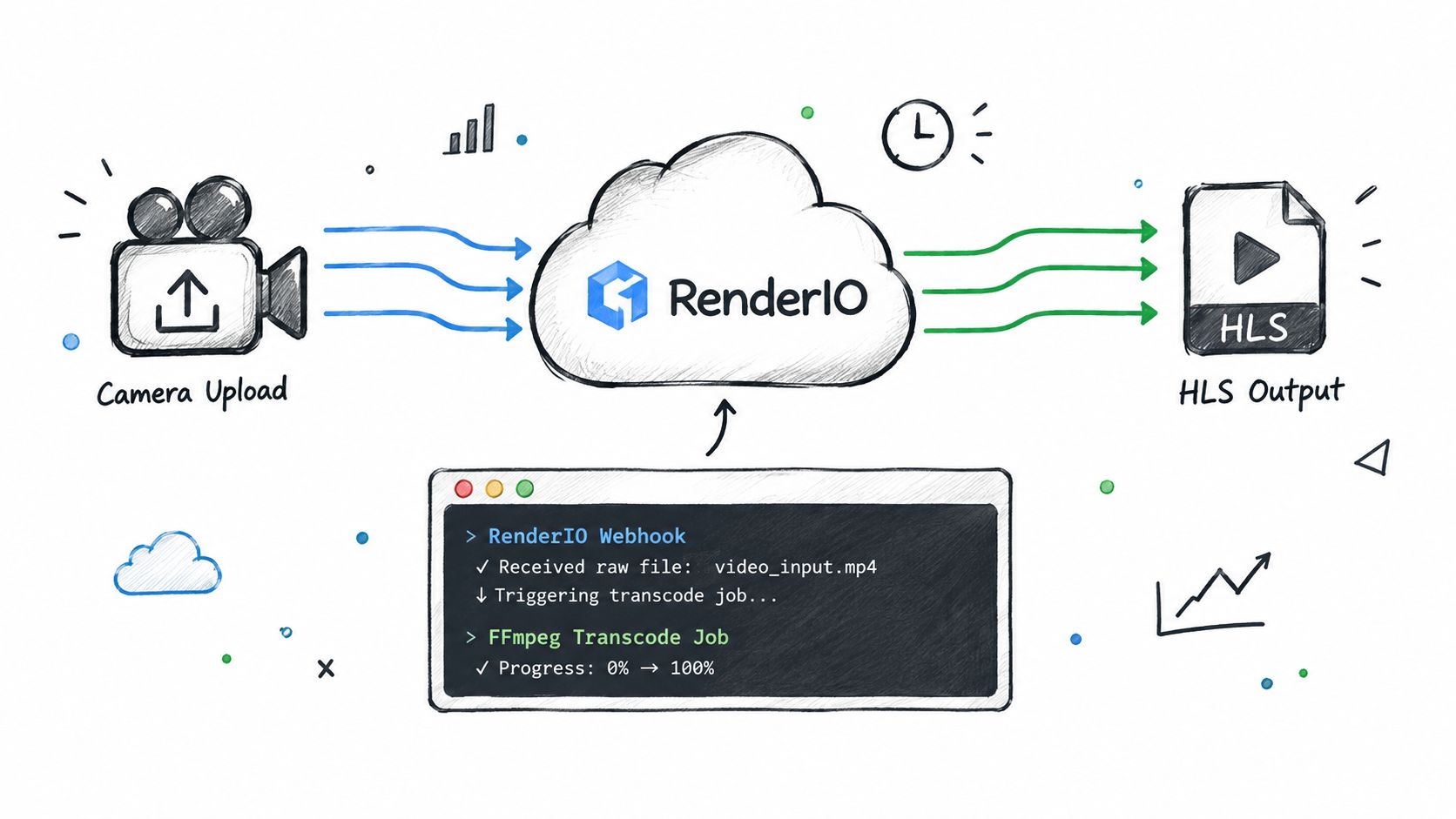
A sane offload pattern
One clean pattern is:
- Raw upload lands in object storage
- Upload event triggers a render job
- The job outputs HLS and DASH packages
- A webhook updates your database
- Your app mints signed playback URLs per viewer session
That removes a lot of operational drag. You're no longer maintaining workers just to run the same packaging commands repeatedly.
A typical render payload shape can be as simple as:
{
  "input": "signed-input-url",
  "outputs": [
    {
      "type": "hls",
      "command": "ffmpeg -i input.mp4 -c:v libx264 -crf 23 -g 48 -keyint_min 48 -sc_threshold 0 -c:a aac -b:a 128k -f hls -hls_time 2 -hls_flags independent_segments master.m3u8"
    },
    {
      "type": "dash",
      "command": "ffmpeg -i input.mp4 -c:v libx264 -crf 23 -g 48 -keyint_min 48 -sc_threshold 0 -c:a aac -b:a 128k -f dash -use_template 1 -use_timeline 1 -adaptation_sets \"id=0,streams=v id=1,streams=a\" manifest.mpd"
    },
    {
      "type": "thumbnails",
      "command": "ffmpeg -i input.mp4 -vf fps=1 thumbs_%04d.jpg"
    }
  ],
  "webhook_url": "app-webhook-url"
}
The response you store usually only needs a few fields:
{
  "job_id": "job_123",
  "status": "processing",
  "playback": {
    "hls": "signed-hls-url",
    "dash": "signed-dash-url"
  }
}
What this changes operationally
The main benefit isn't convenience. It's repeatability. If your ladder, GOP rules, segmenting, and thumbnail generation live in versioned commands instead of ad hoc worker boxes, you get deterministic outputs and easier debugging.
This is the one place where a managed option fits naturally in the stack. RenderIO exposes FFmpeg as an API, so teams can post render commands remotely, produce HLS or DASH outputs, and track job state through polling or webhooks instead of babysitting their own transcoding workers. That's useful when buffering issues trace back to inconsistent packaging rather than the player or network.
For this article's problem, the point is simple: if your encoding layer keeps causing playback stalls, stop making that layer fragile.
Monitoring and Testing Your Stream
A stream can look fine in the encoder logs and still stall on real devices. The fix is to watch the layer that owns the failure.
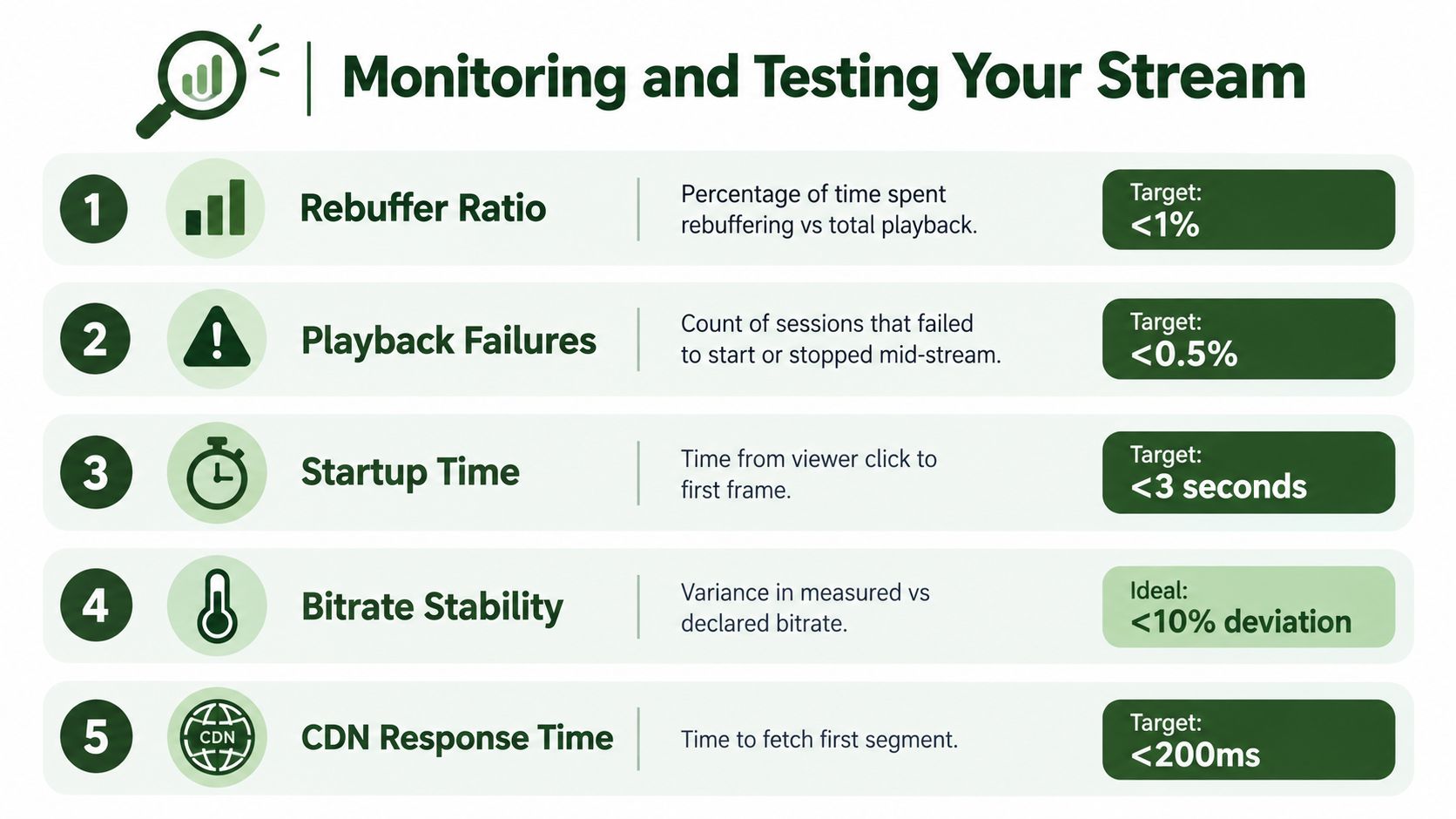
Measure the signals that point to the failing layer
Track a small set of metrics, but map each one to a stack owner.
- Player: startup time, playback failures, seek failures, bitrate switch frequency
- CDN: segment download latency, cache-hit rate, edge 4xx and 5xx rates
- Origin: time to first byte, manifest generation latency, origin error rate
- Encoder and packager: segment duration drift, missing renditions, discontinuities, keyframe alignment errors
That last group gets missed all the time. If one rendition has odd segment boundaries or bad timestamps, the player stalls even when the network is healthy and the CDN is fast. A dashboard that only shows aggregate rebuffering hides that kind of fault.
Build Grafana by row, not by vendor
I like one Grafana row per layer because it speeds up triage during an incident.
- Player row: startup time, fatal error count, rebuffer events by device, ABR switches by rendition
- CDN row: segment p95 latency, cache-hit trend, edge status codes, top failing paths
- Origin row: manifest TTFB, segment TTFB, origin concurrency, saturation indicators
- Encoding row: segment count mismatches, playlist freshness, discontinuities, drift between audio and video timelines
Correlate those rows on the same time axis. If player stalls rise while CDN latency stays flat and one rendition starts throwing switch errors, look at packaging first. If every rendition degrades and edge miss latency climbs, the stall belongs to delivery. This sounds obvious. It is not how many teams build dashboards.
Alert on cohorts, not single sessions. Page on a rise in failures for a device class, ASN, region, player version, or specific rendition. That tells you whether the issue sits with the client, network path, or media output.
Test the stream the way production fails
Run synthetic playback from multiple regions, but do not stop at “manifest returned 200.” Fetch segments, validate media sequence growth, and confirm the player can advance through variant switches. For HLS, I want automated checks on playlist age, target duration drift, and segment availability across the live window. For DASH, I check publish timing and representation consistency.
Then run failure drills.
Throttle bandwidth. Add packet loss. Kill origin during playback and watch whether cache carries the session. Publish a bad rendition on purpose in staging and confirm your alarms point to the encoding row instead of generating a generic playback alert. Those tests tell you whether your observability can separate a network stall from a packaging bug.
There is also a player trade-off under stress. Some players handle constrained bandwidth better by reducing quality early. Others cling to a high rendition too long and stall. Research covered by Tech Xplore points to another option: brief playback slowdown can feel better than a hard pause in some conditions (Tech Xplore coverage of playback slowdown versus buffering). That is a player-layer decision, not a CDN fix.
If your pipeline relies on FFmpeg jobs running across a worker fleet, monitor queue time, job failure rate, and output validation too. I have seen “buffering incidents” that were really late transcodes, missing segments, or inconsistent ladders from one worker pool. Teams using RenderIO for FFmpeg-heavy pipelines should still watch those outputs at the packaging layer. Offloading the transcode fleet removes worker babysitting, but it does not remove the need to validate manifests and segment health.
Troubleshooting Playbook and Next Steps
A buffering incident at 9:07 p.m. during a live event does not care about anyone's favorite theory. The job is to identify which layer owns the stall, make the first safe fix, and avoid wasting 20 minutes changing encoder settings for a CDN miss.
Incident patterns that usually point to one layer
Repeated stalls on one rendition usually start at the encoding or packaging layer. I check whether that variant has bad timestamps, an inflated BANDWIDTH value, missing keyframe alignment, or segment duration drift relative to the rest of the ladder.
Manifest 404s and stale playlist windows usually belong to delivery. That can be a cache rule, publish timing problem, or origin path issue. Audio and video drifting apart after a quality switch usually points back to the transcode path or muxing, not the network.
The goal is fast ownership. Once the owning layer is clear, the fix list gets much shorter.
Keep the first move boring and specific
| Symptom | Likely Layer | First Fix |
|---|---|---|
| Rebuffering spikes on one rendition only | Encoding | Recheck GOP alignment, declared bandwidth, segment duration, and independent segments |
| Manifest loads but playback freezes after a switch | Encoding or player | Inspect keyframe cadence, rendition alignment, and player ABR switch logs |
| Manifest 404s or stale playlist windows | CDN | Review cache policy, publish timing, TTLs, and playlist freshness |
| Long wait before first segment | CDN or origin | Check edge miss behavior, origin latency, and whether startup objects are cacheable |
| Throughput cliff in one region | Network | Test from affected geography, compare carrier paths, and inspect packet loss |
| Audio out of sync after quality changes | Encoding | Repair timestamps, validate track timescales, and verify mux timing |
| Playback dies when origin is stressed | CDN or origin | Enable shield or tiered cache, then confirm segments actually cache under load |
Three next steps worth doing this week
- Add ownership signals to alerts: A generic “playback failure up” page is not enough. Split alerts by manifest errors, segment errors, transcode failures, player stalls, and regional throughput drops so the on-call engineer knows which layer to inspect first.
- Turn the ladder review into an operating task: Re-test bitrate ladder behavior against current devices and content types. Sports, animation, and talking-head video fail in different ways, and stale ladder settings create avoidable stalls.
- Stop hand-maintaining fragile FFmpeg worker pools if they keep causing packaging regressions: If buffering traces back to missing renditions, late segments, or inconsistent outputs across workers, move that transcode and packaging path into a managed system.
For teams running FFmpeg-heavy pipelines, RenderIO is the practical offload path. It moves HLS and DASH generation, thumbnails, and signed outputs behind an API so engineers can spend their time on player behavior, cache tuning, and origin health instead of babysitting media workers. That does not remove validation. It removes one failure-prone layer from your day-to-day operations.
One final rule: judge stream quality by whether playback keeps advancing for real viewers, not by whether a lab session looked sharp on the top rendition. If the stall belongs to the player, fix ABR behavior. If it belongs to the encoder, fix the ladder and timestamps. If it belongs to the CDN or origin, fix cacheability and fetch paths. Buffering gets solved faster when each layer is treated like an owner, not a guess.