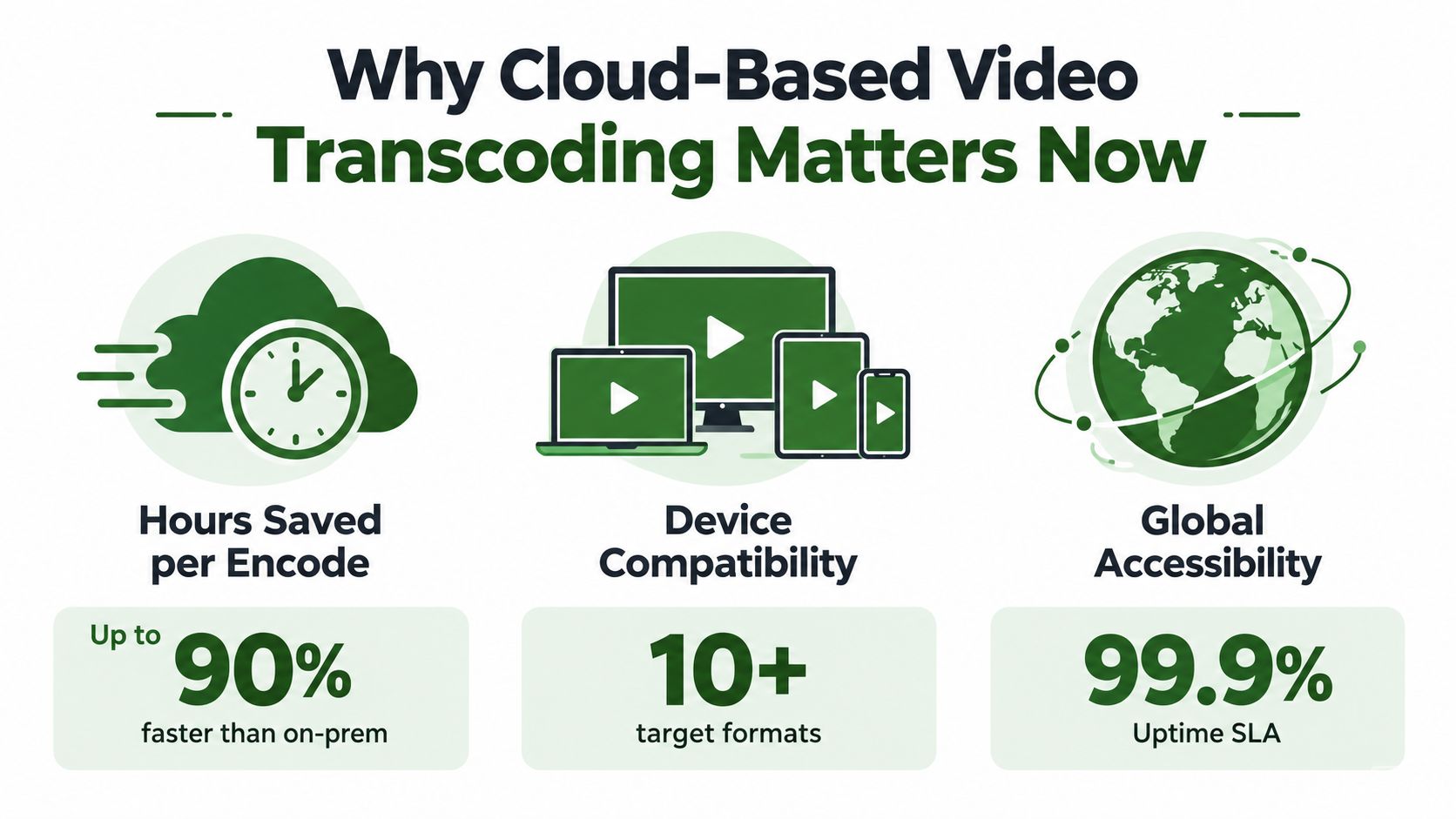
Cloud-based video transcoding is the process of converting video files in data centers using scalable, on-demand infrastructure instead of local servers. Global data-center traffic reached 15.3 zettabytes in 2020, and video represented approximately 83% of data-center-to-end-user traffic.
That contrast explains why a video pipeline can't stop at “convert this file to MP4.” A modern service has to create playable versions for different screens, codecs, resolutions, bitrates, and network conditions, then move those outputs into a delivery system that can handle unpredictable demand.
A team can start with a high-quality master and still deliver a poor experience if its encoding queue is slow, its bitrate ladder is too aggressive, or a failed job leaves the catalog incomplete without warning. Cloud based video transcoding helps with compute capacity, but the core engineering challenge is coordinating storage, workers, packaging, retries, validation, and delivery without paying for the same work twice.
Table of Contents
- Why Cloud-Based Video Transcoding Matters Now
- Core Components of a Cloud Transcoding Workflow
- Serverless vs Containerized vs Edge Architecture
- Scaling, Cost, and Quality Tradeoffs
- Codec Selection as a Deployment Problem
- Implementation Examples and API Patterns
- Orchestration Economics and Provider Selection
- Building Your Transcoding Pipeline Checklist
Why Cloud-Based Video Transcoding Matters Now
A familiar failure pattern starts with a large master file on a workstation or a small on-premises encoding server. The team submits a batch, waits for the queue to clear, and then discovers that the output is too large for mobile playback, lacks a compatible codec for a connected TV, or doesn't include the rendition needed by a slower connection. The encoding job completed, but the delivery job failed.
Cloud transcoding moves that processing into data-center workflows. Compute, storage, networking, and delivery services can be coordinated instead of forcing one local machine to handle every source file and every output profile. That matters because one source video commonly needs multiple versions, not because the original is defective, but because viewers consume it through different devices and network paths.
Cisco's Global Cloud Index analysis forecast global data-center traffic at 15.3 zettabytes in 2020, with approximately 83% of data-center-to-end-user traffic attributed to video. The same analysis identified social networking and media streaming among the fastest-growing workload categories. Those conditions favor elastic processing over a fixed encoding fleet sized for an average day.
Transcoding is part of distribution
The important shift is conceptual. Transcoding isn't merely a format conversion step performed before the “real” delivery system starts. It determines which users can play the content, how much data they receive, how quickly a player can start, and whether an adaptive player can move between representations during playback.
That's why a practical workflow starts with the delivery target. A social-media pipeline may need vertical derivatives, while a subscription video service may need segmented adaptive outputs and a fallback codec. Teams creating soundtrack variations or other media assets can also pair transcoding with specialist tools such as the Elevenlabs video to music tool, then send the resulting media through the same validation and delivery pipeline.
For a deeper foundation, the guide to what video transcoding is provides useful terminology around encoding, resizing, bitrate conversion, and format changes. The operational conclusion is straightforward: cloud capacity solves only one part of the problem. The pipeline still needs explicit policies for outputs, priorities, retries, and acceptance.
Core Components of a Cloud Transcoding Workflow
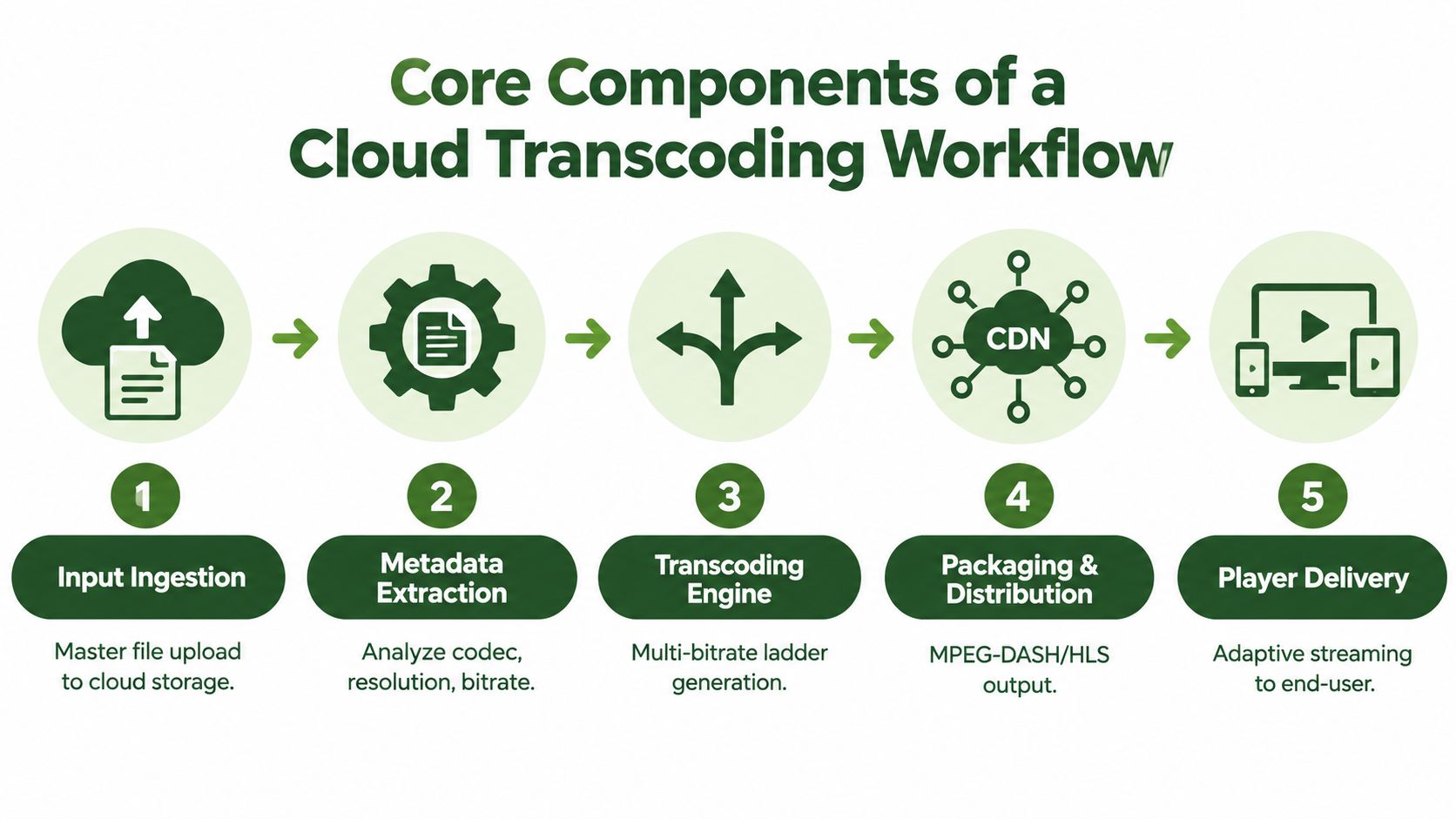
A reliable workflow begins with a master arriving in cloud storage and ends with a player requesting an appropriate representation. Between those points, the system must inspect the input, decide what to produce, execute the work, package the outputs, and publish only assets that pass validation.
MPEG-DASH supplied a major architectural foundation for this model. It was ratified in November 2011 after unanimous positive votes from 26 national bodies, according to the EBU presentation on MPEG-DASH standardization. DASH breaks media into segments requested over HTTP and allows a player to switch among representations as conditions change.
From source file to playback
A useful mental model has four operational layers:
Ingestion and inspection: Accept the source through an upload, object-storage event, or controlled import. Extract duration, dimensions, frame rate, audio layout, codec, and container details before selecting an encoding policy.
Orchestration: Create a durable job record with a deterministic identity. The orchestrator decides which renditions are required, assigns work to an appropriate queue, and records every partition separately.
Encoding and packaging: Decode the source, apply transformations, encode the selected profiles, and package the results into the required streaming format. A DASH or HLS output isn't one file. It's a coordinated set of segments, manifests, and media representations.
Publication and delivery: Validate the outputs, store them with controlled retention, and expose them through a CDN or another delivery layer. The player then selects a suitable representation rather than receiving one fixed file.
On-demand workflows can spend more time optimizing a completed asset. Live workflows have a moving deadline, so the encoder must keep processing and packaging while the source continues arriving. The same representation logic applies, but the failure policy and latency budget are different.
The most common design mistake is treating the transcoder as a single synchronous function. In production, ingestion, metadata extraction, encoding, packaging, validation, and publication have different failure modes. Give each stage an observable state, and make the transitions repeatable without duplicating successful work.
Serverless vs Containerized vs Edge Architecture
A thumbnail request that arrives sporadically can finish in a short-lived worker. A catalog migration may keep encoders busy for hours, while a live stream cannot wait for a distant queue to recover. Those workloads need different deployment choices, and the operational cost often comes from orchestration rather than encoding alone.
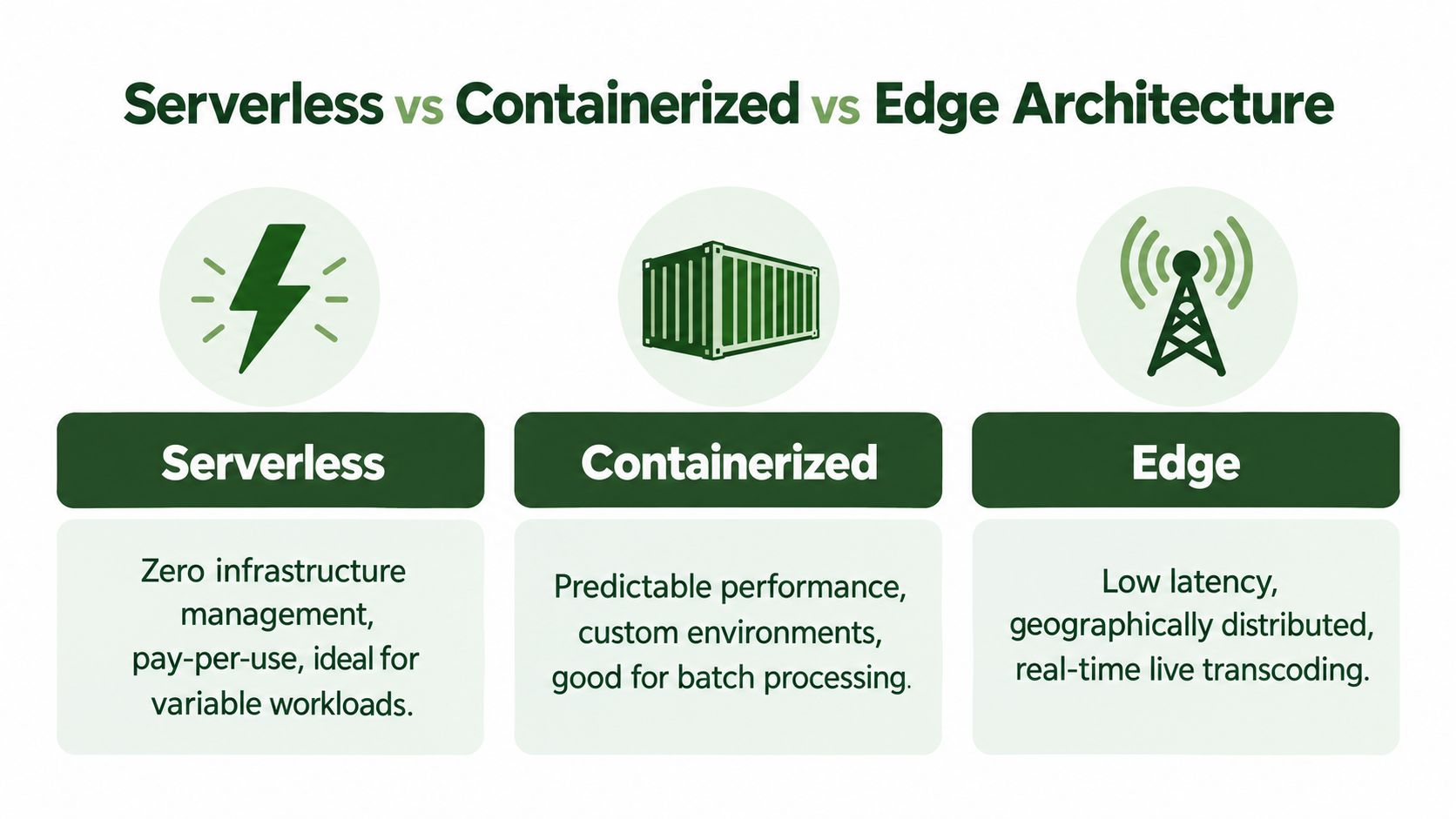
Serverless execution fits irregular workloads made of short, independent tasks. The platform manages much of the infrastructure, and workers can scale without a permanent fleet. The trade-off is limited runtime control. Startup delays, execution limits, ephemeral storage, and restricted codec access can disrupt larger jobs. Retries also need care. A failed invocation can repeat expensive work unless the job record and output key make the operation idempotent.
Containerized workers provide a controlled toolchain. Pin the FFmpeg build, install filters and libraries, configure local storage, and keep behavior consistent across workers. Containers still leave the team responsible for scheduling, image management, worker draining, and capacity protection. A large batch can fill shared storage or overwhelm a downstream service before CPU utilization looks high.
Edge processing places encoding near users or live sources when network distance creates unacceptable latency. It can shorten the path from ingest to playback, but every location adds state to manage. Configuration, output identity, observability, retention, and failure recovery must remain consistent across regions. An edge worker that loses connectivity also needs a clear handoff or retry path.
Choose by failure profile
For bursty, independent jobs, start with managed or serverless workers when inputs are short, retries are safe, and execution limits will not interrupt encoding. For steady batch processing, containers suit workloads that require a pinned toolchain, predictable throughput, or specialized hardware. For live and interactive workloads, edge placement can reduce latency, provided the team can operate distributed monitoring and configuration.
Architecture does not remove the need for durable job records, idempotency keys, output validation, and explicit retry policies. Those controls determine whether a timeout creates one output or several, and whether operators can resume work without re-encoding completed stages.
Teams operating their own FFmpeg service should review the practical concerns described in this FFmpeg transcoding server guide. CPU and GPU capacity are only part of the decision. Job delivery, intermediate-file storage, timeout handling, cleanup, and diagnosis of failed commands shape the actual operating cost.
Scaling, Cost, and Quality Tradeoffs
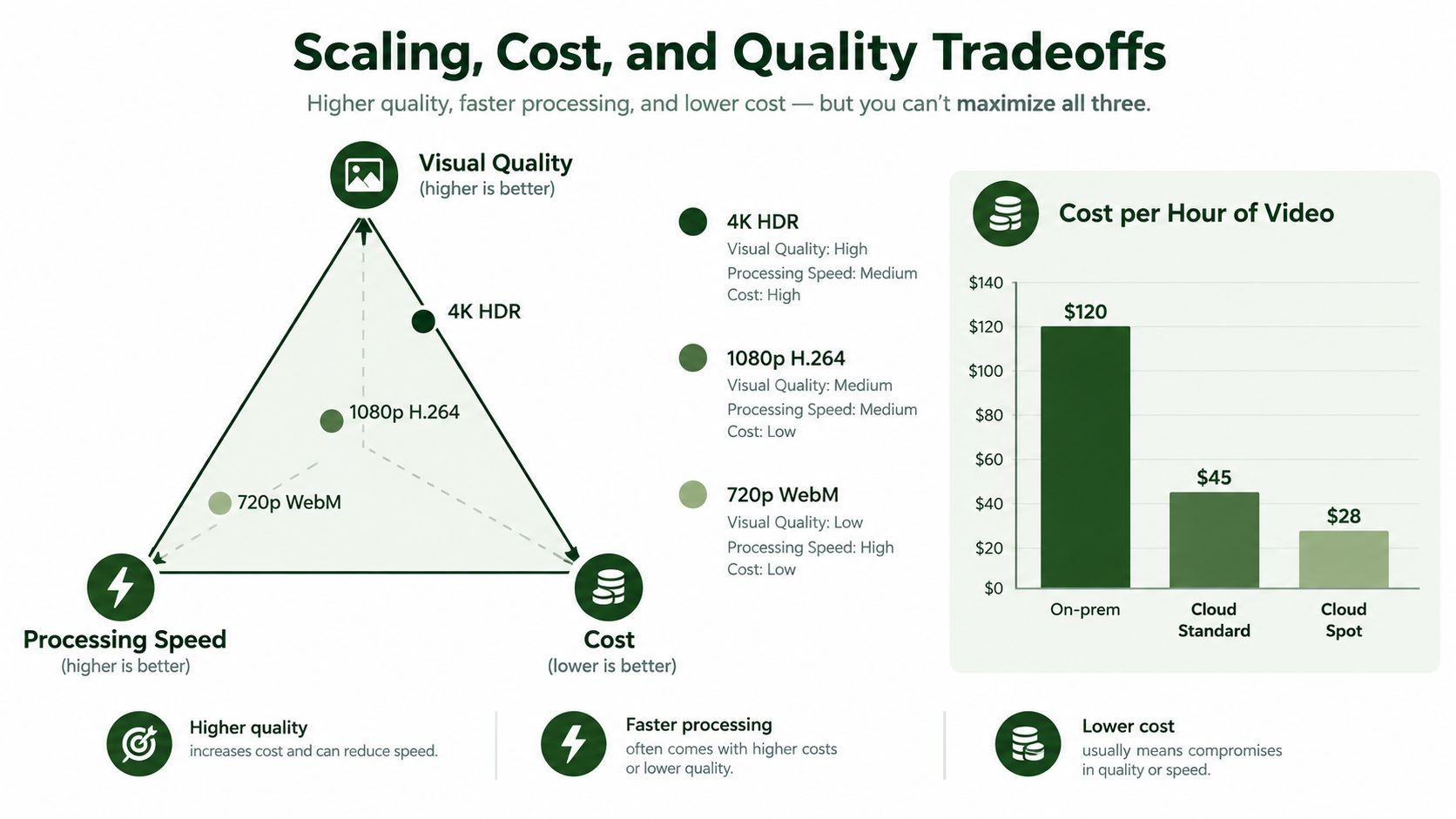
A transcoding pipeline has three competing objectives: visual quality, output bitrate or size, and processing speed. Improving one can hurt another. A faster preset may produce a larger file at the same perceived quality, while a quality-focused encode can consume more compute and delay publication.
Bits per pixel per second is a useful cross-resolution metric because it normalizes bitrate against frame area. Without that normalization, a larger resolution can look inefficient just because it contains more pixels. Track this metric alongside subjective or automated quality checks, output size, and wall-clock duration.
Match the encoder to the workload
For offline work, constant-quality or multipass-style encoding can spend additional computation to reduce bitrate at a target quality. That approach fits archival conversion, catalog processing, and social-media batch generation when completion time has some flexibility.
Live and interactive jobs need a different policy. Fixed-rate, low-latency settings constrain encoder effort so the pipeline can keep pace with the incoming stream. Applying the same quality-first preset to both workloads creates predictable trouble, either by increasing live latency or by wasting offline compute.
A useful queue design separates quality-sensitive work from latency-sensitive work. It also records why a job was processed, which preset was selected, which representations were accepted, and how long each stage took. Throughput alone is a poor success metric if the fastest outputs fail quality checks or require expensive reprocessing.
Parallelism can cut batch duration when the job divides cleanly. A cloud transcoding performance study found that 15 parallel workers achieved an 89% reduction in encoding time compared with sequential execution, while GPU virtual machines delivered the highest performance at the highest infrastructure cost.
That result doesn't mean every job should use the maximum worker count. Codec changes and frame-rate adjustments can demand more computation than bitrate-only or spatial-resolution changes. Storage throughput, source download speed, output writes, and queue contention can become the new bottleneck.
Practical rule: Parallelize independent renditions, but retry failed partitions instead of restarting the entire batch.
Teams evaluating GPU acceleration should read the FFmpeg GPU acceleration guide with a workload-specific question in mind. The right comparison is not “GPU versus CPU” in isolation. It's accepted outputs per unit of infrastructure cost, including failed work, idle capacity, and the quality policy the hardware can sustain.
Codec Selection as a Deployment Problem
A codec decision becomes a deployment problem as soon as one source must serve phones, browsers, connected TVs, and older playback stacks. The smallest output is not automatically the cheapest outcome. Decode support, startup delay, software decoding, battery use, and fallback frequency can outweigh savings in delivered bytes.
AV1 shows the trade-off clearly. Independent technical reporting indicates that AV1 can reduce average bitrate by approximately 30% compared with VP9 and HEVC, and by approximately 70% compared with H.264, although results vary with video complexity. Those figures describe compression potential, not guaranteed delivery savings or a better viewing experience. The comparisons appear in reporting on AV1, VVC, and LCEVC.
A codec policy should therefore define when an output is created, not only how it is encoded. AV1 can serve compatible modern devices when its encoding cost fits the workload. H.264 remains a dependable fallback for devices and ecosystems that cannot consume newer codecs efficiently. HEVC fits selected environments where the device fleet and distribution stack support it predictably.
Generating every codec for every asset creates hidden work. Each unnecessary rendition adds encoding time, storage, validation, replication, and cleanup. Failed jobs add another cost if retries regenerate outputs that already completed. Use a stable asset-and-policy identity so a retry can recognize completed renditions rather than starting duplicate work. This idempotency decision often matters more to cloud spend than a small codec efficiency gain.
Playback telemetry should determine the matrix. Track device decode capability, selected codec, startup delay, rebuffering, battery impact where available, quality at equivalent bitrate, and rendition creation cost. A representation that saves delivery bytes but causes failed starts or repeated fallback requests is not an optimization.
Container choice, audio tracks, captions, and editing compatibility also belong in the policy. VideoTour.ai format tips can help document these decisions before encoding a large catalog.
Use a modern codec where it earns its place, retain a dependable fallback, and avoid outputs that add operational cost without improving playback.
Implementation Examples and API Patterns
A useful API treats transcoding as an asynchronous job, not a request that holds an HTTP connection open until the output is ready. The client submits a source reference, an FFmpeg command or transformation policy, an output destination, an idempotency key, and a webhook target. The service returns a durable job identifier immediately.
The worker then follows a state machine such as queued, running, validating, completed, or failed. Store the command, source identity, selected outputs, timestamps, and full error details with the job. If a worker disappears, another worker should resume or retry from a known state instead of guessing what happened.
Patterns that survive production
For a REST workflow, keep the request narrow and explicit:
- Source reference: Identify the master without copying the file unnecessarily between services.
- Transformation command: Include resizing, filtering, codec, audio, and packaging decisions in a reproducible form.
- Output policy: Define filenames, content types, retention, and access behavior.
- Idempotency key: Derive it from the source version and transformation intent so the same request doesn't create duplicate outputs.
- Completion event: Send job status, output references, validation results, and failure diagnostics to the callback.
For short-form production, chain only where dependencies require it. A resize must precede a watermark if the watermark is positioned relative to the final canvas, while independent account variations can run in parallel. A highlight detection service, such as this highlight detection API, can supply candidate clips that then enter the same resize, caption, audio, and delivery stages.
No-code tools fit well at the orchestration boundary. n8n, Zapier, Make, and Pipedream can trigger a job from a form, storage event, or content record, then wait for a webhook before updating the downstream system. They shouldn't become the place where large media files are repeatedly downloaded and re-uploaded.
Diagnose the failure, not just the status
Return complete FFmpeg stderr on failure, with a safe correlation identifier and the input metadata used for the job. “Processing failed” forces an operator to reproduce the problem. A codec mismatch, missing stream, malformed timestamp, or insufficient output space should be visible in the original job record.
Polling remains useful for clients that can't accept webhooks. Webhooks are better for long-running work, but they need retries, signature validation, and a dead-letter path for callbacks that never arrive. Retry transient infrastructure errors, not deterministic command failures, and retry only the failed partition when the rest of the batch has already completed.
Orchestration Economics and Provider Selection
A transcoding job can finish successfully and still waste money. Duplicate submissions, retries after uncertain timeouts, unnecessary renditions, abandoned intermediates, expired signed URLs, failed webhooks, and repeated quality-control passes often cost more than the encoding minute itself. In production, the expensive failure is frequently orchestration rather than codec selection.
Cloud and serverless do not mean cheap by default. They can reduce server administration while increasing data movement and repeated processing. If the pipeline cannot distinguish a published output from an artifact that merely exists, it will continue paying to create and store files users never receive.
Recent industry reporting identifies GPU power consumption at 39%, codec or feature gaps at 37%, and insufficient stream density at 35% as GPU friction points. The same reporting says 37% to 38% of respondents are targeting encoding operating-expense and CDN-cost reduction in video encoding trends research. Those pressures make idempotency, failure handling, and cleanup part of provider selection, not just implementation detail.
Calculate accepted-output cost
Track the cost of an output that passes validation and reaches publication, rather than comparing encoding-minute rates alone. That calculation should include:
- Successful work: Compute that produces a validated, published output.
- Retry work: Transient failures, deterministic failures, and whether one failed partition can be retried without repeating completed encodes.
- Storage lifetime: Retention for masters, intermediates, manifests, and rejected outputs.
- Output count: Whether each asset needs every rendition, or whether audience and device evidence can determine the generated variants.
- Data movement: Downloads and uploads of the same media across pipeline stages.
- Operational recovery: Operator access to stderr, safe job replay, and a dead-letter queue for persistent failures.
Provider documentation and a representative test workload should expose these behaviors. Check request-level idempotency, observable webhook retries, signed-URL expiration, output-retention rules, and independent retry support for failed partitions. Also verify what happens after a timeout: the client must be able to determine whether the provider accepted the job before submitting it again.
A provider with a higher per-minute rate can still produce a lower accepted-output cost when it prevents duplicate work and makes failures diagnosable. A lower compute rate can become expensive when the pipeline generates unnecessary variants, retains intermediates indefinitely, or leaves operators reconstructing missing outputs by hand. Measure the full path, including orchestration and recovery, before committing to a provider.
Building Your Transcoding Pipeline Checklist
Before moving a production workload, verify the decisions that affect both playback and spend:
- Architecture: Choose serverless, containers, or edge placement based on latency, runtime control, and workload consistency.
- Input contract: Inspect source metadata and reject unsupported or ambiguous inputs before expensive processing.
- Codec policy: Use a compatibility matrix with modern outputs, dependable fallbacks, and playback telemetry.
- Queue separation: Keep live and interactive jobs away from offline quality-focused batches.
- Parallelism: Split independent renditions or files, but cap concurrency around codec complexity, worker type, and storage capacity.
- Idempotency: Make repeated requests resolve to the same job and output identity.
- Failure handling: Retry transient failures, preserve full FFmpeg stderr, and route persistent failures to a dead-letter queue.
- Validation: Check media structure, duration, dimensions, audio, manifests, segments, and playback before publication.
- Retention: Remove intermediates and rejected outputs according to a defined policy.
- Economics: Track cost per accepted output, not only compute time.
- Observability: Record queue delay, processing duration, output size, quality signals, retries, and publication status.
Start with one representative workload, including its difficult inputs and failure cases. Measure the complete path from source arrival to accepted playback, then adjust the queue, codec matrix, worker type, and retention rules together.
RenderIO offers a cloud FFmpeg and yt-dlp API for asynchronous transcoding, resizing, watermarking, thumbnails, audio extraction, and batch media workflows, with polling or webhooks for job status. Visit RenderIO to evaluate an implementation that uses idempotent requests, signed output URLs, automatic retries, and dead-letter handling instead of leaving those operational details to your application.