Your video batch looks healthy right up until it doesn't. FFmpeg workers are running, yt-dlp downloads are completing, and the dashboard shows successful jobs. Then new submissions stop landing. A client retries, other clients join in, and suddenly the queue is growing faster than the pipeline can drain it.
That pattern often starts with an API rate limit, not a broken encoder. Treating every rejected request as a bug to retry immediately can turn a temporary slowdown into a much larger traffic jam. For video systems, the useful question isn't just how many requests the API allows. It's how to admit work at a rate the whole pipeline can sustain.
Table of Contents
- Why Video Pipelines Hit the Wall First
- The Algorithms That Decide Your Ceiling
- Reading the Headers Like a Control Panel
- Backoff, Retries, and Idempotency That Actually Work
- Why Requests per Minute Is the Wrong Model
- A Playbook for RenderIO-Scale Video Automation
- Pre-Flight Checklist and Warning Signs
Why Video Pipelines Hit the Wall First
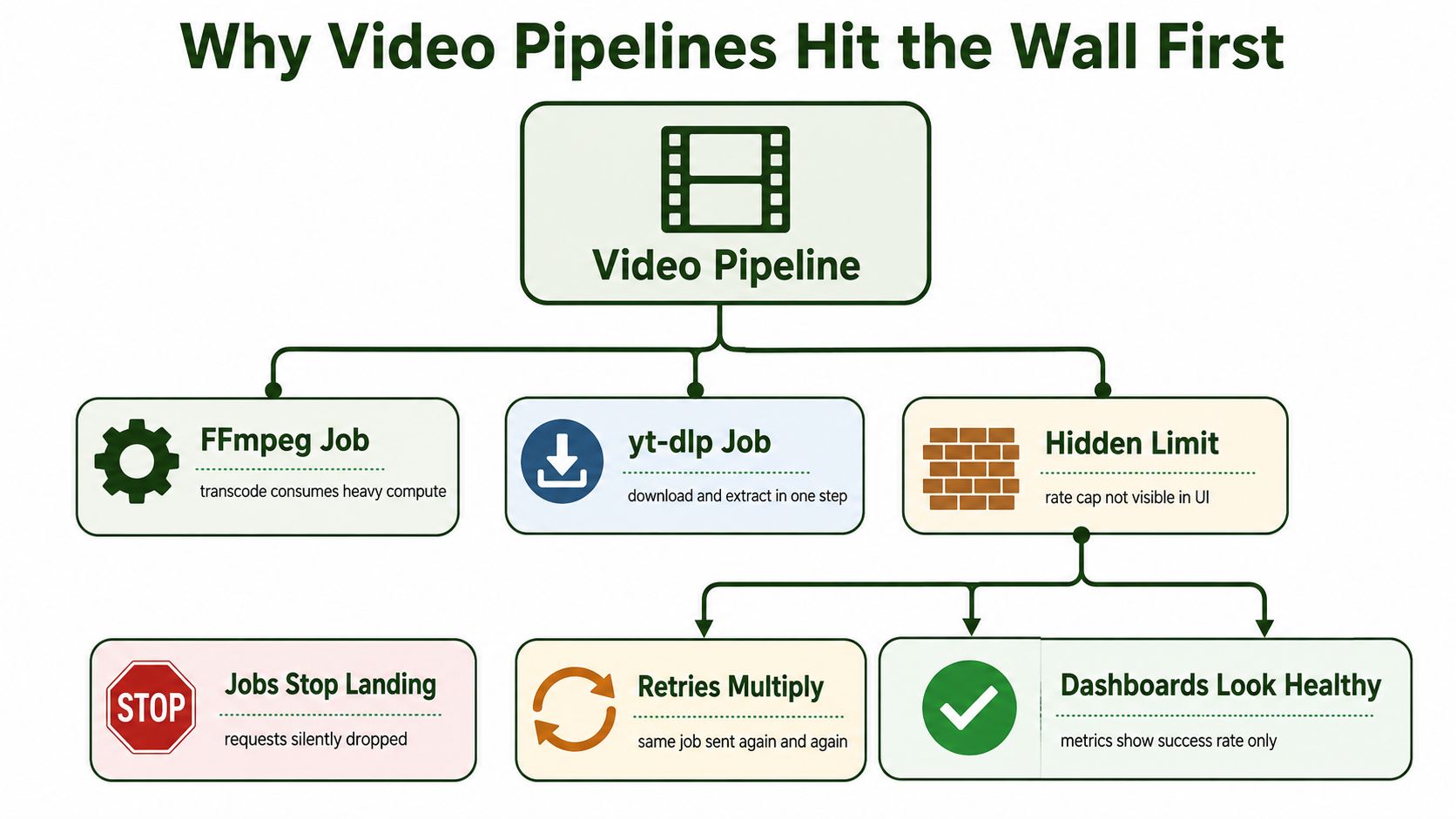
An FFmpeg command can consume substantial compute, while a yt-dlp workflow may download and extract media before any later processing begins. But the first visible failure often happens earlier, at the API boundary. A submission gets rejected or delayed, and the client sees an error without knowing whether the job failed, never entered the queue, or should be tried again later.
That uncertainty encourages a costly response: retry immediately. Several workers do the same, the API receives another burst, and the queue fills with repeat submissions. Meanwhile, a dashboard that tracks completed work or successful responses may still look healthy because it doesn't show rejected submissions or jobs waiting outside the system.
A 429 Too Many Requests response is a flow-control signal. RFC 6585 introduced status code 429 and the optional Retry-After response header, giving APIs a machine-readable way to communicate throttling instead of relying on inconsistent codes such as 403 or 503 (MDN's reference on HTTP 429). In practice, the server is saying that it can't accept this request at the current pace. It isn't necessarily saying the job itself is invalid.
The distinction matters. A malformed FFmpeg command needs correction, not a retry. A temporary submission throttle may call for queueing the job and trying again when permitted. If the client treats both cases alike, it spends capacity repeating work that can't succeed.
Practical rule: A 429 is a scheduling input. Read the response, decide whether the job should wait, and keep it out of the retry pile until it's eligible to run.
Rate limits deserve the same design attention as worker capacity and storage. Teams planning network reliability strategies for small teams may find it useful to include API admission and retry behavior in the same reliability discussion. For video automation, predictable throughput comes from managing when work enters the system, not from asking every worker to submit faster.
The Algorithms That Decide Your Ceiling
Think of a coffee shop with a container of tokens at the counter. Customers can arrive together and spend the tokens already there, but the shop replaces tokens at a steady pace. That's the basic idea behind a token bucket: it permits a burst, then limits sustained traffic to the refill rate.
A leaky bucket is closer to a faucet draining into a cup. Requests arrive into a queue, then leave at a controlled pace. The downstream service sees a smoother flow, but callers may wait in the queue, and new work can be rejected once that queue is full.
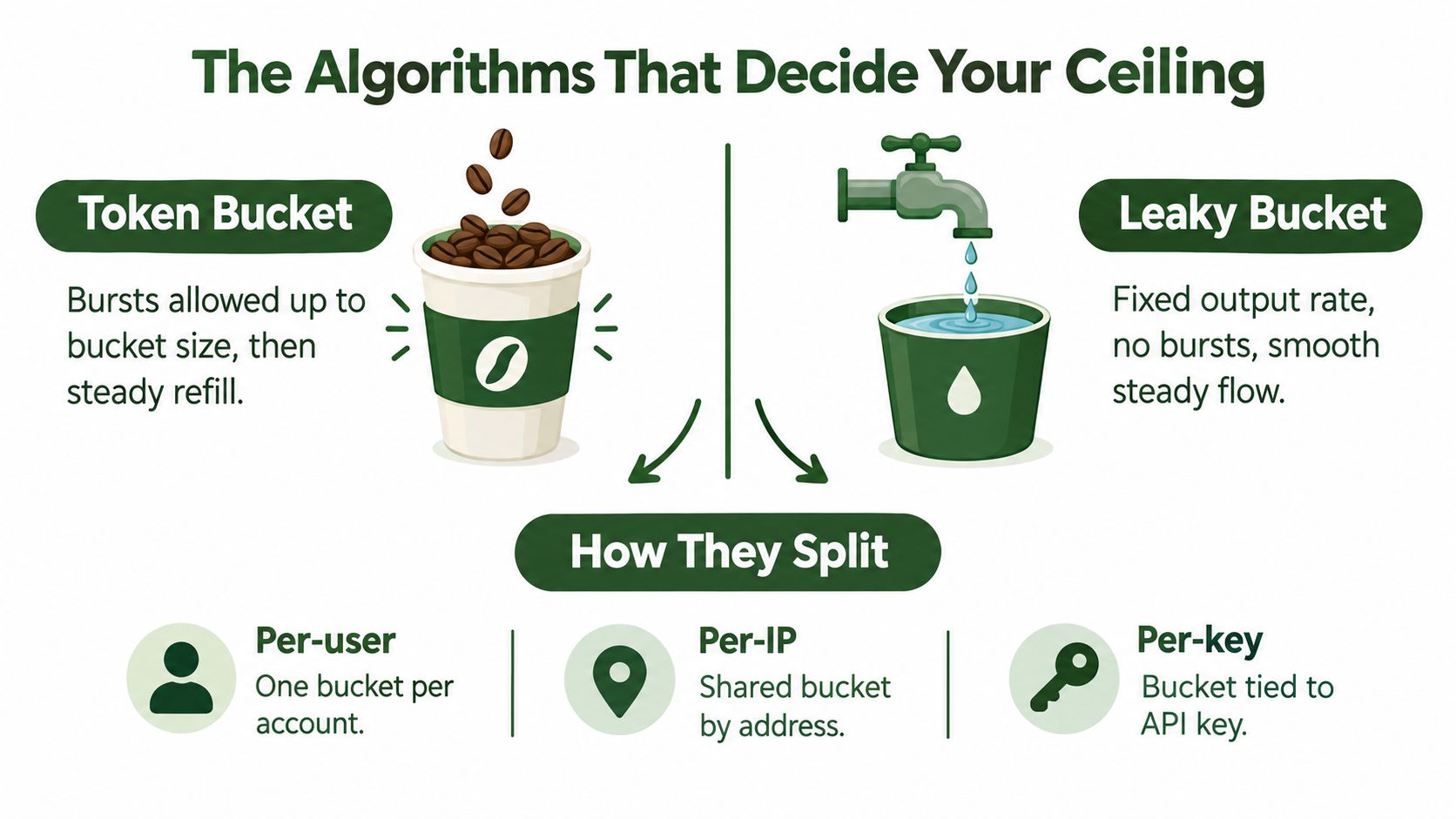
AWS API Gateway uses token-bucket throttling: tokens replenish at a configured steady rate, while bucket capacity determines burst size. Each request consumes a token, so requests can receive 429 responses after the bucket empties even if the workload's long-run rate remains within the configured steady rate (AWS API Gateway throttling documentation).
That difference is easy to miss in a video pipeline. A worker pool may submit a cluster of short FFmpeg jobs at once. The average request rate could look acceptable across a longer window, yet the burst can exhaust the available tokens. The queue then needs to pace submissions rather than dispatch every ready job simultaneously.
Other limit designs answer different questions:
- Fixed window: Counts requests in a set interval and resets the counter at its boundary. It's simple to reason about, but traffic near the boundary can be treated differently from traffic a moment later.
- Sliding window: Tracks usage over a moving period, reducing abrupt boundary effects. The trade-off is additional accounting complexity.
- Concurrency limit: Caps work running at the same time. It's useful when overlapping jobs, rather than raw request arrival, strain downstream processing.
- Queue limit: Accepts work only while a waiting queue has room. It protects the system from accumulating more pending work than it can finish.
A provider can combine these approaches. Look for language about sustained rate, burst capacity, concurrency, or queue length in its documentation. Those terms reveal whether it's limiting arrival speed, simultaneous work, or both. The right client behavior depends on which resource the rule protects.
Reading the Headers Like a Control Panel
A rate-limit response is more useful when the client reads its headers before deciding what to submit next. The names aren't uniform across providers, so a client library should recognize documented formats rather than assume every API follows one convention.
The IETF HTTP RateLimit Fields draft defines RateLimit-Limit, RateLimit-Remaining, and RateLimit-Reset as fields servers can use to communicate quota, remaining allowance, and reset timing (IETF HTTP RateLimit Fields draft). Treat those values as scheduling signals, not just details for a debug log. They can help a client avoid sending a request it already has reason to expect will be rejected.
GitHub uses lowercase x-ratelimit-remaining and x-ratelimit-reset to show remaining capacity and the reset time. Its REST API documentation describes an authenticated personal-request quota of 5,000 requests per hour, alongside secondary controls for bursts and excessive concurrency (GitHub's REST API rate-limit documentation). A client that tracks only the hourly allowance can still hit a secondary limit if it launches too many requests together.
| Header | Source | Value | When to honor |
|---|---|---|---|
RateLimit-Limit |
IETF draft-style fields | Advertised quota | Use to understand the applicable limit, subject to the provider's documented meaning |
RateLimit-Remaining |
IETF draft-style fields | Remaining allowance | Recalculate admission before submitting more work |
RateLimit-Reset |
IETF draft-style fields | Reset timing | Defer work when the current allowance is depleted |
Retry-After |
HTTP response | Delay or HTTP date | Follow when present before retrying a throttled request |
x-ratelimit-remaining |
GitHub-style headers | Remaining capacity | Update the client's view of available quota |
x-ratelimit-reset |
GitHub-style headers | Reset time | Schedule the next attempt around the provider's stated reset |
Read the signals in order. First identify the response status and error type. If the server supplies Retry-After, use that as the immediate wait instruction. Otherwise, consult the reset information and remaining allowance, while respecting any provider-specific documentation about how those values are formatted.
Don't convert a reset value blindly. A header might describe a time or a delay, depending on the API. Keep parsing rules specific to the provider, and make the parsed values available to your scheduler. The scheduler needs to know whether capacity is available now, when it's likely to return, and whether the request belongs to a quota scope that another workflow may also be consuming.
Backoff, Retries, and Idempotency That Actually Work
A video-job submission times out. The server may have accepted it, but the client has no response to confirm that. Retrying without checking can create a duplicate render. Start by classifying the failure: a temporary throttle may clear, while a malformed request or expired credential needs a fix, not another attempt. Failed requests may also consume per-minute capacity, so retries can use up the room needed for recovery.
For transient errors, use exponential backoff with jitter. Increase the wait after each failed attempt, then add randomness so workers do not all retry together. Respect Retry-After when the response provides it. Set a hard retry budget; once it runs out, defer the job or report the failure. A finite queue is easier to control than workers retrying forever.
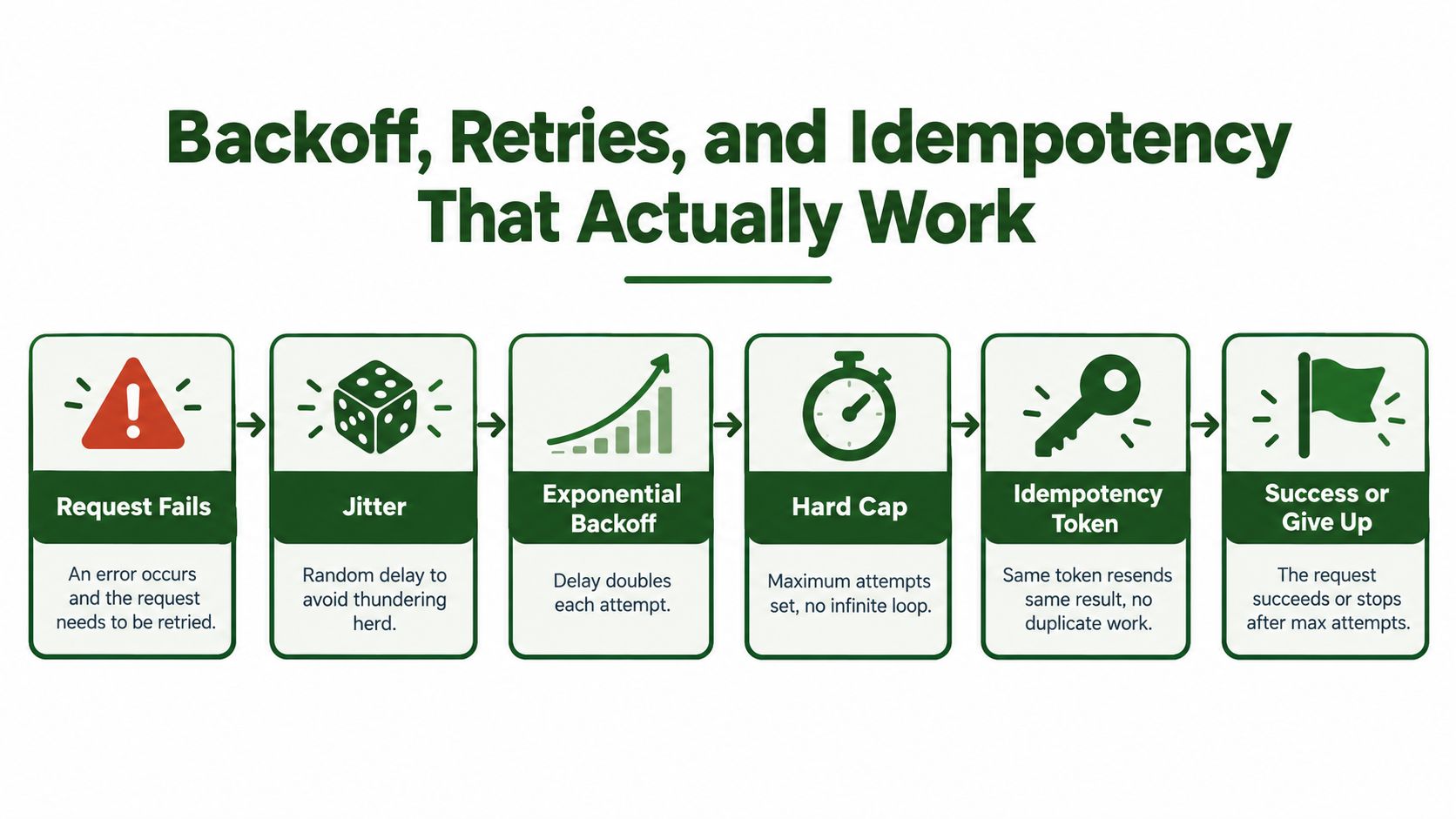
Use idempotency to make an uncertain submission safer. Send the same idempotency key when retrying, so an API that supports this behavior can recognize the repeated request rather than create another job. For grouped submissions, align the retry policy with batch-processing guidance.
A language-neutral retry loop looks like this:
for each attempt within the retry budget:
    send request with the same idempotency key

    if request succeeds:
        return result

    if error is permanent:
        stop and report the error

    if response includes Retry-After:
        wait for the instructed delay
    else:
        wait for capped exponential backoff plus jitter

stop and defer or report the job
Keep retries at the request level distinct from replaying a workflow. A validation failure needs a corrected request. If the job may have been accepted but its response was lost, check its status or retry with the same idempotency key. This keeps recovery from adding avoidable work to an already busy queue.
Why Requests per Minute Is the Wrong Model
A pipeline accepts a thumbnail extraction, a single transcode, and a multi-output job as three requests. Their workloads are not equal. They can differ in processing cost, runtime, and downstream work, so treating each submission as one unit may fill the constrained resource before a request-per-minute limit is reached.
Admission control should account for the minimum available capacity across several scopes: the account's global budget, each tenant's allowance, endpoint limits, and available concurrency. A job waits if any one of these is exhausted. Otherwise, a healthy account-wide average can hide a tenant or endpoint that is already starved for capacity.

Weighted admission control assigns different costs to different jobs. For example, a multi-output pipeline could receive a higher weight than a lightweight metadata operation, while simultaneous transcodes are capped separately from API submissions. Choose weights using the service's documented controls and observed workload. One request count cannot represent CPU use, payload size, or pressure on a downstream queue.
HTTP headers describe only part of the scheduling problem. A 429 signals that a request was rejected for rate limiting; Retry-After can indicate when to try again, and RateLimit-Remaining can show available request allowance where supported. These signals help pace submissions, but they do not tell you whether workers have room to process accepted video jobs.
For asynchronous workloads, monitor queue depth and job concurrency alongside submission rate. If the queue keeps growing while workers are saturated, the system is accepting work faster than it can finish it. Users wait longer even if no 429 appears.
Design for the constrained resource: If transcodes are the bottleneck, cap transcode concurrency. If API submissions are the bottleneck, pace admission. If one tenant is using shared capacity, apply a tenant-level budget instead of slowing every customer.
Separate request acceptance from job completion when setting admission rules. RenderIO's guide to asynchronous processing explains that distinction. Use it to base scheduling on what the pipeline can process, not only on how quickly a client can send requests.
A Playbook for RenderIO-Scale Video Automation
A reliable video pipeline has three parts: a producer that creates jobs, a scheduler that decides when to submit them, and workers or downstream services that process accepted work. When those parts are coupled, each producer tends to submit as fast as it can and respond to throttling with more requests. Put a queue between creation and submission instead.
Start by reducing avoidable calls. Batch related work when the API supports it, and prefer webhook notifications over aggressive polling when the service offers them. A webhook lets the service report progress without requiring the client to ask repeatedly whether a job has finished. If polling is necessary, schedule it deliberately and keep it separate from job-submission capacity.
Next, place a bounded worker pool in front of submissions. The scheduler should consult the API's documented quota signals, then pace work according to the limits that apply to the account, endpoint, and current workload. Each submission should carry an idempotency key where supported, and each transient retry should follow a bounded policy rather than restart the whole workflow.
Teams designing pipelines around Automated Content Generation can use the same separation between generating work and admitting it to processing. For integration details, RenderIO's video API integration guide can help connect an API client to the workflow without turning retries into an uncontrolled submission loop.
Monitor the signals that show whether the scheduler is keeping up:
- 429 frequency: Watch for a rise in throttled submissions, especially when it coincides with higher retry activity.
- Queue depth: A queue that grows continuously means work is arriving faster than the pipeline can drain it.
- Retry delay: Longer waits can indicate reduced available capacity or repeated attempts against a limit.
- Per-tenant throughput: Compare tenants so one busy workflow doesn't hide starvation elsewhere.
- Completion and notification lag: Track how long accepted jobs take to finish and how promptly the client learns that they have finished.
The point isn't to eliminate every 429. A temporary 429 can be a normal signal that the client has reached a boundary. The operational goal is to prevent a burst from turning into duplicate jobs, unbounded queues, or a backlog that users can't predict. A scheduler that respects server hints and workload capacity makes throughput more stable than a client that keeps retrying.
Pre-Flight Checklist and Warning Signs
Before a batch starts, verify that the client can read the provider's documented rate-limit headers and Retry-After behavior. Put submissions behind a bounded worker pool, attach an idempotency key to each supported job submission, and set a maximum retry budget. Add alerts for rising 429 frequency and queue depth, then confirm the team can pause admission without losing queued work.
Watch for capacity warning signs during the run. Remaining quota may be falling faster than the scheduler's expected admission rate. Retry delays may climb, queue depth may keep increasing, or completion notifications may arrive later than expected. Each signal suggests a different issue, so correlate them instead of reacting to a single 429 in isolation.
Should you poll or use webhooks? Prefer webhooks when the API supports them and your system can receive them reliably. Use polling only when needed, and schedule it so status checks don't compete blindly with submissions.
How should you size the worker pool? Start with a bound that reflects the provider's documented concurrency constraints and the pipeline's observed queue behavior. Raise it only when the service has room to accept the extra work, not because local workers are idle.
When should you upgrade instead of retrying harder? If valid workloads repeatedly exceed the documented capacity and the queue keeps growing despite sensible pacing, investigate a higher quota or plan. More retries won't create capacity, and they can consume more of the allowance you already have.
If your team is building video automation, RenderIO provides a cloud FFmpeg and yt-dlp API for submitting processing jobs without managing the underlying servers and queues. Review your submission pacing, retry policy, and notification flow, then try RenderIO with a workload that reflects the jobs you need to run.